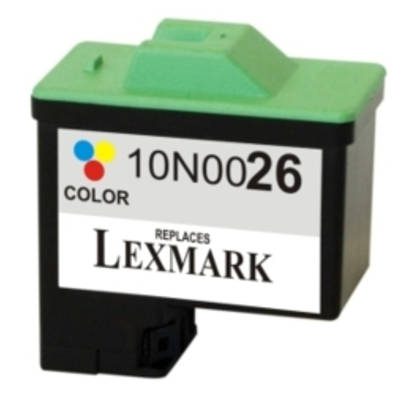
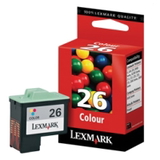
Bring Color Back to Every Page with Lexmark 26 Ink Dear Customer, when your prints start looking pale, streaky, or simply “not like they used to,” it’s often a clear sign that your cartridge needs replacing. In this category we focus on one proven solution: Lexmark 26 ink cartridge (10N0026E) in color—available both as an Original OEM cartridge and as a carefully selected compatible alternative. The goal is simple: help you restore vivid color, sharp details, and smooth gradients—so school projects, family photos, and everyday documents look the way you intended. What Is the Lexmark 26 (10N0026E) Color Ink Cartridge? The Lexmark 26 is a tri-color ink cartridge designed for reliable home and small-office printing. It combines multiple color inks in one unit, making it a convenient choice when you want consistent color output without complicated setup. If you’re looking for ink for Lexmark printer models from the classic Z and X series, this cartridge is a popular match—commonly used in devices such as Lexmark Z13, Lexmark Z612, Lexmark X1150 or Lexmark X1250 (always confirm your exact printer model before ordering). Original OEM vs Compatible: How to Choose the Right Lexmark 26 We know one of the biggest questions is whether to choose an Original OEM Lexmark 26 or a compatible Lexmark 26. Both options in this category are built to satisfy the same everyday need: dependable color printing when you don’t have time for troubleshooting. - Original OEM Ink Cartridge Lexmark 26 (10N0026E) (Color) – a factory-original solution for customers who prefer the manufacturer’s cartridge and want the classic OEM printing experience.
- Compatible Ink Cartridge 26 for Lexmark (10N0026E) (Color) – a cost-effective alternative selected for customers who want great color and reliable performance at a better price. In the DrTusz.pl offer, our compatible cartridges are as good as the originals in everyday use—crisp text, lively color, and stable operation.
Our advice: if you print occasionally and want the most budget-friendly option, the compatible cartridge is often the smartest pick. If you prefer to stay strictly with the manufacturer’s solution, choose the OEM version. Either way, you’re choosing Lexmark 26 ink made for your printer’s requirements. Common Printing Problems This Cartridge Solves A fresh ink cartridge Lexmark 26 can quickly eliminate the issues that frustrate most users. If you’ve noticed any of the following, replacing the cartridge is usually the fastest way to bring your printer back to form: - Faded colors or “washed-out” images
- Streaks, banding, or missing colors in charts and photos
- Uneven gradients and dull graphics in presentations
- Frequent cleaning cycles that don’t improve quality
Because color is often the first thing we notice on a page, using the right ink for Lexmark Z612 (or your specific model) makes a visible difference—your prints can look brighter, cleaner, and simply more professional. How to Avoid Ordering the Wrong Cartridge To choose the correct Lexmark 26 (10N0026E), we encourage you to check: - The cartridge number on your current unit: 26 or 10N0026E
- Your printer model name (e.g., Lexmark Z or X series)
- Whether you need color (this category is for color printing)
This simple verification saves time and helps you get the exact ink for printer Lexmark that fits and prints correctly from the first installation. Why Buy Lexmark 26 Cartridges from Us? We focus on making printing feel easy again: clear product selection, trustworthy options, and a range that includes both Original OEM and high-quality Compatible cartridges. When you choose a compatible Lexmark 26 from our offer, you’re choosing a smart balance of quality and savings—without giving up the color impact your documents and photos deserve. Print Confidently—Choose Your Lexmark 26 Today If you’re ready to bring back vivid color and dependable results, choose your Lexmark 26 ink cartridge now—OEM or compatible—and get your printer working at its best again. Add the right cartridge to your cart and enjoy clean, colorful printing from the very first page. |