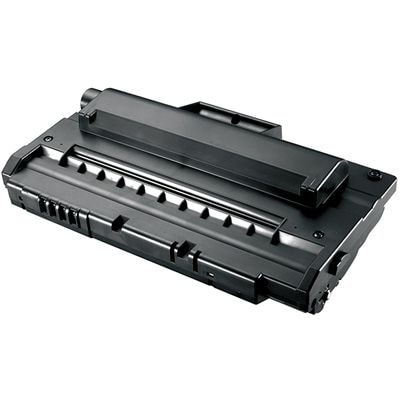
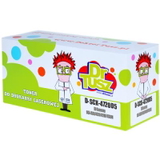
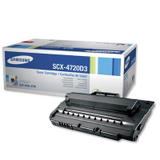
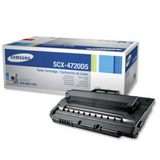
Reliable black printing for your Samsung SCX-4720 – every page looks professional Dear Customer, when your printer is the heart of your home office or small business, you need a toner that simply works—without streaks, faded letters, or surprise downtime. In our category Toner cartridges Samsung SCX-4720 – compatible and original OEM, we focus on what matters most: crisp black text, consistent coverage, and hassle-free installation. Whether you print invoices, school materials, shipping labels, or everyday documents, the right toner for printer Samsung SCX-4720 helps you keep your workflow smooth and your results sharp. Here you’ll find both Compatible and Original OEM laser toner cartridges—so you can choose the option that best fits your budget and expectations, without compromising your peace of mind. What’s inside this category: SCX-4720D3 and SCX-4720D5 toners (Compatible & OEM) This series is built around two well-known cartridge codes used in Samsung printers: SCX-4720D3 and SCX-4720D5. We offer carefully selected options in both classes: - Compatible Toner SCX-4720D5 for Samsung (DT-TS-4720/3) (Black)
- Compatible Toner SCX-4720D5 for Samsung (DT-TS-4720/5) (Black)
- Compatible Toner SCX-4720D3 for Samsung (DT-TS-4720/3) (Black)
- Original OEM Toner Samsung SCX-4720D3 (Black)
- Original OEM Toner Samsung SCX-4720D5 (Black)
All products in this category are laser toner cartridges in black, designed for users who value clear, readable prints and dependable performance from the first page to the last. Compatible printers: SCX-4720 series and popular related models Choosing the correct toner for printer SCX-4720 starts with verifying your exact device model. This cartridge family is used across several closely related multifunction printers. The most common compatible devices include the Samsung SCX-4720F and Samsung SCX-4720FN, and it is also seen in related series such as Samsung SCX-4520. If your printer name contains “SCX-4720” and your current cartridge code matches SCX-4720D3 or SCX-4720D5, you’re in the right place. When in doubt, we encourage you to check the marking on the cartridge currently installed in your device—this is often the fastest, most reliable confirmation. Original OEM vs compatible: how to choose the best toner for Samsung SCX-4720 Many customers ask us: “Should we buy an OEM cartridge or a compatible one?” The answer depends on your priorities—cost per page, printing volume, and purchasing habits. Here’s a clear comparison to help you decide: - Original OEM toner Samsung SCX-4720: manufactured to the brand’s specifications and often chosen by users who prefer to keep everything strictly OEM. It’s a classic, safe choice for those who want the manufacturer’s product line.
- Compatible toner for printer Samsung SCX-4720: a smart option for customers who want excellent print quality with better cost efficiency. Our compatible cartridges from the DrTusz.pl offer are designed to deliver results that are as good as the originals—sharp text, even blacks, and stable performance.
If you print frequently (for example, daily reports, order documents, or office paperwork), a compatible toner SCX-4720D5 can be a particularly practical choice—especially when you want to stock up and minimize interruptions. If you print occasionally and prefer sticking to a brand-labeled solution, an original OEM toner SCX-4720D3 or original OEM toner SCX-4720D5 can be the right fit. Common printing problems—and how the right SCX-4720 toner solves them We know what typically frustrates users of laser multifunction printers: suddenly the text turns gray, pages show uneven coverage, or printing stops at the worst moment. The good news is that most of these issues are linked directly to cartridge condition and quality. By choosing a well-matched toner for Samsung SCX-4720, you reduce the risk of: - Faded prints that make documents look unprofessional
- Streaks or patchy black areas that waste paper and time
- Frequent replacements caused by low-yield, unreliable cartridges
- Unexpected downtime when you run out of toner mid-task
Our goal is simple: help you keep your printer ready to work—so you can focus on your tasks, not troubleshooting. How to pick the correct cartridge: D3 vs D5 and smarter buying tips When selecting a toner for printer SCX-4720, pay attention to the cartridge code and your printing habits. In this category, you’ll mainly choose between SCX-4720D3 and SCX-4720D5 formats and between Compatible and Original OEM classes. - Match the code: if your current cartridge says SCX-4720D3, choose SCX-4720D3; if it says SCX-4720D5, choose SCX-4720D5.
- Think about volume: for heavier printing routines, many users prefer higher-capacity options to reduce how often they replace toner.
- Consider convenience: buying a spare compatible toner for Samsung SCX-4720 helps you avoid urgent last-minute shopping when toner runs out.
If you want an efficient solution with excellent results, our compatible toner SCX-4720D3 and compatible toner SCX-4720D5 options are built for everyday reliability—ideal for busy offices and home workstations alike. Why buy your Samsung SCX-4720 toner cartridges from us? We create this category to make your choice easy: one place for the most important cartridge versions, clearly labeled, with options for both budget-focused and OEM-focused customers. We also know that “compatible” should never mean “uncertain”—that’s why we emphasize dependable performance and print quality that meets real-world expectations. When you order toner cartridges Samsung SCX-4720 from our selection, you’re choosing clarity, stability, and a printing experience that feels smooth and predictable—exactly what you want from a laser device you rely on. Get back to clean, confident printing – choose your SCX-4720 toner today Your printer can only be as dependable as the cartridge inside it. We encourage you to pick the right toner for printer Samsung SCX-4720 now—compatible or original OEM—and enjoy sharp black text, consistent results, and fewer interruptions. Choose your Samsung SCX-4720D3 or SCX-4720D5 toner today and print with confidence from the very first page. |