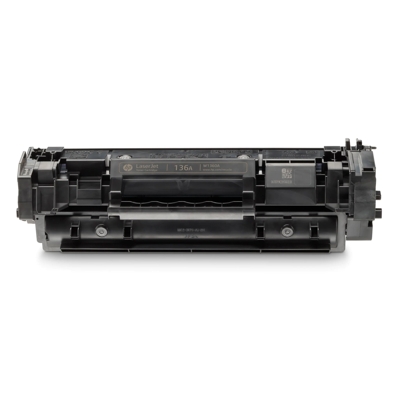
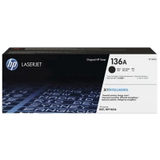
HP 136A (W1360A) toner cartridges – crisp black text you can trust Dear Customer, when you print invoices, school materials, shipping labels or office documents, you want one thing above all: a clean, sharp black that looks professional on every page. The HP 136A (W1360A) toner cartridge was designed exactly for that purpose—reliable everyday laser printing with consistent results from the first page to the last. In this category you’ll find laser toner cartridges HP 136A, including the Original OEM Toner HP 136A (W1360A) (Black), so you can match the cartridge to your printing habits, budget and expectations without compromise. Which printers is toner for HP 136A made for? The HP 136A toner is used in popular compact printers and multifunction devices designed for homes and small offices. It’s a great choice if you rely on models such as HP LaserJet M211d or the multifunction HP LaserJet M236dw MFP (and other devices from the same family). If your printer indicates cartridge code 136A or symbol W1360A, you’re in the right place—this is the dedicated toner for printer HP LaserJet that keeps your device working smoothly. Why choose an Original OEM HP 136A (W1360A) Black toner? Choosing an original cartridge is all about peace of mind. The Original OEM Toner HP 136A (W1360A) is manufactured to HP specifications, which means predictable performance, stable print quality and a seamless fit with your printer’s system. It’s ideal for customers who print business documents, official correspondence or any text where clarity matters. - Professional black output – crisp text, clear lines, readable barcodes and neat graphics.
- Reliable operation – designed to work smoothly with your printer model.
- Consistency – uniform coverage that helps your documents look clean and presentable.
Original vs compatible: how to choose the best HP 136A toner cartridge for your needs We encourage you to choose based on how you print: - Choose Original OEM if you want factory-spec operation, top predictability and you often print important documents.
- Choose a compatible HP 136A toner if you want to reduce printing costs without giving up quality—our DrTusz.pl compatible cartridges are as good as originals in everyday use, offering sharp text and dependable performance.
Not sure which option is right? Think about monthly volume and how “mission-critical” your prints are. For occasional home printing, a cost-effective compatible cartridge can be a smart decision. For frequent, formal office printing, Original OEM is often the simplest, safest route. Common printing issues with toner for printer HP LaserJet M211/M236 – and how the right cartridge helps Many customers come to this category after noticing problems that disrupt daily work. The right HP 136A toner cartridge often solves or prevents issues such as: - Faded prints or uneven black – typically linked to a depleted cartridge or poor-quality consumables.
- Streaks or smudges – can happen when toner quality is inconsistent or the cartridge is worn.
- Printer errors / recognition issues – using a cartridge designed specifically for HP 136A (W1360A) helps ensure proper compatibility.
Tip: if you want the most stable results, store your cartridge in a dry place, install it only when you’re ready to print, and avoid exposure to heat or direct sunlight. Why buy HP 136A (W1360A) toner from our store? We focus on what matters in real-life printing: clear product selection, dependable quality and a range that lets you choose between Original OEM and proven compatibles. This category is built for customers looking specifically for toner HP 136A—quickly, confidently, and without guessing whether the cartridge will fit. Summary & CTA – print confidently again If you want crisp black text, reliable operation and a cartridge matched to your printer, the HP 136A (W1360A) Black toner is the right choice. Whether you prefer Original OEM HP 136A or a high-quality compatible alternative from DrTusz.pl, we’re here to help you print cleanly and cost-effectively. Choose your HP 136A toner cartridge now and get back to smooth, professional printing—page after page. |