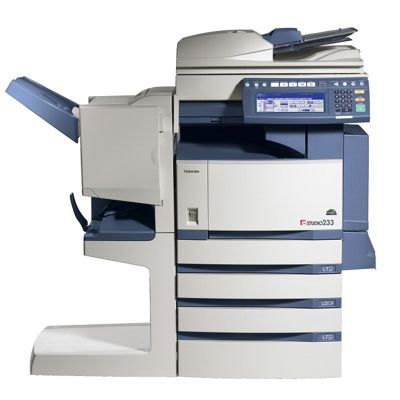
Toshiba e-Studio 233 – dependable monochrome printing for everyday office work If you use the Toshiba e-Studio 233 (also searched as Toshiba 233 or Toshiba e-Studio), you already know it’s a solid, work-oriented device designed for busy environments: offices, reception desks, school administration, accounting departments, and service points. This model focuses on reliable black-and-white output—documents, invoices, reports, shipping labels, and internal paperwork—where clarity and consistency matter more than fancy color. To keep your device running smoothly, you need the right toner for printer Toshiba e-Studio 233. In this category, we gathered both Original OEM and Compatible laser toner cartridges that match this model and help you print with confidence from the first page to the last. What a toner for Toshiba e-Studio 233 should deliver A good toner for Toshiba 233 is not just “black powder in a cartridge.” It directly affects print sharpness, page yield, device cleanliness, and the day-to-day comfort of using your copier/printer. With the right cartridge, you get: - Crisp, readable text—perfect for contracts, tables, and small fonts.
- Consistent coverage—uniform blacks without unwanted light areas.
- Reliable operation—stable printing without frequent interruptions.
- Predictable yield—important when you print in batches or manage costs per page.
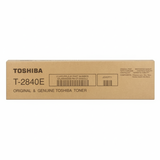
Whether you’re printing occasional sets or processing daily stacks of documents, choosing the right toner for printer Toshiba e-Studio 233 helps you avoid downtime and keeps your workflow uninterrupted. Original OEM or Compatible – choose what fits your priorities In our store, you can choose between Original OEM cartridges and carefully selected Compatible cartridges. Both options are popular—just for different reasons. - Original OEM toner is the manufacturer’s cartridge solution. It’s a great choice if you prefer sticking to the official brand path and want a familiar, standard option for your Toshiba e-Studio 233.
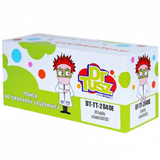
- Compatible toner is the smart alternative for customers who want to control printing costs without sacrificing quality. Our compatible cartridges from DrTusz.pl are designed to deliver printing results that are as good as the originals, with strong black density and dependable performance.
If you’re comparing options for an ink for Toshiba e-Studio 233, remember: this model uses laser toner, so the right choice is a toner for Toshiba e-Studio 233—not liquid ink. Picking a toner matched to your device is the key to trouble-free printing. Popular toner cartridges in this category (T-2840E) This category is focused and practical—exactly what you want when you need the correct cartridge fast. Here you’ll find the two most commonly chosen products for this model: - Original OEM Toner Toshiba T-2840E (6AJ00000035) (Black) – the official OEM cartridge for users who prefer a manufacturer-branded solution for their Toshiba e-Studio 233.
- Compatible Toner T-2840E for Toshiba (6AJ00000035) (Black) – a cost-effective option that delivers excellent print quality and reliability, ideal for frequent printing and budget-conscious offices.
Both options are designed for black-and-white output and are intended to work seamlessly with the Toshiba 233 family, so you can order with confidence and avoid mismatched supplies. How to choose the right toner for Toshiba 233 – quick checklist When selecting a toner for printer Toshiba e-Studio 233, we recommend focusing on a few practical points. This helps you avoid ordering the wrong product and reduces the risk of printing issues. - Match the code: look for T-2840E and the reference 6AJ00000035. This is the easiest way to ensure compatibility.
- Decide on OEM vs Compatible: choose OEM for the official route, or choose Compatible if you want high quality at a better cost per page—our compatible is designed to perform like the original.
- Think about your print volume: if you print a lot, compatible toner can significantly reduce operating costs while maintaining sharp text and consistent blacks.
Common user issues with Toshiba e-Studio 233 – and how the right toner helps In everyday use, customers most often report issues that are usually linked to a worn cartridge, incorrect installation, or a mismatched supply. With a properly selected toner for Toshiba e-Studio 233, you can reduce the chance of problems such as: - Faded prints or uneven black coverage—often a sign the toner is running low or not seated correctly.
- Smudging or marks on the page—sometimes caused by poor-quality supplies or an incorrectly handled cartridge.
- Recognition errors—usually solved by using the correct cartridge model (T-2840E) and installing it according to device prompts.
If anything is unclear, we’re here to help. We’ll gladly guide you to the right toner for printer Toshiba 233 based on your exact device and your printing needs. Order your toner today – fast, safe, and with support We encourage you to explore our selection of toner cartridges for Toshiba e-Studio 233—both Original OEM and Compatible. Choose the version that best fits your workflow and budget, and keep your office printing stable and predictable. Call to action: Add the right toner for Toshiba e-Studio 233 to your cart now or contact us if you want us to confirm compatibility before you order. We offer quick order processing, reliable delivery, and friendly customer support—so you can get back to printing without delays. |