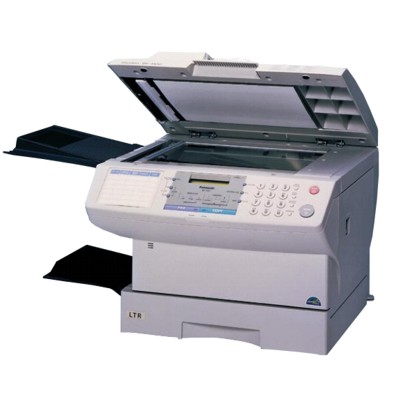
| Looking for a reliable toner for Panasonic DF-1100? The Panasonic DF-1100 series (also searched as Panasonic DF1100, Panasonic DF or DF1100) is a proven laser solution designed for offices that value speed, clarity and repeatable results. To keep your device performing at its best, you need the right toner cartridge for Panasonic DF-1100—one that delivers crisp black text, consistent coverage and trouble-free operation from the first page to the last. Panasonic DF-1100 printing: clear text, stable performance The Panasonic DF-1100 is built for everyday business printing where readability matters—documents, invoices, reports, forms and internal correspondence. A high-quality toner for printer Panasonic DF-1100 ensures sharp edges on letters, deep blacks and clean graphics without smudging. Because laser devices rely on precise toner dosing and correct fusing, using a properly matched cartridge helps maintain stable print quality and protects key components inside the printer. When you choose a dedicated toner for Panasonic DF-1100, you get predictable results that make office work smoother—fewer interruptions, fewer reprints and more confidence that every page looks professional. What a good toner cartridge for Panasonic DF1100 should deliver Whether you print occasionally or in larger batches, the right toner for Panasonic DF1100 should balance quality, efficiency and reliability. In practice, this means: - consistent black density from start to finish,
- clean, readable small fonts and fine lines,
- reduced risk of background greying and streaks,
- smooth operation with fewer printer alerts and stoppages,
- better cost control thanks to predictable yield.
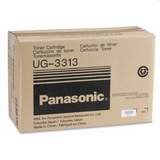
In our store we focus on cartridges that match the requirements of the Panasonic DF platform so you can print confidently—day after day. Our selection: original OEM toner for Panasonic DF-1100 This category features original manufacturer solutions for users who want factory-standard performance and maximum compatibility. A popular choice here is: - Original OEM Toner Panasonic UG-3313 (UG-3313) (Black) – a dependable option for sharp business documents and stable performance in the Panasonic DF-1100.
We keep the offer clear and easy to navigate, so you can quickly find the exact toner cartridge for Panasonic DF-1100 you need—without guessing or comparing dozens of similar items. How to choose the right toner for Panasonic DF-1100 (and avoid common issues) To make sure you’re buying the correct toner for Panasonic DF devices, always verify the cartridge code and printer model naming. The DF-1100 can appear in searches as Panasonic DF1100 or DF1100—so it’s worth double-checking the product symbol before checkout. Common user-reported printing problems often come down to an exhausted or improperly stored cartridge. If you notice any of the issues below, replacing the toner is usually the first—and most effective—step: - prints are too light or uneven,
- faded areas across the page,
- streaks or repeating marks,
- powdery smudges on paper,
- toner low warnings followed by rapid quality loss.
For customers comparing options: original OEM toner for Panasonic DF-1100 is designed by the manufacturer for the device and typically offers maximum predictability. At the same time, many buyers also consider compatible cartridges for cost optimization—at DrTusz.pl, our compatible solutions are selected so that they perform just as well as originals, delivering excellent quality and reliable operation. If you’re unsure which route is best for your printing habits, we’re happy to help you choose. Order your toner cartridge and keep your DF1100 ready for work We encourage you to explore the available toner for printer Panasonic DF-1100 in this category and choose the cartridge that best fits your needs. If you have questions about matching the right toner, print quality issues, or the Panasonic UG-3313 code, contact us—our team will guide you quickly and clearly. Add the cartridge to your cart, place your order, and we’ll take care of fast, convenient delivery so your Panasonic DF-1100 can get back to printing without delay. |