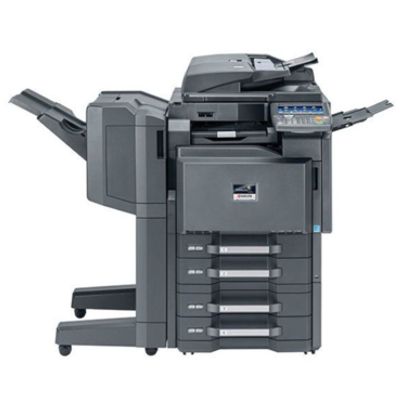
Kyocera TASKalfa 8001i – a powerhouse for demanding office printing The Kyocera TASKalfa 8001i is a high-performance multifunction device built for environments where reliability, speed, and consistent quality matter every day. Whether you search for it as Kyocera 8001i, Kyocera TASKalfa, 8001i or 8001I, this model is known for handling large print volumes, sharp text, and stable operation in busy departments, print rooms, and corporate offices. To keep that performance exactly where it should be, you need the right toner for printer Kyocera TASKalfa 8001i—matched to the machine and to your workload. Toner for Kyocera TASKalfa 8001i – what you gain with the right cartridge A properly selected toner for Kyocera TASKalfa 8001i is more than “just consumables”. It directly impacts readability of documents, smooth grayscale transitions, and the overall efficiency of your printing workflow. In everyday use, the right toner for printer Kyocera 8001i helps you maintain: - Clean, deep black for contracts, invoices, and reports
- Consistent output across long print runs—important in high-volume offices
- Stable performance that supports the device’s productivity and minimizes interruptions
- Predictable operating costs thanks to controlled toner consumption and reliable yields
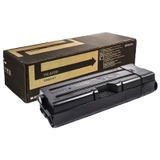
If your team prints a lot, a dependable toner for Kyocera TASKalfa 8001i is simply the easiest way to protect both quality and time—two things every office needs more of. Our range: OEM and compatible toners for Kyocera 8001i In this category we focus on proven solutions for the Kyocera TASKalfa 8001i. We offer both original OEM options and compatible alternatives—so you can choose what best fits your budget and internal printing policy. One of the key products available here is: - Original OEM Toner Kyocera TK-6705 (1T02LF0NL0) (Black)
This is an original manufacturer solution designed to deliver reliable performance and consistent black output for demanding document workflows. If your organization requires OEM consumables for compliance, fleet standardization, or internal procurement rules, OEM toner is the straightforward choice. How to choose the best toner: OEM vs compatible (and what matters most) When selecting a toner for printer Kyocera TASKalfa 8001i, start with what you print and how much you print. OEM toner is ideal when you want manufacturer-standard operation and unified servicing routines. Compatible toner can be an excellent choice when you want to optimize costs without compromising everyday quality—especially when it comes from a trusted supplier. We often get questions about differences between OEM and compatible cartridges. In practice, the choice usually comes down to procurement preferences and cost planning. The most important rule: always choose a cartridge that is clearly dedicated to the model. For this printer, that means looking for the correct designation (such as TK-series codes) and confirming it matches the Kyocera TASKalfa 8001i. Common user issues we help solve include: - Uncertainty about the correct toner code (especially when the device is listed as Kyocera 8001i / 8001I)
- Unexpected drops in print quality—faded black, uneven density, or background shading
- Downtime concerns in high-volume teams where running out of toner stops the whole workflow
If you’re not sure which toner for Kyocera TASKalfa 8001i is right, we encourage you to contact us—tell us how you use the device, and we’ll help you choose the best option quickly and confidently. Buy toner for Kyocera TASKalfa 8001i with confidence We know that in a busy office, toner can’t be an afterthought. That’s why we keep our offer clear and practical—focused on the cartridges you actually need for the Kyocera TASKalfa 8001i. Browse the available toner for printer Kyocera 8001i, choose the version that matches your requirements, and place your order when it’s convenient. CTA: We encourage you to explore the category and select your toner for Kyocera TASKalfa 8001i today. If you need help confirming compatibility or choosing between OEM and compatible solutions, contact us—we’ll guide you and help you keep your printing running smoothly, with fast delivery options available. |