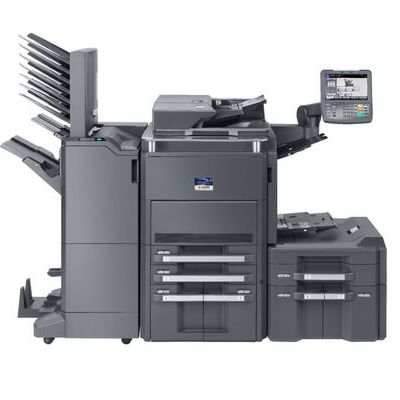
Kyocera TASKalfa 6501i – a true workhorse for busy offices Kyocera TASKalfa 6501i is a high-performance A3 multifunction device designed for departments that print a lot, every day. It’s valued for fast, stable operation, sharp text output and reliable handling of large document batches. To keep this machine performing at its best, it’s worth choosing the right toner for printer Kyocera TASKalfa 6501i—matched to your workload, quality expectations and budget. Toner for Kyocera 6501i – what it affects in everyday printing A properly selected toner for Kyocera TASKalfa 6501i is not just “black powder in a cartridge”. It directly influences print sharpness, page coverage consistency, and the smooth operation of the device during long print runs. In an office environment, where invoices, contracts, reports or shipping documents are produced daily, you want predictable results—clean text, even blacks and no unwanted streaks. With a dedicated toner for 6501i, you gain: - clear, professional-looking documents with deep black print,
- reliable performance during long runs (important for A3 and multi-page jobs),
- fewer interruptions caused by print quality drops or toner-related errors,
- better cost control thanks to a stable yield and consistent coverage.
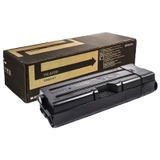
Our offer: Original OEM toner for Kyocera TASKalfa 6501i In this category we focus on proven solutions for demanding users. If you want manufacturer-grade reliability and the highest predictability, we recommend an Original OEM cartridge. A popular and frequently chosen product is: - Original OEM Toner Kyocera TK-6705 (1T02LF0NL0) (Black) – a dedicated solution for Kyocera TASKalfa 6501i, designed to deliver stable quality and excellent compatibility with your device.
We continuously expand the range of options for devices from the Kyocera TASKalfa family. If you print in large volumes and want to standardize supplies across your fleet, we’ll help you choose the right toner for printer Kyocera 6501i quickly and safely. Original vs compatible toner for Kyocera TASKalfa 6501i – how to choose wisely When selecting a toner for Kyocera TASKalfa 6501i, you usually decide between Original OEM and a high-quality compatible cartridge. Original OEM toners are produced to the manufacturer’s specifications and are often chosen by organizations that prioritize uniformity and strict internal procurement rules. At the same time, many customers ask us about compatible solutions. It’s worth knowing that compatible cartridges from the DrTusz.pl offer are designed to be as good as the originals in everyday use—delivering strong print quality and dependable performance at a more budget-friendly cost per page. If you want help deciding what will be best for your specific environment (accounting office, school, logistics, shared print room), we encourage you to contact us—together we’ll match the best option to your workflow. Common user issues with Kyocera 6501i toners – and how to avoid them High-speed devices like Kyocera TASKalfa 6501i work under pressure, so small supply mistakes can quickly become noticeable. The most common issues we help customers with include: - Wrong cartridge code – always confirm the symbol (for example, TK-6705) before ordering a toner for 6501i.
- Faded print or uneven black – often caused by running the toner too low or using a cartridge not suited to the device.
- Streaks and spots – sometimes linked to a worn drum/maintenance components in heavily used machines; we can advise what to check if the toner replacement doesn’t solve it.
- Unexpected “toner empty” messages – correct installation and using a properly matched toner for Kyocera 6501i helps prevent unnecessary downtime.
If you tell us how many pages you print monthly and what types of documents dominate, we’ll recommend the most cost-effective and reliable solution. Order your toner for Kyocera TASKalfa 6501i with confidence We encourage you to browse the products in this category and choose a reliable toner for printer Kyocera TASKalfa 6501i that keeps your office moving without interruptions. If you’re not sure which option to select, contact us—our team will help you confirm compatibility and choose the best cartridge for your needs. Add the toner to your cart today and ensure your Kyocera 6501i is always ready for the next big print job. |