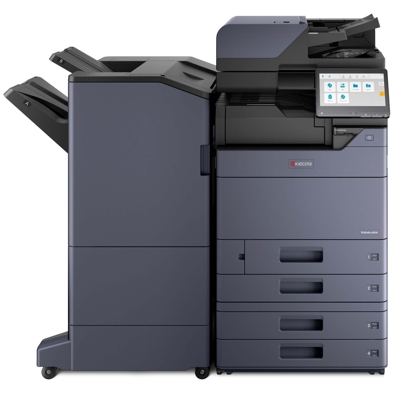
Reliable printing with Kyocera TASKalfa 6004 i Kyocera TASKalfa 6004 i is a powerful A3 multifunction device designed for busy offices, print rooms and institutions where speed, consistency and sharp black text matter every day. If you use this model for high-volume reports, invoices, contracts or technical documentation, choosing the right toner for Kyocera TASKalfa 6004 i is essential for keeping workflows smooth and costs under control. What a toner for Kyocera 6004 i should deliver The Kyocera 6004 i is built for intensive use, so the toner for printer Kyocera TASKalfa 6004 i must be stable from the first page to the last. In this category you will find only black laser toner options (monochrome printing), tailored to produce crisp lines, readable small fonts and deep blacks—exactly what offices expect from a professional Kyocera TASKalfa series device. When you choose a well-matched toner for Kyocera 6004 i, you gain: - consistent density on long runs (important for contracts and forms),
- clean text and precise graphics for business documents,
- reliable performance in high-duty environments,
- less downtime caused by toner-related issues.
Compatible and Original OEM: one printer, two smart options In our store we offer both Original OEM and Compatible solutions, so you can choose the approach that best matches your budget and print policy. Both options in this category are designed specifically as toner for Kyocera TASKalfa 6004 i (also searched as Kyocera 6004 i, 6004i, 6004I or 6004 i). - Original OEM toner is the manufacturer’s cartridge—often chosen by companies that standardize on OEM consumables.
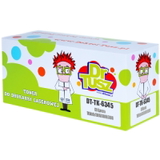
- Compatible toner is a cost-effective alternative. Our compatible cartridges from DrTusz.pl are crafted to deliver results as good as the originals—strong black, clean text and reliable page-to-page repeatability.
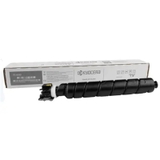
Featured products in this category To make your choice easy, we focus this page on the most popular and proven cartridge model used by this device: TK-6345. Here are the key options you’ll find: - Original OEM Toner Kyocera TK-6345 (1T02XF0NL0) (Black) – the classic OEM choice for Kyocera TASKalfa performance and predictable office workflows.
- Compatible Toner TK-6345 for Kyocera (1T02XF0NL0) (Black) – a smart way to reduce printing costs without sacrificing quality; a great fit for frequent printing and larger teams.
Whichever version you choose, you’re buying a cartridge dedicated to the same specification: toner TK-6345 (1T02XF0NL0) for Kyocera TASKalfa 6004 i. How to choose the right toner TK-6345 for Kyocera TASKalfa If you print mostly text and office documents, both OEM and compatible solutions are excellent—so the decision usually comes down to internal policies and cost strategy. We recommend: - Choose Original OEM if your organization requires manufacturer-branded consumables or you want to keep purchasing consistent across departments.
- Choose Compatible if you want to optimize cost per page while keeping professional output quality—our DrTusz.pl compatible toners are built to match real office needs.
Common issues users look to solve with the right toner for Kyocera TASKalfa 6004 i include faint prints, uneven black coverage, toner dusting, or frequent “low toner” warnings. In many cases, these problems are related to using an incorrect cartridge type, installing it improperly, or running with a worn cartridge for too long. If anything seems unclear, we encourage you to contact us—our team will help you confirm the correct toner model and advise on best practices for installation and daily use. Order your toner for Kyocera TASKalfa 6004 i with confidence We make it easy to buy the right toner for printer Kyocera TASKalfa 6004 i—whether you prefer Original OEM or a high-quality Compatible option. Browse the products above, pick the cartridge that fits your printing style, and keep your Kyocera 6004 i running at full speed. CTA: Add your chosen toner TK-6345 to the cart now or contact us if you want help selecting the best option for your office. We offer fast delivery and friendly support—so you can get back to printing without delays. |