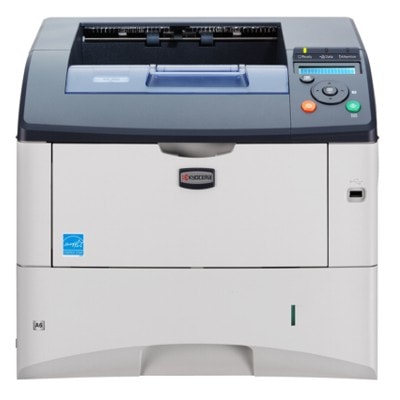
| The Kyocera FS-3920DN is a proven monochrome laser printer designed for busy offices that expect speed, reliability and sharp text on every page. With duplex printing and network capability, it’s often the “workhorse” in accounting, administration, warehouses and service departments—places where a printer simply has to work every day. To keep that performance consistent, choosing the right toner for Kyocera FS-3920DN and the right maintenance parts is essential. Efficient printing starts with the right toner and service parts In this category we focus on what matters most for everyday operation: toner cartridges (Laser Cartridges), and the key components that influence print quality and device reliability—drum unit and fuser unit. When you select the right toner for printer Kyocera FS-3920DN, you get predictable page yield, crisp black print, and fewer interruptions during large print jobs. Just as importantly, a properly matched drum and fuser help you avoid repeating defects, smudging, or paper handling issues. - Toner – responsible for density, contrast and overall black text quality.
- Drum Unit – transfers the image to paper; wear can cause repeating marks or backgrounding.
- Fuser Unit – fixes toner onto the page with heat/pressure; problems may lead to smearing or poor adhesion.
Compatible vs Original OEM – choose what fits your priorities We offer both Original OEM and Compatible solutions for the Kyocera FS-3920DN, so you can match your purchase to your budget and printing habits. If you want manufacturer-certified components, original cartridges are a safe choice. If you’re looking to reduce cost per page without sacrificing quality, our compatible options are a smart alternative. We want to be clear: compatible cartridges from our DrTusz.pl offer are designed to deliver print results that are as good as the originals—sharp text, solid blacks and stable performance—while helping you control printing expenses. - Original OEM – manufacturer solution, consistent performance, ideal for strict internal standards.
- Compatible – excellent value, reliable quality, perfect for everyday office printing and larger volumes.
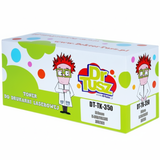
Popular products for Kyocera FS-3920DN in our offer To make selection easy, we stock the most searched and most practical items for this model. Whether you type FS-3920DN, FS 3920 DN, FS3920DN or FS-3920 dn, you’ll find the right match here: - Compatible Toner TK-350 for Kyocera (1T02J10EU0) (Black) – a cost-effective choice for everyday printing and high page counts.
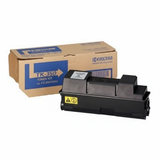
- Original OEM Toner Kyocera TK-350 (1T02J10EU0) (Black) – the classic OEM option for users who prefer manufacturer supplies.
- Original OEM Drum Unit Kyocera DK-320 (302J093010) (Black) – essential when print defects repeat at regular intervals or quality drops despite a new toner.
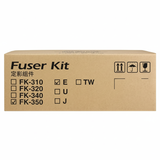
- Original OEM Fuser Unit Kyocera FK-350 (302J193050) – recommended if you notice smearing, poor toner bonding, or frequent paper jams related to heat/pressure.
Thanks to this selection, you can easily complete your set: one order can cover both the toner for Kyocera FS-3920DN and the key service components that keep your device stable long-term. How to choose the right cartridge – practical tips and common issues When selecting ink for Kyocera FS-3920DN (in a laser printer this means toner), start with your monthly print volume and your expectations for cost control. If the printer runs daily and prints many invoices, reports or shipping documents, a compatible TK-350 can significantly lower operating costs while keeping professional-looking results. If your workflow requires strict OEM-only procurement, the original TK-350 is the straightforward choice. Also consider the symptoms your printer shows—many issues are not “toner problems” at all: - Faded print or uneven black – often solved with a fresh toner for printer Kyocera FS-3920DN, but can also indicate drum wear.
- Repeating marks/spots at regular intervals – a typical sign the drum unit DK-320 may need replacement.
- Smudging or toner rubbing off – may point to a worn fuser unit FK-350 rather than the cartridge itself.
- Frequent paper jams – sometimes linked to worn fuser components or rollers; replacing the fuser can restore reliability.
If you’re unsure which part you need, we encourage you to contact us—tell us what you see on the printout and how the printer behaves, and we’ll help you choose the most cost-effective solution. Order confidently – we’re here to help We encourage you to explore our category Toner cartridges for Kyocera FS-3920DN and choose between compatible and Original OEM options that best match your office needs. Add the right toner for Kyocera FS-3920DN to your cart, and if you want long-term peace of mind, consider the drum unit and fuser unit as part of a complete maintenance plan. Need assistance with compatibility, symptoms, or selecting the best option for your print volume? Contact us—we’ll help you make the right choice. Check the available products, place your order, and enjoy fast, convenient delivery and printing you can rely on. |