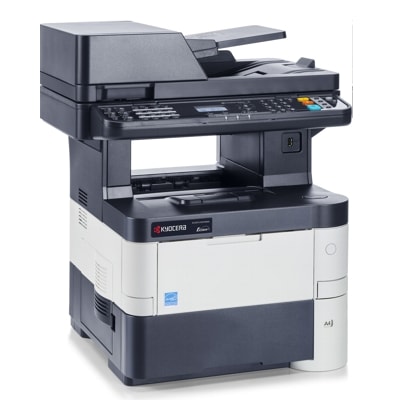
Reliable printing with Kyocera EcoSys M3540dn Kyocera EcoSys M3540dn (also searched as Kyocera M3540dn, M3540dn, M3540 DN or M3540DN) is a fast, business-ready monochrome multifunction printer designed for offices that expect sharp text, consistent performance and economical operation. To keep this device working at its best, it’s worth choosing proven consumables—especially the right toner for Kyocera EcoSys M3540dn and the key service components that influence print quality and reliability. Toner and service components – what matters in M3540dn In this category you’ll find not only toner cartridges for Kyocera EcoSys M3540dn, but also the components that ensure stable operation over thousands of pages: drum units, waste toner tanks, developer units, maintenance kits and fuser units. Together, they determine whether the printer delivers clean blacks, even coverage and trouble-free paper handling. When you choose toner for Kyocera M3540dn, pay attention to: - Print quality – deep black, crisp text and stable coverage on documents.
- Efficiency and cost per page – especially important for frequent printing in offices.
- Compatibility and reliability – smooth installation and predictable results.
- Service parts condition – worn drum or fuser can reduce quality even with a new toner.
Original OEM or Compatible – choose what suits your needs We offer both Original OEM and Compatible options so you can match your purchase to your budget and printing style. Original parts are manufacturer-branded solutions designed for maximum predictability. At the same time, our compatible toner for Kyocera EcoSys M3540dn is a smart alternative—carefully selected to deliver results that are as good as originals, while helping you reduce everyday printing costs. The most common differences customers consider are: - Price – compatible options usually provide a lower cost per page.
- Branding – OEM is Kyocera-branded; compatible is our proven alternative.
- Office routine – for high-volume printing, choosing the right set (toner + service parts) often matters more than the label.
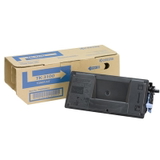
Popular products for Kyocera EcoSys M3540dn in our offer To make shopping easy, we stock the most frequently chosen consumables for this model. You’ll find, among others: - Original OEM Toner Kyocera TK-3100 (1T02MS0NL0) (Black) – a reliable choice for daily office documents and consistent black output.
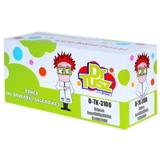
- Compatible Toner TK-3100 for Kyocera (1T02MS0NL0) (Black) – a cost-effective solution with quality comparable to the original, ideal when you print a lot.
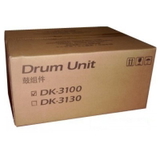
- Original OEM Drum Unit Kyocera DK-3100 (302MS93020) (Black) – helps maintain sharpness and uniform print as the machine ages.
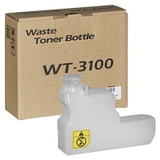
- Original OEM Waste Toner Tank Kyocera WT-3100 (302LV93020) – essential when the printer reports a full waste container or needs replacement to continue working.
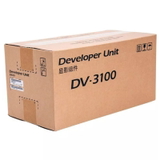
- Original OEM Developer Kyocera DV-3100 (2LV93080, 302LV93080) – supports stable toner transfer and consistent density on the page.
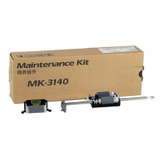
- Original OEM Maintenance Kit Kyocera MK-3140 (1702P60UN0) – a practical set for scheduled service to keep your Kyocera EcoSys running smoothly.
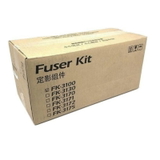
- Original OEM Fuser Unit Kyocera FK-3100 (302MS93070, 302MS93076) – important when you notice smudging, poor fixing or paper handling issues.
This wide selection means you can order exactly what you need—whether it’s just a toner for M3540dn or a complete service refresh. How to select the right toner and avoid common issues When choosing toner for printer Kyocera EcoSys M3540dn, always verify the cartridge code. For this model, the key is TK-3100. If you are replacing more than just toner, check which message your device displays—many issues come from consumables that are simply reaching their service limit. Customers using Kyocera EcoSys printers often report situations such as: - Faded prints or uneven black – can be caused by an aging drum unit or developer, not only by low toner.
- Streaks or repeating marks – often linked to drum wear or contamination.
- Printer stops with a maintenance alert – a maintenance kit may be required to restore normal operation.
- Smudging or toner not fixing well – can indicate a fuser unit that needs replacement.
- Waste toner message – the waste toner tank may be full and must be replaced.
If you print a lot, we recommend thinking in sets: toner for Kyocera M3540dn plus the service part that corresponds to the error message or print symptom. This approach typically saves time, avoids downtime, and restores the “like new” print look. Order today – and keep your Kyocera printing without downtime We encourage you to browse our full selection of toner cartridges for Kyocera EcoSys M3540dn—both Original OEM and Compatible—as well as drum units, developer units, waste toner tanks, maintenance kits and fuser units. If you’re unsure which item your printer needs, contact us—we’ll help you match the right toner for Kyocera EcoSys M3540dn and the correct service components quickly and confidently. CTA: Choose your TK-3100 toner and the necessary maintenance parts now, add them to your cart, and let us take care of fast delivery and smooth ordering—so your Kyocera EcoSys M3540dn is always ready for work. |