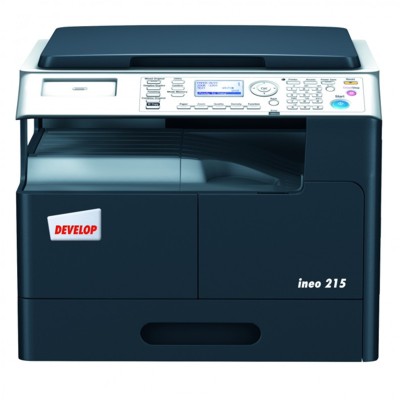
| Dear Customer, the Develop Ineo 215 is a reliable A4 multifunction device designed for everyday office work: invoices, contracts, reports, shipping documents and internal correspondence. It’s valued for consistent print quality, practical workflow features and predictable operating costs—provided you choose the right toner for printer Develop Ineo 215. In this category we focus on what matters most: dependable toner cartridges for Develop Ineo 215 in Original OEM class, so your device keeps working smoothly day after day. Develop 215 toner – built for sharp business documents A good toner for Develop 215 should deliver crisp text, clean lines and stable coverage from the first page to the last. Because the Develop Ineo series is often used in shared offices, print consistency is crucial—especially when multiple people print at different times of day and in varying volumes. OEM toner is engineered to work in sync with the printer’s imaging system, which helps keep blacks deep, fonts readable and fine elements (like tables or barcodes) well-defined. When you choose ink for Develop Ineo 215, you may actually mean toner—this model uses laser technology, so the right choice is a toner for printer 215. Toner is a fine powder designed for precise transfer and fusing, which is why it’s the go-to for fast, professional monochrome printing. Where Original OEM toner makes a difference Original cartridges are a great option when you want maximum predictability and manufacturer-grade compatibility. With an OEM toner for printer Develop Ineo 215, you benefit from stable performance that supports the device’s intended duty cycle—ideal for busy teams and document-heavy environments. - Consistent density and legibility in business text documents
- Reliable cooperation with the printer’s monitoring and status functions
- Reduced risk of print defects caused by mismatched consumables
- Comfortable, trouble-free replacement routine
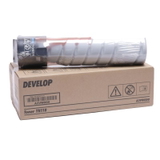
Our selection: a proven OEM bestseller for Develop Ineo 215 We keep the offer clear and focused on what customers most often choose for this model. A popular and practical option is: - Original OEM Toners Develop TN-118 (A3VW0D0) (Black) (2-pack)
A twin pack is a convenient choice for offices that want to minimize downtime and always keep a spare toner for Develop Ineo 215 on hand. It also helps you plan printing costs and avoid urgent, last-minute orders when the cartridge runs out unexpectedly. How to choose the right toner for Develop Ineo 215 To select the best toner cartridges for Develop Ineo 215, start with the cartridge code and your printing habits. For this category, the key identifier is TN-118 and the OEM reference A3VW0D0. If you print regularly (for example, daily batches of documents), choosing a multi-pack can be the simplest way to stay productive. You may also see searches like Develop 215, Develop Ineo or simply 215—they all point to the same family of consumables. If you’re unsure whether your device is the exact Develop Ineo 215 variant, tell us what’s on the printer label or share the cartridge symbol you currently use—we’ll help you match the correct toner for printer Develop Ineo 215. Original vs compatible toner – what you should know In general, customers compare OEM and compatible options to balance budget and expectations. Original OEM toner is the manufacturer’s solution, while compatible toner is an alternative designed to meet the same functional needs. Importantly, when you buy compatible cartridges from the DrTusz.pl offer, you’re choosing products that are as good as originals in everyday use—made to print cleanly, reliably and cost-effectively. In this particular category, however, we focus on Original OEM toners, ideal if you prefer manufacturer-grade consumables for your toner for Develop 215. Common user issues with Develop Ineo 215 toner and easy fixes - “Toner low” message too early – printing may continue; prepare your spare pack and replace when quality drops.
- Faded prints – gently remove and reinsert the cartridge; check print density settings if your environment is very dry.
- Streaks or uneven coverage – confirm the cartridge is seated correctly; if the issue persists, replacing with a fresh toner for printer 215 usually resolves it.
- Incorrect cartridge error – verify the symbol TN-118 / A3VW0D0 matches your device and that packaging is intact.
Ready to print without interruptions? We encourage you to explore our toner cartridges for Develop Ineo 215 and choose a solution that fits your workflow—whether you’re stocking up for the office or simply replacing a used cartridge. Add the Original OEM Toners Develop TN-118 (A3VW0D0) (Black) (2-pack) to your cart for convenient запас and peace of mind. If you have any questions about selecting the right toner for printer Develop Ineo 215, contact us—we’ll help you quickly and accurately. We also offer fast delivery options so you can get back to printing as soon as possible. |