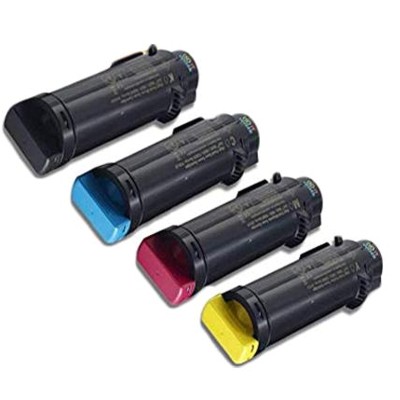
Bring Your Color Documents to Life with Dell 593-BBx Toner Cartridges Dear Customer, when printouts need to look professional the first time—crisp text, smooth gradients, and confident colors—you can’t afford streaks, faded areas, or surprise “low toner” messages mid-job. The Dell 593-BBx series was created precisely for reliable, high-quality color laser printing in busy offices and demanding home workspaces. In this category we offer original OEM Dell toner cartridges designed to work seamlessly with your printer, delivering the consistent results you expect from the Dell ecosystem. What’s Included in the Dell 593-BBx Series (OEM Toners) In this category you’ll find a complete set of original Dell color laser toners, so you can match the cartridge exactly to the color you need and keep your device working at full potential: - Original OEM Toner Dell NCH0D (593-BBSG) – Black – for sharp, readable text and clean business graphics.
- Original OEM Toner Dell 042T1 (593-BBRX) – Magenta – for vivid reds/pinks and balanced photo accents.
- Original OEM Toner Dell WG4T0 (593-BBSC) – Cyan – for strong blues and accurate corporate colors.
- Original OEM Toner Dell 2RF0R (593-BBRY) – Yellow – for bright highlights and natural-looking color blends.
If you’re searching for toner for Dell printer that keeps colors consistent across pages and between print runs, choosing the correct Dell 593-BBRX, 593-BBSG, 593-BBRY, or 593-BBSC is the simplest way to stay in control of quality. Compatible Printers: Made for Popular Dell Color Laser Devices The Dell 593-BBx toner family is used in select Dell color laser printers that are often found in offices where speed and dependable color matter. These cartridges are compatible with devices such as Dell H625cdw, Dell H825cdw, and Dell S2825cdn (among others). If your printer model belongs to this group, selecting the dedicated toner for printer Dell H625cdw or toner for printer Dell S2825cdn from the Dell 593-BBx series helps ensure smooth installation, predictable performance, and stable print quality. Why Choose Original OEM Dell 593-BBx Toner? Original OEM cartridges are designed by the manufacturer to cooperate precisely with the printer’s imaging system. That means you get results that look “finished” right off the tray—ideal for invoices, reports, offers, presentations, and day-to-day office printing. - Consistent color and crisp detail – excellent for charts, logos, and small text.
- Reliable operation – fewer surprises such as smudging, uneven coverage, or premature “empty” alerts.
- Clean, predictable replacement – the cartridge fits the way it should, with clear identification by code (e.g., 593-BBSG for black).
- Optimized for your printer – stable performance in devices like Dell H625cdw/H825cdw/S2825cdn.
Common Printing Problems This Series Helps You Avoid Many users come to us after experiencing the same frustrations: washed-out pages, color shifts between prints, and streaks that make documents look unprofessional. Choosing the right Dell 593-BBx toner cartridge can reduce issues such as: - Faded or uneven color blocks when one color is running low (often yellow or cyan).
- Grey-looking black text when black toner isn’t the correct type or is near empty.
- Inconsistent branding colors on marketing documents and presentations.
- Time wasted on reprints—because one imperfect page can ruin an entire set.
When your workflow depends on dependable output, using a dedicated toner for printer Dell H825cdw or toner for printer Dell S2825cdn from the OEM Dell 593-BBx family is a practical way to protect your time and your reputation. How to Choose the Right Cartridge (Quick, Safe Checklist) We encourage you to pick your toner calmly and confidently—without guessing. Here’s what to check before adding to cart: - Printer model – confirm the exact device name (e.g., Dell H625cdw).
- Cartridge code – match the printed code precisely: 593-BBSG (black), 593-BBSC (cyan), 593-BBRX (magenta), 593-BBRY (yellow).
- Color you actually need – if prints show a color tint or missing tones, one cartridge may be the cause.
- Your printing style – mainly text (black toner matters most) or lots of graphics (keep all CMYK ready).
This approach ensures you buy the correct toner for Dell printer the first time—no unnecessary returns, no delays, no downtime. Original vs Compatible: What’s the Difference and What We Recommend? In this specific category, we present original OEM Dell 593-BBx toners—a great choice when you want manufacturer-standard results and maximum predictability. At the same time, many customers ask us about compatible options. As DrTusz.pl, we want you to know: our compatible cartridges are as good as the originals—they are a smart alternative when you’re optimizing costs without compromising print quality. If you ever decide to go that route, we’ll help you choose a compatible toner for printer Dell H625cdw or other matching model that fits your needs and budget. Choose Your Dell 593-BBx Toner and Print with Confidence Whether you need deep, readable black or a full set of vibrant CMYK colors, the Dell 593-BBx series gives you the control and quality your documents deserve. Select the exact cartridge code, replace it in minutes, and enjoy clean, professional output page after page. Ready to restore perfect color and sharp text? Choose your Dell 593-BBx toner cartridge now and keep your printer working at its best—order today and print without interruptions. |