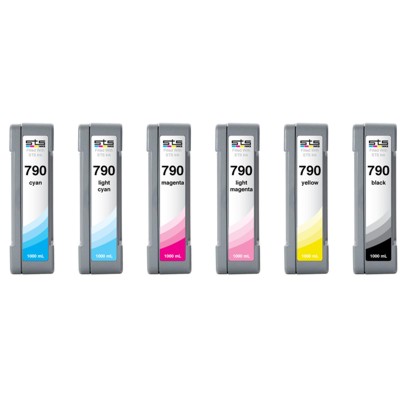
Clean Prints Start Here: HP 790 Ink Cartridge Care for Demanding Plotters Dear Customer, when a large-format printer starts leaving streaks, missing lines, or faded patches, the problem often isn’t “bad ink” at all—it’s a clogged or partially dried printhead. In this category, we focus on practical maintenance for printers using the HP 790 ink system, offering both original OEM and compatible solutions where applicable—because reliable output is not a luxury, it’s the foundation of every professional project. If you work with plotters such as the HP DesignJet 9000s or HP DesignJet 10000s, you know how quickly downtime can turn into missed deadlines. That’s why we’ve built this selection around one goal: restoring clean, confident printing as fast as possible. What You’ll Find in This Category: Refill Components & Cleaning Fluids This subpage is dedicated to Cartridges Inkjet in the form of refill components, specifically fluids for cleaning. These products are designed to support the HP 790 ecosystem by helping you maintain the ink path and printheads—especially when your printer has been idle, used intermittently, or exposed to drying conditions. Instead of wasting expensive media on test after test, a proper cleaning routine can often bring your device back to full performance with noticeably sharper lines and more even fills. - Class: Refill components
- Type: Fluids for cleaning
- Use case: supporting printhead cleanliness and ink flow in printers that use HP 790 ink cartridges
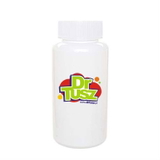
Featured Product: Specialistic Fluid for Cleaning Heads HP 250 ml (Universal) The key product in this category is the Specialistic Fluid for Cleaning Heads HP 250 ml (Universal). Think of it as a “reset button” for printing quality when ink residue, dried pigments, or microscopic blockages start affecting nozzle performance. It’s a targeted solution for one of the most common user issues in large-format printing: inconsistent output even after standard maintenance cycles. Typical symptoms this cleaning fluid can help address include: - missing lines or banding across wide-format prints,
- uneven color coverage and “patchy” areas,
- faded sections despite seemingly adequate ink levels,
- problems after longer printer downtime (ink drying in the system),
- repeated cleaning cycles that don’t fully restore nozzle performance.
When your goal is crisp technical drawings, smooth gradients, or solid blocks of color, cleanliness of the printhead area matters as much as choosing the right ink for HP 790 printing. A professional cleaning fluid supports stable ink flow and can reduce the need for repeated purges that consume ink and time. Original OEM vs Compatible: How to Choose with Confidence Customers often ask us what’s “safer”: original OEM products or compatible alternatives. Our advice is simple—choose based on your workflow, budget, and expectations, but don’t accept the myth that compatible options must be worse. The compatible products in the DrTusz.pl offer are designed to be as good as originals in everyday professional use, delivering a smart balance of performance and cost. - Original OEM: best for customers who want manufacturer-branded solutions and standardized procedures across teams.
- Compatible: ideal when you want excellent results and better cost control—especially for frequent maintenance and high-volume environments.
And if you’re wondering whether this is the right place for you: if you searched for ink for printer HP DesignJet 9000s or ink for printer HP DesignJet 10000s and you’re battling quality issues, cleaning is often the quickest and most economical first step before replacing parts. Why Proper Maintenance Pays Off (and Saves Ink) In large-format printing, every meter of media counts—and so does every minute your device is offline. A well-chosen cleaning fluid can help you avoid unnecessary cartridge swaps, reduce wasted prints, and keep your color and line accuracy where it should be. Instead of chasing the problem by buying more ink for HP 790, you address the real cause: blockage and residue that prevent ink from landing evenly on the substrate. The result is smoother production and a calmer workflow—exactly what you want when clients are waiting. Ready to Restore Perfect Output? Choose Your HP 790 Cleaning Solution We encourage you to treat maintenance as part of printing quality—not an afterthought. If your HP DesignJet output has lost its crispness, the Specialistic Fluid for Cleaning Heads HP 250 ml (Universal) is a practical, workshop-proven way to bring your printer back to life and protect your daily productivity. Add it to your supply kit today and keep your HP 790 printing system performing at its best. Order now and get back to clean, sharp, professional prints—without downtime. |