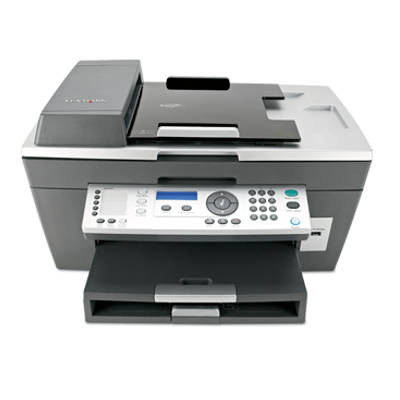
Reliable printing with the Lexmark X7350 The Lexmark X7350 from the Lexmark X Series is a practical all-in-one inkjet device designed for everyday home and small office tasks. It handles documents, school materials, and color graphics, so choosing the right ink for Lexmark X7350 has a direct impact on print quality, convenience, and your cost per page. In this category, we’ve gathered both Original OEM and Compatible ink cartridge options—so you can match your printing style and budget without compromise. What ink for Lexmark X7350 is used for and what to expect Good ink for printer Lexmark X7350 means crisp black text, readable small fonts, and smooth color transitions in photos and graphics. Whether you print invoices, forms, homework, or occasional pictures, the right cartridge helps keep results consistent and reduces the risk of interruptions. In the Lexmark X7350, you’ll typically use a black cartridge for sharp text and a color cartridge for images and charts. Choosing the correct capacity is also important—standard cartridges work well for occasional printing, while higher-yield versions are ideal when you print more frequently. - Black ink cartridge for Lexmark X7350 – best for documents, contracts, and everyday text printing.
- Color ink cartridge for Lexmark X7350 – designed for photos, presentations, school projects, and colorful graphics.
- XL / high-yield options – fewer replacements and better value for regular users.
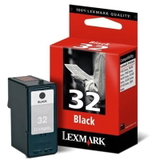
Our range: Original OEM and Compatible ink cartridge options We make it easy to find exactly the ink cartridge for Lexmark X7350 you need. This category includes popular, proven models in both Original OEM and Compatible versions, so you can choose the solution that fits your expectations. - Original OEM Ink Cartridge Lexmark 32 (18CX032E) (Black) – dependable OEM black for everyday office and home documents.
- Original OEM Ink Cartridge Lexmark 34 (18C0034E) (Black) – an OEM alternative for users who want consistent black text output.
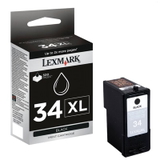
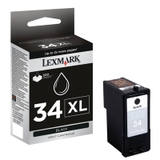
- Original OEM Ink Cartridge Lexmark 34 XL (18C0034E) (Black) – high-yield black cartridge for higher monthly volume.
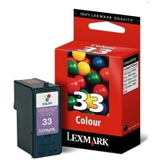
- Original OEM Ink Cartridge Lexmark 33 (18CX033E) (Color) – OEM color for clear graphics and balanced tones.
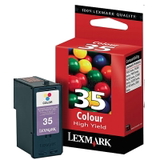
- Original OEM Ink Cartridge Lexmark 35 (18C0035E) (Color) – OEM color option for everyday color printing.
- Compatible Ink Cartridge 32 for Lexmark (18CX032E) (Black) – cost-effective black printing without sacrificing readability.
- Compatible Ink Cartridge 34 for Lexmark (18C0034E) (Black) – a smart choice for frequent document printing.
- Compatible Ink Cartridge 33 for Lexmark (18CX033E) (Color) – affordable color printing for home and school use.
- Compatible Ink Cartridge 35 for Lexmark (18C0035E) (Color) – budget-friendly color for graphics and mixed documents.
We focus on availability and variety, so you can quickly compare an Original OEM ink cartridge with a Compatible ink cartridge and pick what makes the most sense for your printing routine. How to choose: Original OEM vs Compatible ink cartridge If you’re wondering which ink for Lexmark X7350 is best, start with how you print: how often, what you print, and whether you prefer maximum OEM predictability or lower running costs. - Original OEM ink cartridge for Lexmark X7350 – a great fit if you want the manufacturer’s solution and highly repeatable results, especially for important documents or color-sensitive prints.
- Compatible ink cartridge for Lexmark X7350 – perfect if you want to reduce printing costs while keeping excellent quality. Our compatible cartridges from DrTusz.pl are designed to be just as good as the originals in everyday use—sharp text, reliable color, and smooth performance.
Tip: If you print a lot of text, consider a higher-yield black cartridge (such as an XL option). If you print occasional color pages, choosing a standard color cartridge may be the most economical approach. Common Lexmark X7350 printing issues and quick fixes Inkjet printers like the Lexmark X7350 can sometimes show minor issues—often easy to solve with the right habits and a fresh ink cartridge for Lexmark X7350. - Faded prints or missing lines – run the printer’s cleaning/nozzle check and make sure the cartridge is correctly installed.
- Cartridge not recognized – remove and reinstall the cartridge, check protective seals are fully removed, and restart the device.
- Colors look off – print a test page, verify you’re using the correct color cartridge, and check print settings (draft vs normal).
- Ink dries out due to rare printing – print a small test page once in a while to keep ink flowing smoothly.
If you need help choosing the right ink for printer Lexmark X7350 or matching Lexmark 32/33/34/35 numbers to your needs, we’re here to advise—just contact us. Choose your ink for Lexmark X7350 and print with confidence We encourage you to explore the full selection of ink cartridges for Lexmark X7350—both Original OEM and Compatible. Choose black for crisp documents, color for vivid graphics, or an XL option for fewer replacements. Add your cartridges to the cart and enjoy a smooth ordering process, fast delivery options, and helpful customer support. If you have any questions, contact us—we’ll help you pick the best cartridge for your Lexmark X7350. |