Haven't found what you were looking for? Click here! ▼
Describe below exactly what you are looking for and we will see how we can help. You will receive a reply to your e-mail address by 15:35 at the latest
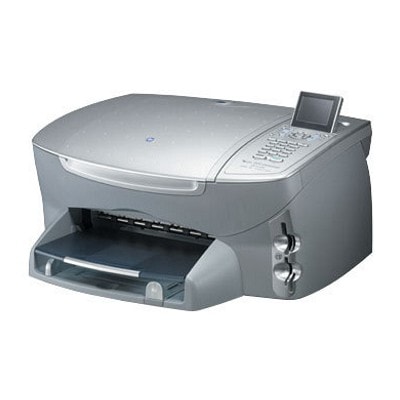
Ink cartridges for HP PSC 2550 - compatible and original OEM
Keep your HP PSC 2550 running at its best with the right ink cartridges for everyday documents, vivid color prints, and photo output. In this category you’ll find Ink cartridges for HP PSC 2550 from both Original OEM and Compatible ranges, designed for models searched as HP 2550, HP PSC 2500 Series, Q3092A, and 2550.
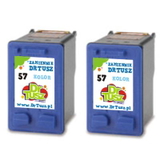
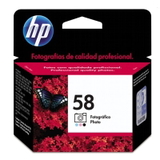
Choose reliable black and color options like HP 56 (C6656AE) Black and HP 57 (C6657AE) Color, available as single cartridges, value 2-packs, and convenient multi packs (56 + 57). For photo-focused printing, you can also select the HP 58 (C6658AE) Photo Original OEM cartridge. Compatible alternatives are built for fit and function in your printer, while Original OEM cartridges deliver the manufacturer’s expected consistency and print quality.
Stock up today and print with confidence—whether you prefer OEM assurance or a cost-effective compatible option. Pick the cartridge (or multipack) that matches your printing needs and explore the full selection of HP PSC 2550 ink cartridges now.
Product Number: Q3092A Other names: All-In-One Printer HP PSC 2550
Reliable printing with the HP PSC 2550 (HP PSC 2500 Series)
HP PSC 2550 is a proven all-in-one device from the HP PSC 2500 Series, designed for everyday home and small-office tasks: printing, copying, and scanning. If you want this model to keep delivering sharp documents and vivid photos, you need the right ink for HP PSC 2550. In this category we gathered both Original OEM and compatible ink cartridges that match the printer perfectly—so you can choose exactly what fits your needs and budget.
Which ink cartridges fit HP PSC 2550?
The HP PSC 2550 uses classic HP cartridge symbols that many users recognize instantly. Here you will find ink cartridges for HP PSC 2550 in black, color, and photo versions, including popular references such as Q3092A and the best-known cartridge codes: HP 56 (C6656AE), HP 57 (C6657AE), and HP 58 (C6658AE). This means you can easily restore full functionality of your printer—whether you print mostly text, colorful school projects, or occasional photos.
Black ink for HP PSC 2550 – for crisp text, invoices, homework, and office documents
Color ink for HP PSC 2550 – for graphics, presentations, and everyday color printing
Photo ink for HP 2550 – for smoother tones and better photo results on photo paper
Multipacks and twin-packs – convenient sets for people who print regularly and want a spare ready
Our offer: Compatible and Original OEM cartridges in one place
We keep the selection clear and practical: you can order a single cartridge or choose a cost-effective set. Among the most popular products in this category you will find:
Compatible Ink Cartridges 56 + 57 for HP (SA342AE) (multi pack) – a balanced set for everyday printing
Compatible Ink Cartridge 56 for HP (C6656AE) (Black) and Compatible Ink Cartridge 57 for HP (C6657AE) (Color) – great when you want to replace only the cartridge that ran out
Compatible Ink Cartridges 56 for HP (C9502AE) (Black) (2-pack) and Compatible Ink Cartridges 57 for HP (C9503AE) (Color) (2-pack) – smart option for frequent printing
Original OEM Ink Cartridge HP 56 (C6656AE) (Black) and Original OEM Ink Cartridge HP 57 (C6657AE) (Color) – for customers who prefer manufacturer cartridges
Original OEM Ink Cartridge HP 58 (C6658AE) (Foto) – for dedicated photo printing
Original OEM Ink Cartridges HP 56 + 57 (SA342AE) (multi pack) – an OEM bundle for a complete refresh
Thanks to this variety, you can pick the right ink for HP PSC 2550 based on how you print: occasionally, intensively, text-only, or photo-heavy.
How to choose: Original OEM vs compatible ink for HP PSC 2550
When selecting an ink cartridge for HP PSC 2550, it helps to start with your priorities:
Original OEM – chosen by customers who want to stay with the manufacturer’s cartridge line and prefer a “same as in the box” approach.
Compatible – ideal when you want excellent value and reliable performance. Our compatible cartridges from DrTusz.pl are designed to be as good as the originals in everyday use, with strong blacks and vivid colors—perfect for home and office printing.
Still unsure what to pick? If you print a lot (documents for work/school), a compatible multi pack is often the most economical way to keep your HP PSC 2550 ready. If you print photos, consider adding the HP 58 (C6658AE) photo cartridge to improve tonal transitions and photo quality.
Common user issues with HP PSC 2550 inks—and quick tips
Many HP PSC 2550 owners come to us with similar questions. Here are practical tips that often help:
Faded print or missing colors – usually means one cartridge is empty or needs a nozzle clean. Replacing the correct ink for HP PSC 2550 (black or color) typically fixes it fast.
Streaks on the page – run cleaning/alignment from the printer menu and make sure you’re using good paper suited to inkjet printing.
Cartridge not recognized – remove and reinsert the cartridge, check protective tape was removed, and ensure you selected the right model (HP 56/57/58 for HP PSC 2500 Series).
Printing mostly text but color runs out – consider having a spare color cartridge ready, because the printer may use color for maintenance cycles.
Choose your ink and keep your HP PSC 2550 ready
We encourage you to browse all options in the category Ink cartridges for HP PSC 2550 – compatible and original OEM and select the cartridge (or set) that best matches your printing habits. If you want help choosing the right ink for HP 2550 or confirming a code like Q3092A, contact us—we’ll guide you quickly and clearly. Add your cartridges to the cart, choose a convenient delivery option, and get back to smooth printing with your HP PSC 2550.
CTA: Check the available HP 56 / HP 57 / HP 58 cartridges above and order today—or message us if you want a recommendation based on what you print most.