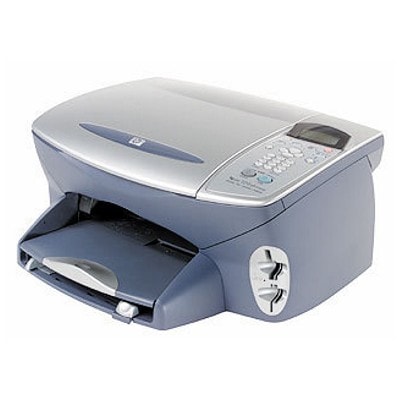
Reliable printing with the HP PSC 2210v The HP PSC 2210v (also known as HP 2210v or the HP PSC 2200 Series) is a popular all‑in‑one device designed for everyday home and small office work. It combines printing, copying and scanning in one compact unit—perfect for school materials, invoices, forms and family photos. To keep this printer running smoothly, it’s worth choosing the right ink for HP PSC 2210v—matched to your needs and printing style. What ink cartridges does the HP PSC 2210v use? This category includes ink cartridges for HP PSC 2210v in two options: Original OEM and Compatible. The printer works with well-known cartridge models identified by codes you may also search for, such as C8660A, C6656AE, C6657AE and C6658AE. In practice, the most common choices are: - HP 56 – black ink cartridge for HP PSC 2210v, ideal for text and office documents
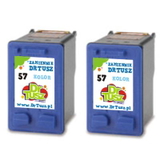
- HP 57 – color ink cartridge for HP PSC 2210v, great for graphics and everyday color printing
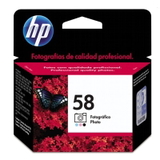
- HP 58 – photo ink cartridge for HP PSC 2210v, designed to improve photo tones and gradients
Whether you print occasionally or regularly, choosing the right ink for HP 2210v helps maintain crisp text, accurate colors and consistent page output. Original OEM vs compatible ink for HP PSC 2210v Many customers ask us which option is best: Original OEM ink cartridges or compatible ink cartridges. The answer depends on what you value most—brand preference, budget, or printing volume. Here’s a clear comparison: - Original OEM ink for HP PSC 2210v – manufactured by HP, designed specifically for this device, a safe choice for users who prefer official solutions.
- Compatible ink for HP PSC 2210v – a cost-effective alternative. In our DrTusz.pl offer, compatible cartridges are made to deliver results that are as good as originals in everyday use—sharp black text, vivid color, and reliable operation.
If you print a lot (schoolwork, documents, web pages), compatible ink cartridges for HP PSC 2210v are often the smartest way to reduce costs without sacrificing quality. If you print important documents occasionally and want to stay strictly with the manufacturer’s line, Original OEM may be your preferred option. Popular cartridges in this category—single and multipacks We keep this category focused on the most practical choices, so you can quickly order the right ink cartridge for HP PSC 2210v without guessing. You’ll find, among others: - Compatible Ink Cartridges 56 + 57 for HP (SA342AE) (multi pack) – a convenient black + color set for everyday printing
- Compatible Ink Cartridges 2x 56 + 57 for HP (SD399AE) (multi pack) – a great option for higher volumes and better value per page
- Compatible Ink Cartridge 56 for HP (C6656AE) (Black) and Compatible Ink Cartridges 56 for HP (C9502AE) (Black) (2-pack) – for frequent document printing
- Compatible Ink Cartridge 57 for HP (C6657AE) (Color) and Compatible Ink Cartridges 57 for HP (C9503AE) (Color) (2-pack) – for color pages, charts, and mixed media
- Original OEM Ink Cartridge HP 56 (C6656AE) (Black) and Original OEM Ink Cartridge HP 57 (C6657AE) (Color) – classic OEM choices
- Original OEM Ink Cartridge HP 58 (C6658AE) (Foto) – for better photo depth and smoother transitions
- Original OEM Ink Cartridges HP 56 + 57 (SA342AE) (multi pack) – an OEM set that covers daily black and color needs
Choosing a multipack is often the easiest way to stay prepared—especially if your HP PSC 2210v is used by the whole family or a small team. How to choose the right ink for HP 2210v—practical tips To pick the best ink for printer HP PSC 2210v, we recommend focusing on three simple criteria: - What you print most: text (HP 56), color documents (HP 57), or photos (HP 58).
- How often you print: frequent printing usually favors multipacks and compatible cartridges for better running costs.
- Your quality expectations: for everyday work, our compatible ink cartridges for HP PSC 2210v provide excellent results; for brand-only preference, choose Original OEM.
Common issues users report with the HP PSC 2210v and similar models usually involve printing interruptions after longer breaks, faded color, or streaks. In many cases, the solution is straightforward: replace an old or dried-out cartridge, run the printer’s cleaning cycle, and print a test page. If you’re unsure which ink cartridge for HP PSC 2200 Series to choose, we’re here to help you match the cartridge code and the printing purpose. Order ink cartridges for HP PSC 2210v with confidence We make it easy to find and buy the right ink for HP PSC 2210v—whether you prefer Original OEM cartridges or want a high-quality, cost-effective compatible ink cartridge. Browse the products in this category, choose a single cartridge or a multipack, and keep your printer ready for everything from homework to photo printing. Call to action: We encourage you to explore our selection of ink cartridges for HP PSC 2210v and place your order today. If you have any questions about compatibility (e.g., 2210v, 2210 V, 2210V, 2210 v, C8660A) or need help choosing between OEM and compatible options, contact us—our team will guide you quickly and accurately. Fast delivery options help you get back to printing without unnecessary downtime. |