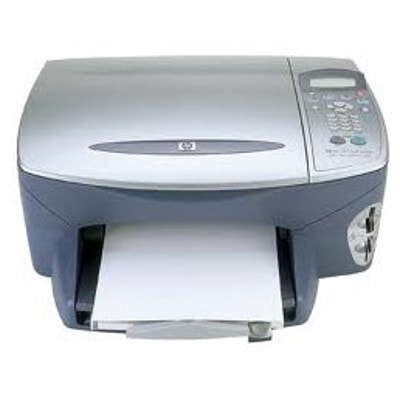
Reliable printing with the HP PSC 2175v (HP PSC 2100 Series) The HP PSC 2175v (also searched as HP 2175v, 2175V, 2175 v or HP PSC 2100 Series) is a classic all‑in‑one inkjet device designed for everyday home and small office tasks. It handles documents, school materials and occasional photos—provided you choose the right ink for printer HP PSC 2175v. In this category we offer both Original OEM and carefully selected compatible ink cartridges for HP PSC 2175v, so you can match print quality, budget and printing habits without compromises. What ink cartridges the HP PSC 2175v uses and what you can print For this model, the most common choices are the proven HP cartridge families: HP 56 (C6656AE) for black text, HP 57 (C6657AE) for color, and HP 58 (C6658AE) for photo printing. With the right set, you can easily cover: - sharp black text for bills, letters and office documents (HP 56 / C6656AE),
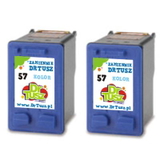
- color graphics, charts and school projects (HP 57 / C6657AE),
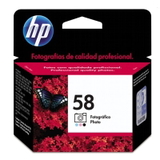
- better tonal transitions in photos and more natural skin tones (HP 58 / C6658AE).
If you type queries like Q3070A or simply 2175v, you’re in the right place—this page is dedicated to ink for HP PSC 2175v and the cartridges that fit this printer family. Compatible vs Original OEM—choose what fits your needs Many customers ask us whether it’s better to choose an original cartridge or a compatible one. The honest answer: it depends on your priorities. Original OEM ink cartridges for HP PSC 2175v are manufactured by HP and are a great option when you want a factory-standard experience and you print occasionally. At the same time, our compatible ink cartridges for HP PSC 2175v from DrTusz.pl are designed to deliver results that are just as satisfying in everyday use—clear text, vivid colors and reliable operation—while helping you reduce printing costs. If you print frequently (school, work-from-home, lots of drafts), compatible cartridges are often the most practical choice. Popular products in this category—black, color and convenient multipacks We keep this category focused and practical: the best-selling options for the HP PSC 2175v, including single cartridges and multipacks. Here are some customer favorites: - Compatible Ink Cartridge 56 for HP (C6656AE) (Black) – a dependable choice for everyday text printing.
- Original OEM Ink Cartridge HP 56 (C6656AE) (Black) – OEM black ink for those who prefer original solutions.
- Compatible Ink Cartridge 57 for HP (C6657AE) (Color) – for color documents, graphics and occasional photo prints.
- Original OEM Ink Cartridge HP 57 (C6657AE) (Color) – OEM color cartridge for consistent, familiar results.
- Original OEM Ink Cartridge HP 58 (C6658AE) (Foto) – dedicated photo cartridge for improved photo quality.
- Compatible Ink Cartridges 56 for HP (C9502AE) (Black) (2-pack) – smart when you print a lot of black pages.
- Compatible Ink Cartridges 57 for HP (C9503AE) (Color) (2-pack) – convenient запас for color printing.
- Compatible Ink Cartridges 56 + 57 for HP (SA342AE) (multi pack) – the classic set: black + color together.
- Original OEM Ink Cartridges HP 56 + 57 (SA342AE) (multi pack) – OEM multipack for users who want originals in a bundle.
- Compatible Ink Cartridges 2x 56 + 57 for HP (SD399AE) (multi pack) – a cost-effective option for higher monthly printing.
Thanks to this range, you can easily pick the exact ink cartridge for HP PSC 2175v you need—whether you want a single black cartridge, a color refill, or a full multipack ready for weeks of printing. How to choose the right ink for HP PSC 2175v—practical tips When choosing ink for printer HP PSC 2175v, we recommend a simple approach: - Start with what you print most: mainly text → choose HP 56 black; a mix of text and color → add HP 57; photos → consider HP 58 photo.
- Decide on convenience: if you don’t want to reorder often, choose a 2-pack or multipack (e.g., SA342AE or SD399AE).
- Match your budget: Original OEM for a classic OEM experience; compatible cartridges when you want excellent everyday quality and better economy.
Common issues reported by HP PSC 2175v users usually come down to typical inkjet maintenance, not the printer itself. If you notice faded prints, missing colors, or streaks, the solution is often: - running the printer’s head cleaning / alignment function,
- printing a test page after replacing a cartridge,
- making sure the cartridge is correctly seated,
- printing at least once in a while to prevent ink drying in nozzles.
If you’re unsure which cartridge you need—C6656AE, C6657AE, C6658AE, or a multipack—tell us what you print and how often. We’ll help you select the best ink for HP 2175v. Order your ink today—fast shopping and real support We encourage you to explore the full selection of ink cartridges for HP PSC 2175v available in this category—both compatible and Original OEM. Choose a single cartridge or stock up with a multipack and keep your printer ready whenever you need it. CTA: Add your chosen ink for HP PSC 2175v to the cart now, or contact us if you want a quick recommendation—we’ll gladly help you pick the best option and arrange convenient delivery. |