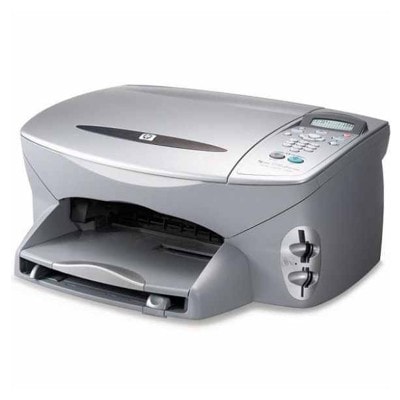
| If you’re using the HP PSC 2171 (also known as HP 2171 or the HP PSC 2100 Series), you already know why this all‑in‑one device is still appreciated: it’s simple, reliable, and perfect for everyday printing, copying, and scanning at home or in a small office. To keep it working at its best, you simply need the right ink for HP PSC 2171—and that’s exactly what we offer in this category: both compatible and Original OEM ink cartridges. Ink for HP PSC 2171 – what to print and what to expect The HP PSC 2171 uses classic HP cartridge solutions that are great for mixed daily use: black text documents, school printouts, occasional color graphics, and even photo printing when you choose the right cartridge. In practice, most users combine a black cartridge with a tri‑color cartridge, and for photo work they add a dedicated photo cartridge. In this category you’ll find ink cartridges for HP PSC 2171 designed for: - Sharp black text for invoices, homework, and letters (black cartridge series 56)
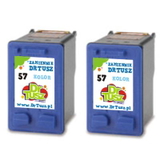
- Everyday color printing (tri‑color cartridge series 57)
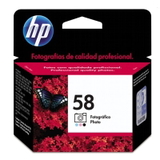
- Better photo tones and smoother transitions (photo cartridge series 58)
- Convenient multi packs and 2‑packs for frequent printing
Whether you search by printer model (HP PSC 2171) or by cartridge code such as Q3072A, we make it easy to match the right ink for HP 2171 to your needs. Compatible and Original OEM cartridges – a wide, practical selection We know that different customers have different priorities, so we stock both Original OEM cartridges and carefully selected compatible ink cartridges. This way you can choose exactly what fits your printing style and budget—without compromising on quality. Our compatible cartridges from DrTusz.pl are built to be as good as originals in everyday use: clean prints, stable color, and dependable performance. Popular choices in this category include: - Compatible Ink Cartridges 56 + 57 for HP (SA342AE) (multi pack) – a balanced set for text and color printing
- Compatible Ink Cartridges 2x 56 + 57 for HP (SD399AE) (multi pack) – ideal when you print often and want запас/backup
- Compatible Ink Cartridge 56 for HP (C6656AE) (Black) and Compatible Ink Cartridge 57 for HP (C6657AE) (Color) – a simple, cost‑effective pair
- Compatible Ink Cartridges 56 for HP (C9502AE) (Black) (2-pack) and Compatible Ink Cartridges 57 for HP (C9503AE) (Color) (2-pack) – convenient for higher volume printing
- Original OEM Ink Cartridge HP 56 (C6656AE) (Black) and Original OEM Ink Cartridge HP 57 (C6657AE) (Color) – for customers who prefer manufacturer supplies
- Original OEM Ink Cartridge HP 58 (C6658AE) (Foto) – a great option for photo lovers
- Original OEM Ink Cartridges HP 56 + 57 (SA342AE) (multi pack) – an easy, official set for everyday use
How to choose the right ink cartridge for HP PSC 2171 Choosing ink for printer HP PSC 2171 is easiest when you start with what you print most: - Mainly documents? Choose a strong black option: HP 56 (C6656AE) or its compatible equivalent.
- Color for school and home? Add HP 57 (C6657AE) tri‑color.
- More photos? Consider the HP 58 (C6658AE) photo cartridge for improved photo output.
- Print regularly? Multi packs and 2‑packs reduce the risk of running out at the wrong time.
Original OEM vs compatible: Original OEM cartridges are made by HP and are a classic choice for users who prefer manufacturer-branded supplies. Our compatible ink cartridge for HP PSC 2171 is the smart alternative for customers who want excellent print quality and better cost efficiency—without giving up reliability. If you’re unsure which route is best for you, we’re here to help you pick the best ink for HP PSC 2100 Series based on your usage. Common HP PSC 2171 printing issues – and quick tips This printer model is dependable, but like any inkjet, it can show a few typical symptoms—usually easy to solve with the right approach and fresh cartridges: - Faded prints or missing colors – often caused by low ink or dried nozzles; replacing the cartridge and running a cleaning cycle typically helps.
- Streaks on the page – may indicate a cartridge nearing end of life or a need for printhead maintenance.
- Cartridge not recognized – remove and reseat the cartridge, gently clean contacts, and ensure you’re using the correct model (HP 56/57/58).
- Printing slows down – switching to the right print mode for drafts vs final copies can make a difference in everyday use.
When you choose the correct ink cartridge for HP PSC 2171 and replace it in time, you reduce interruptions and protect print quality—especially for important documents. Order ink for HP PSC 2171 with confidence We encourage you to explore our full selection of ink cartridges for HP PSC 2171—compatible and Original OEM—so you can print exactly the way you want: affordably, reliably, and with great results. Add your chosen cartridge or multi pack to your cart and keep your printer ready for daily tasks. Need help matching a cartridge code like C6656AE, C6657AE, C6658AE, SA342AE, or identifying compatibility with Q3072A? Contact us—together we’ll choose the best ink for HP 2171. We also offer fast delivery options, so you can get back to printing without unnecessary delays. CTA: Check the available products in this category and choose your next ink for printer HP PSC 2171 today—if you have any questions, we’re ready to advise. |