Haven't found what you were looking for? Click here! ▼
Describe below exactly what you are looking for and we will see how we can help. You will receive a reply to your e-mail address by 09:15 on friday (2 October 2026) at the latest
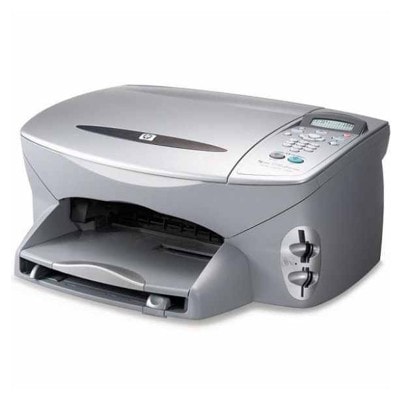
Ink cartridges for HP PSC 2170 - compatible and original OEM
Keep your HP PSC 2170 printing sharp and reliable with our selection of inkjet ink cartridges designed for the HP PSC 2100 Series. Whether you search by model (HP 2170 / 2170) or cartridge codes like C6656AE (HP 56), C6657AE (HP 57), C6658AE (HP 58) or Q3067A, you’ll find the right match for crisp documents and vibrant color prints.
Choose between Original OEM cartridges for factory-grade performance or compatible ink cartridges for HP PSC 2170 for a cost-effective alternative. Available options include Black HP 56, Color HP 57, and Photo HP 58, plus convenient multipacks such as HP 56 + 57 (SA342AE) and value 2-packs—ideal for frequent printing and fewer replacements. All cartridges listed are made to fit and work smoothly with your printer for consistent results.
Pick the cartridge that fits your printing needs and budget, then stock up to avoid downtime—order your HP PSC 2170 ink cartridges today. Explore the full range of compatible and Original OEM options and keep every page looking its best.
Product Number: Q3067A Other names: All-In-One Printer HP PSC 2170
Reliable printing with the HP PSC 2170 (HP PSC 2100 Series)
The HP PSC 2170 is a popular all-in-one device from the HP PSC 2100 Series, designed for everyday home and small-office tasks: printing documents, copying, and scanning. It’s valued for its simple operation and dependable performance—but like any inkjet, it delivers its best results only with the right ink. In this category you’ll find both Original OEM and Compatible ink cartridges for HP PSC 2170, so you can match your printing style and budget without compromising quality.
Ink for HP PSC 2170 – what matters in daily use
Choosing the right ink for HP PSC 2170 means better text sharpness, smoother color fills, and fewer interruptions. This printer typically uses a black cartridge for crisp documents and a tri-color cartridge for graphics and photos. For photo enthusiasts, there is also a dedicated photo cartridge option—ideal when you want richer tones and smoother transitions in images.
In our selection of ink cartridges for HP 2170, you’ll find solutions for:
Everyday black printing (schoolwork, invoices, forms, notes)
Color printing (charts, presentations, simple graphics)
Photo printing (more natural tones and improved photo detail with the photo cartridge)
Convenient multi-packs to reduce cost per page and keep a spare ready
Compatible and Original OEM cartridges – a full range in one place
We make it easy to buy the right ink cartridge for HP PSC 2170 by offering both trusted OEM options and high-quality alternatives. Whether you prefer manufacturer cartridges or you want a cost-effective solution, you can choose confidently.
Popular picks in this category include:
Compatible Ink Cartridge 56 for HP (C6656AE) (Black) – a great everyday choice for clean, readable text.
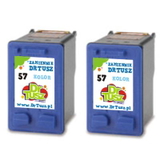
Compatible Ink Cartridge 57 for HP (C6657AE) (Color) – ideal for color prints and home graphics.
Compatible Ink Cartridges 56 + 57 for HP (SA342AE) (multi pack) – a practical set for balanced black + color printing.
Compatible Ink Cartridges 2x 56 + 57 for HP (SD399AE) (multi pack) – a smart option if you print often and want fewer reorders.
Compatible Ink Cartridges 57 for HP (C9503AE) (Color) (2-pack) and Compatible Ink Cartridges 56 for HP (C9502AE) (Black) (2-pack) – convenient twin packs for regular users.
Original OEM Ink Cartridge HP 56 (C6656AE) (Black) and Original OEM Ink Cartridge HP 57 (C6657AE) (Color) – manufacturer cartridges for those who prefer OEM.
Original OEM Ink Cartridges HP 56 + 57 (SA342AE) (multi pack) – OEM convenience in a single bundle.
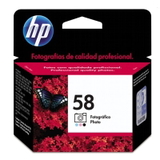
Original OEM Ink Cartridge HP 58 (C6658AE) (Foto) – for better photo results and smoother gradients.
If you search by printer series or cartridge code, you’re in the right place: this page matches phrases like HP PSC 2170, HP 2170, HP PSC 2100 Series, and codes such as Q3067A.
How to choose ink for printer HP PSC 2170 – practical tips
Dear Customer, the best ink for printer HP PSC 2170 depends on what you print most often:
If you mainly print documents, choose a strong black option like HP 56 (C6656AE) (Original OEM or Compatible).
If you print in color regularly, add HP 57 (C6657AE) and consider a multi pack for better value.
If you care about photo quality, consider the HP 58 (C6658AE) (Foto) alongside your standard setup.
If you print frequently, multi packs and 2-packs help avoid downtime and reduce last-minute purchases.
Original OEM vs Compatible ink cartridges – what’s the difference?
Original OEM ink cartridges for HP PSC 2170 are produced by the printer manufacturer and are a safe, well-known choice. Compatible ink cartridges for HP PSC 2170 are designed to match the same printer requirements while offering excellent value. In our store, we focus on compatible cartridges that are as good as the originals in everyday printing—clear text, vivid colors, and reliable operation—so you can print more without overpaying.
In short:
Original OEM – manufacturer brand, familiar choice, consistent performance.
Compatible – excellent cost-to-quality ratio, ideal for frequent printing and budget control, with quality comparable to OEM.
Common HP PSC 2170 cartridge questions and easy fixes
Users of the HP PSC 2170 often ask about issues that are easy to solve with the right cartridge and a few habits:
Faded prints or streaks – usually a sign of low ink or clogged nozzles; replacing the cartridge or running the printer’s cleaning cycle helps.
Color looks off – a tri-color cartridge may be depleted in one color; swapping the HP 57 often restores balance.
Cartridge not recognized – remove and reseat the cartridge carefully and ensure protective elements are removed before first use.
Infrequent printing – inkjets can dry out; printing a small test page weekly helps keep nozzles clear.
Choose your HP PSC 2170 ink today – we’re here to help
We encourage you to explore our full range of ink cartridges for HP PSC 2170—both Compatible and Original OEM. Whether you need a single black cartridge, a color refill, or a cost-saving multi pack, we’ve prepared an offer that makes it easy to print reliably and economically.
CTA: Add the right ink for HP PSC 2170 to your cart now, and if you’re unsure which cartridge to choose, contact us—we’ll help you match the correct cartridge code and pick the best option for your printing needs. We also provide fast delivery options so you can get back to printing without unnecessary delays.