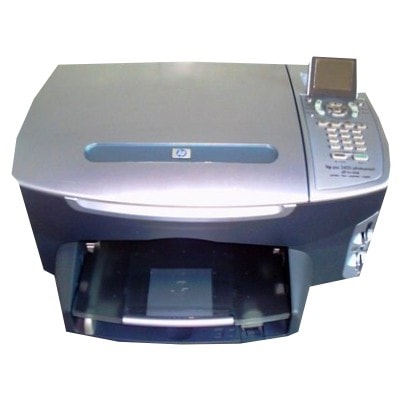
| If you use the HP Photosmart 2450 (also known as HP 2450, HP Photosmart 2400 Series, Q3090A), you already know it was designed for home photo printing—simple, reliable and capable of producing surprisingly nice colour images on the right paper. To keep this printer performing at its best, you need the right ink cartridge for HP Photosmart 2450—and in this category we offer both Original OEM and high-quality compatible ink cartridges selected for everyday convenience and excellent print results. Ink for HP Photosmart 2450 – what you get with the right cartridge The HP Photosmart 2450 uses two main cartridges: a black and a tri-colour. Choosing the correct ink for HP 2450 means consistent text sharpness, smooth gradients in photos, and fewer interruptions while printing. Whether you print school materials, documents, colour graphics or holiday photos, a well-matched ink cartridge for HP Photosmart 2400 Series helps you maintain predictable quality from the first page to the last. - Black ink – crisp, readable text and clean lines for everyday documents.
- Colour ink – vibrant photos, colourful charts and natural-looking skin tones.
- Multipacks – a practical option if you print regularly and want a ready запас at home.
In our offer, you’ll find the most popular cartridge references for this model, including C6656AE (black) and C6657AE (colour), as well as convenient multipacks like SA342AE. Compatible and Original OEM cartridges – a wide choice in one place We know that customers expect both flexibility and safety when buying an ink cartridge for HP Photosmart 2450. That’s why we keep a balanced selection: Original OEM cartridges for those who prefer the manufacturer’s solution, and carefully chosen compatible ink cartridges for those who want excellent value without compromising quality. Popular options in this category include: - Compatible Ink Cartridge 56 for HP (C6656AE) (Black) – a cost-effective choice for everyday printing.
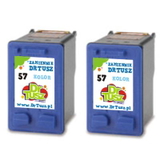
- Compatible Ink Cartridge 57 for HP (C6657AE) (Color) – for photos and colour documents.
- Compatible Ink Cartridges 56 for HP (C9502AE) (Black) (2-pack) – handy if you print lots of text.
- Compatible Ink Cartridges 57 for HP (C9503AE) (Color) (2-pack) – a smart option for frequent colour printing.
- Compatible Ink Cartridges 56 + 57 for HP (SA342AE) (multi pack) and Compatible Ink Cartridges 2x 56 + 57 for HP (SD399AE) (multi pack) – ideal for home users who want to avoid running out of ink at the worst moment.
- Original OEM Ink Cartridge HP 56 (C6656AE) (Black) and Original OEM Ink Cartridge HP 57 (C6657AE) (Color) – manufacturer cartridges for those who want OEM consistency.
- Original OEM Ink Cartridges HP 56 + 57 (SA342AE) (multi pack) – OEM convenience in one set.
How to choose ink for HP 2450: OEM vs compatible (and what really matters) When selecting ink for HP Photosmart 2450, start with your printing style. If you print occasionally, a single black or colour cartridge may be enough. If you print frequently—especially mixed text + colour—multipacks and 2-packs reduce downtime and can lower cost per page. - Original OEM ink cartridge – a great choice if you prefer the manufacturer’s solution and want a familiar, standard experience.
- Compatible ink cartridge – the best option when you want excellent value. The compatible cartridges from DrTusz.pl are designed to deliver print quality that is as good as the originals, while keeping printing costs under control.
Practical tip: always match the cartridge code to your needs—C6656AE for black, C6657AE for colour, and set codes like SA342AE for combined packs. This is the simplest way to ensure you’re buying the right ink cartridge for HP Photosmart 2400 Series. Common HP Photosmart 2450 ink problems and quick solutions Even with the right ink for HP Photosmart 2450, users sometimes run into typical inkjet issues—usually easy to fix: - Faded prints or missing colours – run the printer’s cleaning cycle and check if the colour cartridge is not empty.
- Streaks on photos – use a nozzle cleaning option and print a test page; make sure you use suitable photo paper.
- Cartridge not recognised – remove and reseat the cartridge, gently clean contacts, and restart the printer.
- Ink dries out with rare printing – consider printing a small colour test page once in a while or choosing a multipack so you can replace when needed without waiting.
If you ever feel unsure which ink cartridge for HP 2450 you need, we’re here to help—choosing the correct cartridge code usually solves the problem instantly. Choose your ink for HP Photosmart 2450 and print with confidence We encourage you to browse our selection of compatible and Original OEM ink cartridges and pick the best match for your HP Photosmart 2450 printing habits. Order today to keep your printer ready for documents and photos whenever you need them. If you have any questions about selecting an ink cartridge for HP Photosmart 2450, contact us—we’ll help you choose quickly and correctly, and we’ll make sure your order is prepared for fast, convenient delivery. CTA: Check the available cartridges in this category now and choose the best ink for HP Photosmart 2450—or ask us for support and we’ll guide you to the right option. |