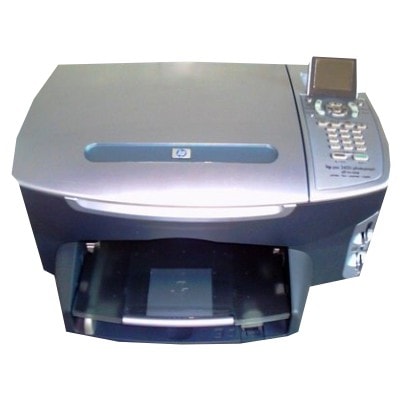
| The HP Photosmart 2400 Series is a popular home photo printer designed for vivid color prints, sharp text, and everyday versatility. Whether you use your HP 2400 for family photos, school projects, or occasional office documents, choosing the right ink for HP Photosmart 2400 is the simplest way to keep print quality consistent and your printer ready whenever you need it. Reliable ink for HP Photosmart 2400 Series – what matters most This model works with two main cartridges: one black and one tri-color. The correct ink cartridge for HP Photosmart 2400 directly affects color saturation, text sharpness, drying time, and even how smoothly the printer runs through cleaning cycles. With a well-matched cartridge set, you can expect: - clean, readable black text for documents and labels,
- natural skin tones and strong color contrast in photos,
- stable performance during regular printing and longer breaks,
- good results on both plain paper and photo paper (depending on the cartridge and media used).
If you’re searching phrases like HP Photosmart 2400, HP Photosmart 2400 Series, or simply 2400, you’re in the right place—we’ve prepared a complete selection of ink cartridges for HP 2400 in both Original OEM and Compatible versions. Compatible and Original OEM: one printer, two smart ways to print We offer two classes of products so you can match your choice to your printing style and budget: - Original OEM ink cartridges – manufactured by HP, a safe choice for customers who prefer using brand-original supplies and want maximum predictability.
- Compatible ink cartridges – cost-effective alternatives tested for everyday use. Our compatible cartridges from DrTusz.pl are designed to be as good as the originals in normal printing: clear text, strong colors, and dependable page output.
Both options are selected to fit your ink for HP Photosmart 2400 needs—whether you print occasionally or more frequently. Popular cartridges in this category (Black, Color, and multipacks) To make buying easier, we stock the most commonly chosen combinations for the HP Photosmart 2400: - Compatible Ink Cartridge 56 for HP (C6656AE) (Black) – a practical choice for crisp documents and everyday printing.
- Original OEM Ink Cartridge HP 56 (C6656AE) (Black) – original black cartridge for customers who prefer OEM supplies.
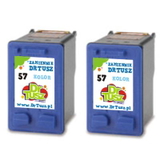
- Compatible Ink Cartridge 57 for HP (C6657AE) (Color) – for photos, graphics, and colorful home projects.
- Original OEM Ink Cartridge HP 57 (C6657AE) (Color) – original tri-color cartridge for consistent color output.
- Compatible Ink Cartridges 56 + 57 for HP (SA342AE) (multi pack) – a convenient black + color set.
- Original OEM Ink Cartridges HP 56 + 57 (SA342AE) (multi pack) – OEM multipack for those who like to keep everything original.
- Compatible Ink Cartridges 56 for HP (C9502AE) (Black) (2-pack) and Compatible Ink Cartridges 57 for HP (C9503AE) (Color) (2-pack) – ideal if you print often and want a spare ready.
- Compatible Ink Cartridges 2x 56 + 57 for HP (SD399AE) (multi pack) – a larger multipack to reduce cost per print and avoid running out at the wrong time.
Thanks to this variety, you can quickly pick a single cartridge, a standard set, or a multipack—whatever best fits how you use your HP Photosmart 2400 Series. How to choose the right ink cartridge for HP 2400 If you’re unsure which ink for HP 2400 to order, we encourage you to follow these simple guidelines: - Match the symbol, not just the printer name: for this printer the key codes are HP 56 (C6656AE) for black and HP 57 (C6657AE) for color.
- Choose OEM if you want the original manufacturer solution or you print critical work where you prefer to keep everything OEM.
- Choose compatible if you print frequently and want excellent quality with better cost-efficiency—our compatible cartridges are built to deliver results comparable to originals.
- Consider multipacks if you want the best convenience: black + color together or even double sets for uninterrupted printing.
Common user issues with HP Photosmart 2400 – and how good ink helps Customers using the HP Photosmart 2400 sometimes report issues typical for inkjet printers, especially when printing is irregular. The most common ones include fading colors, missing lines, or the printer asking for cartridge checks after replacement. In many cases, these problems are related to old cartridges, long gaps between prints, or improper installation. - Streaks or missing colors: replacing with a fresh ink cartridge for HP Photosmart 2400 and running a cleaning cycle usually restores quality.
- Cartridge not recognized: ensuring the cartridge is correctly seated and contacts are clean often resolves it.
- Ink drying out after long breaks: if you print rarely, it’s worth running a small color print from time to time and keeping a spare multipack ready.
When you buy your ink for HP Photosmart 2400 Series from us, you get not only a wide selection (compatible and Original OEM), but also the confidence that the products are chosen specifically for this printer family. Order ink for HP Photosmart 2400 today We encourage you to explore the full range of ink cartridges for HP Photosmart 2400 available in this category—single cartridges, 2-packs, and multipacks in both Compatible and Original OEM versions. If you’d like help choosing the best option for your printing habits, contact us—we’ll gladly recommend the right ink for HP 2400. Add your cartridges to the cart and enjoy fast, convenient delivery and printing that looks the way it should. |