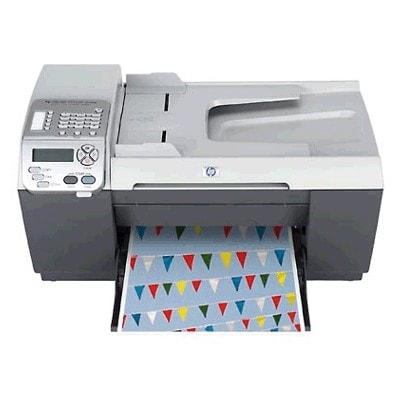
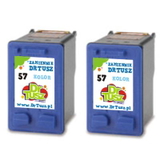
Reliable printing with the HP OfficeJet 5510v (HP OfficeJet 5500 Series) If you use the HP OfficeJet 5510v (also searched as HP 5510v, 5510V, 5510 v, or HP Officejet 5500 Series), you know it’s a practical all-in-one designed for everyday home and small-office tasks—printing documents, occasional colour graphics, and handling daily paperwork without fuss. To keep this model working smoothly, it’s crucial to choose the right ink for HP OfficeJet 5510v and replace cartridges before print quality drops. Ink cartridges for HP OfficeJet 5510v – what to expect This printer uses two main cartridges: HP 56 Black and HP 57 Color (often identified by codes such as C6656AE, C6657AE, SA342AE; some users also search by device label like Q3437A). With the right ink cartridge for HP OfficeJet 5510v, you’ll get crisp text, readable invoices, and clear colour for charts, school materials, and everyday photos on suitable paper. In our store we offer both Original OEM and Compatible ink cartridges for HP OfficeJet 5510v. That means you can choose maximum brand continuity (OEM) or an excellent price-to-performance alternative (compatible) without sacrificing reliability—our compatible options from DrTusz.pl are designed to be just as good as originals in normal use. Compatible and Original OEM ink – a wide selection in one place We keep this category focused and practical: proven cartridges and cost-saving multipacks for the HP OfficeJet 5510v. Popular choices include: - Compatible Ink Cartridge 56 for HP (C6656AE) (Black) – a smart option for frequent text printing.
- Compatible Ink Cartridge 57 for HP (C6657AE) (Color) – ideal when you need colour graphics and mixed documents.
- Compatible Ink Cartridges 56 + 57 for HP (SA342AE) (multi pack) – a convenient set for balanced black + colour use.
- Compatible Ink Cartridges 2x 56 + 57 for HP (SD399AE) (multi pack) – a great choice for higher volume printing and fewer interruptions.
- Compatible Ink Cartridges 56 for HP (C9502AE) (Black) (2-pack) and Compatible Ink Cartridges 57 for HP (C9503AE) (Color) (2-pack) – practical multipacks that help reduce cost per page.
- Original OEM Ink Cartridge HP 56 (C6656AE) (Black) and Original OEM Ink Cartridge HP 57 (C6657AE) (Color) – for customers who prefer manufacturer cartridges.
- Original OEM Ink Cartridges HP 56 + 57 (SA342AE) (multi pack) – the OEM set for complete coverage.
Whether you’re searching for ink for HP 5510v or an ink cartridge for HP OfficeJet 5510v by code, you’ll find clear product naming and compatible alternatives next to OEM options for easy comparison. How to choose the right ink for HP 5510v When choosing ink for printer HP OfficeJet 5510v, start with two questions: how much you print and what you print most often. - Mostly documents and black text: consider the HP 56 Black cartridge, or a black multipack if you print a lot.
- Mixed printing (text + colour): pick a 56 + 57 multipack so you can replace both when needed.
- Higher volume, fewer reorder cycles: choose 2-packs or the 2x multipack to keep a spare ready.
Original OEM vs Compatible: what’s the real difference? Original OEM cartridges are made by HP and are a natural choice for customers who want to stay strictly within manufacturer branding. Compatible cartridges are cost-effective alternatives designed to work with the same printer model. In our offer, compatible ink cartridges for HP OfficeJet 5510v are selected to provide excellent print quality, dependable recognition by the printer, and stable performance—so you can print with confidence while keeping running costs under control. Common HP OfficeJet 5510v user issues—and how new cartridges help Over time, many users notice issues that are simply cartridge-related, such as: - Faded black text or grey-looking documents – often solved by replacing the HP 56 black cartridge.
- Missing colours or streaks in graphics – typically linked to a depleted HP 57 colour cartridge.
- Inconsistent print quality after long breaks in printing – replacing old cartridges and printing a few test pages usually restores results.
If you’re unsure which cartridge you need for the HP OfficeJet 5510v or you’re matching by codes like C6656AE, C6657AE, or SA342AE, we’re here to help you choose the right option quickly. Order ink cartridges for HP OfficeJet 5510v and get back to hassle-free printing We encourage you to explore our selection of compatible and Original OEM ink cartridges for HP OfficeJet 5510v and pick the best option for your printing style. Add a multipack to keep a spare at hand, reduce downtime, and enjoy clean, readable prints whenever you need them. CTA: Choose your ink for HP OfficeJet 5510v today—browse the cartridges in this category or contact us if you want a quick recommendation. We offer fast dispatch, secure packaging, and friendly support so you can buy the right cartridge with confidence. |