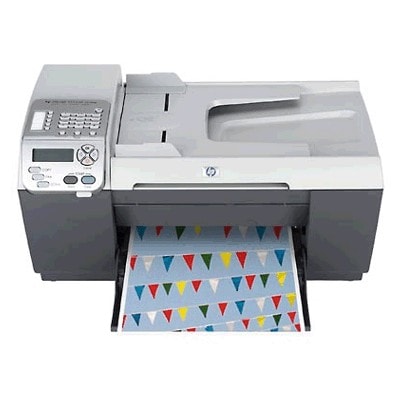
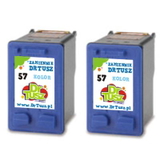
Reliable printing with the HP OfficeJet 5510 Dear Customer, the HP OfficeJet 5510 (also searched as HP 5510 or HP Officejet 5500 Series) is a proven all-in-one printer designed for everyday home and small-office tasks—printing documents, simple graphics, school materials, and occasional photos. To keep this model working smoothly and to maintain consistent print quality, it’s worth choosing the right ink for printer HP OfficeJet 5510, matched precisely to the device and your printing habits. What makes ink for HP OfficeJet 5510 special? The HP OfficeJet 5510 uses two separate ink cartridges: one black and one tri-color. This solution is convenient and economical—when one cartridge runs out, you replace only that one. In this category you’ll find both Original OEM and compatible ink for HP OfficeJet 5510, all selected to fit this printer and deliver clear text and vivid color. Commonly used cartridge symbols and search phrases include Q3435A, as well as the cartridge codes HP 56 and HP 57 (C6656AE black and C6657AE color). If you’re looking for “ink for HP 5510”, you’re in the right place. Compatible and Original OEM cartridges – one page, a wide choice We offer both original cartridges from HP and high-quality compatible alternatives. Original OEM ink is a great choice if you want the manufacturer’s cartridge, while our compatible cartridges are an excellent option when you want to reduce printing costs—without giving up strong results. We know that many customers worry about quality when choosing a replacement, which is why we focus on reliable compatible solutions—our compatible ink for HP OfficeJet 5510 is designed to be just as practical and effective in everyday use as OEM. - HP 56 (C6656AE) Black – for sharp, readable text and clean office documents.
- HP 57 (C6657AE) Color – for color graphics, charts, and photo printing.
- Multi packs – convenient sets for users who want both cartridges ready at once.
- 2-packs – ideal if you print frequently and want a spare cartridge on hand.
Popular products for HP 5510 – quick picks To make shopping easier, here are some of the most frequently chosen items in this category. Each of them is a proven match as ink for HP OfficeJet 5510: - Compatible Ink Cartridge 56 for HP (C6656AE) (Black) – a budget-friendly choice for everyday black printing.
- Compatible Ink Cartridge 57 for HP (C6657AE) (Color) – a practical option for home and office color output.
- Compatible Ink Cartridges 56 + 57 for HP (SA342AE) (multi pack) – a convenient set for users who want black + color together.
- Compatible Ink Cartridges 56 for HP (C9502AE) (Black) (2-pack) – a smart solution for frequent document printing.
- Compatible Ink Cartridges 57 for HP (C9503AE) (Color) (2-pack) – great when color printing is part of your routine.
- Original OEM Ink Cartridge HP 56 (C6656AE) (Black) and Original OEM Ink Cartridge HP 57 (C6657AE) (Color) – for customers who prefer OEM supplies.
- Original OEM Ink Cartridges HP 56 + 57 (SA342AE) (multi pack) – OEM set for complete replacement in one order.
How to choose the right ink cartridge for HP OfficeJet 5510 When you choose ink for HP OfficeJet 5510, we recommend checking three simple things: - Cartridge code – for this printer it’s typically HP 56 (C6656AE) for black and HP 57 (C6657AE) for color.
- Your printing style – mostly documents? Consider a black cartridge or black 2-pack. Printing mixed content? A multi pack saves time and keeps you prepared.
- Original vs compatible – choose OEM if you prefer manufacturer cartridges; choose compatible if you want excellent value and dependable results.
Differences are usually about cost and brand. OEM cartridges are produced by HP, while compatible cartridges are alternative supplies made to fit the same printers. In everyday use, our compatible cartridges are a strong choice for customers who expect clear prints and hassle-free installation—at a more attractive price per page. Typical HP OfficeJet 5510 ink issues and helpful tips The HP OfficeJet 5510 is reliable, but like many inkjet devices it can sometimes show messages or print imperfections—especially if it’s used occasionally. Here are issues we often help customers with when they shop for ink for HP 5510: - Faded prints or missing colors – usually caused by low ink or ink drying after longer breaks. Replacing the cartridge and running a cleaning cycle often solves the problem.
- Streaks or uneven black text – can happen when the black cartridge is near empty or after long inactivity. A fresh HP 56 cartridge is the quickest fix.
- Printer not used for a while – if you print rarely, keep a spare cartridge and print a test page occasionally to maintain stable output.
- Choosing the wrong code – if you see C6656AE, C6657AE, or SA342AE on the old cartridge or packaging, you’re selecting the right family for this category.
Order your ink for HP OfficeJet 5510 with confidence We encourage you to explore our full selection of ink cartridges for HP OfficeJet 5510—both Original OEM and high-quality compatible ink for HP OfficeJet 5510. Choose a single cartridge, a money-saving 2-pack, or a convenient multi pack and keep your printer ready whenever you need it. CTA: Add your chosen ink for printer HP OfficeJet 5510 to the cart today, and if you’re unsure which option is best for your needs, contact us—we’ll help you match the right cartridge code and set for your printing habits. We also provide fast delivery options so you can get back to printing without unnecessary downtime. |