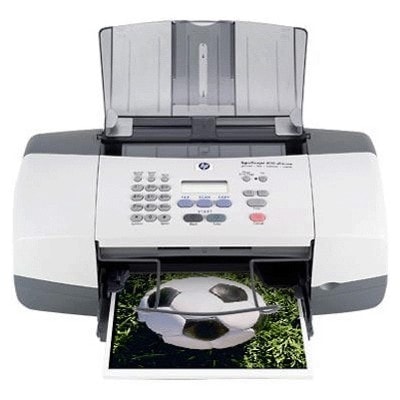
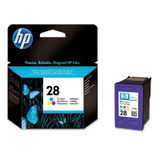
| The HP OfficeJet 4105z (also found as HP 4105z or HP Officejet 4100 Series) is a proven all-in-one inkjet device designed for everyday home and small-office printing. It handles documents, simple graphics, and day-to-day paperwork reliably—provided you choose the right ink for HP OfficeJet 4105z. In this category we bring together everything you need: both Original OEM cartridges and high-quality compatible ink cartridges matched to this model. Ink for HP OfficeJet 4105z – what you need to print with confidence The printer works with classic HP cartridge families that many users know well: HP 56 for black and HP 57 for color, plus HP 28 (color) in selected setups. These cartridges are designed for sharp text and clear color output, making them a solid choice for: - everyday documents: invoices, forms, school materials, letters, notes,
- simple color prints: charts, presentations, basic graphics,
- occasional photo-style printing on suitable paper (especially with color cartridges).
When you buy ink for printer HP OfficeJet 4105z, you’re choosing not just a cartridge, but also the comfort of smooth installation, consistent print quality, and fewer interruptions. We focus on cartridges that fit correctly and perform predictably—whether you pick an OEM solution or a compatible one. Compatible and Original OEM cartridges – a wide, practical selection We stock the most popular options for the 4105z, including single cartridges and cost-effective multi packs. In this category you’ll find, among others: - Compatible Ink Cartridge 56 for HP (C6656AE) (Black) – a great everyday black option for crisp text.
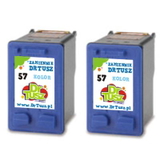
- Compatible Ink Cartridge 57 for HP (C6657AE) (Color) – for color graphics and mixed document printing.
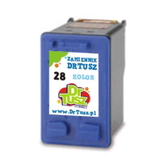
- Compatible Ink Cartridge 28 for HP (C8728AE) (Color) – a practical choice for users who need this color variant.
- Compatible Ink Cartridges 56 + 57 for HP (SA342AE) (multi pack) – a convenient set for balanced black + color printing.
- Compatible Ink Cartridges 2x 56 + 57 for HP (SD399AE) (multi pack) – ideal when you print regularly and want a backup ready.
- Compatible Ink Cartridges 56 for HP (C9502AE) (Black) (2-pack) and Compatible Ink Cartridges 57 for HP (C9503AE) (Color) (2-pack) – economical two-packs for higher demand.
- Original OEM Ink Cartridge HP 56 (C6656AE) (Black) and Original OEM Ink Cartridge HP 57 (C6657AE) (Color) – manufacturer cartridges for users who prefer OEM-only printing.
- Original OEM Ink Cartridges HP 56 + 57 (SA342AE) (multi pack) – an OEM bundle for everyday convenience.
- Original OEM Ink Cartridge HP 28 (C8728AE) (Color) – original color cartridge for supported configurations.
Thanks to this variety, you can easily match your purchase to your printing style—single replacement, set for the whole month, or a multi pack to keep your workflow uninterrupted. How to choose the right ink cartridge for HP 4105z To pick the best ink for HP OfficeJet 4105z, start with two quick checks: which colors you print most (black-only vs. mixed), and the cartridge code you need. The most common codes customers search for include C6656AE (HP 56), C6657AE (HP 57), C8728AE (HP 28) and also printer identifiers like Q1613A or “4105 Z”. If you print mostly text, prioritize black (HP 56). If your documents include logos, charts, or school projects, add a color cartridge (HP 57 or HP 28 depending on your setup). Wondering whether to choose Original OEM or compatible ink cartridges? Here’s the practical difference: - Original OEM ink – manufacturer cartridges, a classic choice for users who always stick to OEM solutions.
- Compatible ink cartridges – a cost-effective alternative. Our compatible cartridges from DrTusz.pl are designed to be just as good as the originals in everyday use: strong black text, clean color, and reliable fit.
If you want the best value per page, multi packs and 2-packs are often the smartest route—especially for home offices and families that print regularly. Common user issues with the HP OfficeJet 4105z – and how the right cartridge helps Users of the HP Officejet 4100 Series sometimes report typical inkjet challenges such as faded text, missing color lines, or the printer not recognizing a newly installed cartridge. In many cases, the solution is straightforward: - choose the correct cartridge code (HP 56 / HP 57 / HP 28),
- install a fresh cartridge before the old one is completely dry,
- run the printer’s basic cleaning/alignment if prints look streaky after replacement.
When you buy the correct ink cartridge for HP OfficeJet 4105z—compatible or OEM—you reduce downtime and avoid unnecessary troubleshooting. And if you’re unsure which option fits your printer version, we’re here to help you confirm the right match. Order ink for HP OfficeJet 4105z today – and keep printing without interruptions We encourage you to explore our full selection of ink cartridges for HP OfficeJet 4105z: from single replacements to multi packs, in both Compatible and Original OEM versions. Add the right cartridges to your cart, stock up for the next weeks, and print with peace of mind. If you have questions about compatibility (for example: 4105z, 4105 Z, 4105Z, or Q1613A), contact us—we’ll help you choose quickly and correctly. We also offer fast delivery options so you can get back to printing as soon as possible. CTA: Choose your ink for printer HP OfficeJet 4105z now—compare compatible and Original OEM cartridges and order the option that best fits your printing needs. |