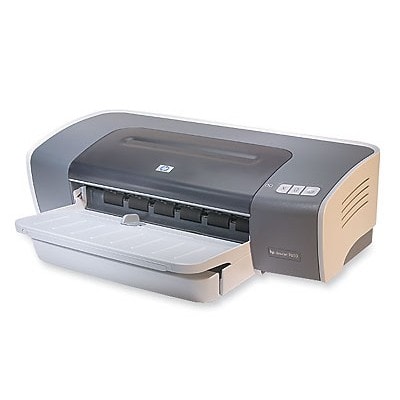
Ink for HP DeskJet 9650 – reliable printing for a proven workhorse The HP DeskJet 9650 (also searched as HP 9650 or HP Deskjet 9600 Series) is a classic, wide-format inkjet designed for everyday documents and occasional color prints. When it’s fed with the right ink, it still delivers crisp text, readable graphics, and consistent pages—whether you print at home, in a small office, or for school projects. In this category, we’ve gathered the best-matching ink cartridges for HP DeskJet 9650 in both Compatible and Original OEM versions. Which cartridges fit HP DeskJet 9650? (HP 56 & HP 57) This printer uses two key ink standards: HP 56 (Black) and HP 57 (Color). You may also find them by cartridge codes such as C6656AE (black), C6657AE (color), or multi-pack references like SA342AE. Choosing the correct ink for HP DeskJet 9650 ensures smooth installation, accurate recognition by the printer, and predictable print quality. - HP 56 black ink cartridge – ideal for text documents, forms, invoices, and everyday printing.
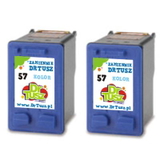
- HP 57 color ink cartridge – for color graphics, charts, photos, and presentations.
- HP 56 + 57 multipack – a convenient option if you print in both black and color and want to stock up.
Print quality, performance, and everyday use Good ink for HP 9650 is not just “something that prints.” It should provide clean black text, stable color areas, and minimal streaking. With the right cartridge set, your HP DeskJet 9650 can handle: - sharp black text for office and school documents,
- color diagrams and spreadsheets with readable details,
- mixed printing (black + color) without frequent cartridge swaps,
- consistent output for routine, high-volume tasks.
We also pay attention to practical aspects that matter to users: good page yield, dependable chip recognition, and cartridges that install easily—so you can get back to printing quickly. Compatible and Original OEM cartridges – choose what suits you best In our store, you can select between Original OEM cartridges and carefully selected Compatible cartridges. Original OEM means cartridges made by the printer manufacturer, while compatible cartridges are produced by trusted third parties. The key thing: our compatible options from DrTusz.pl are designed to be as good as the originals in everyday printing—while often being a smarter choice for frequent printing and budget control. - Original OEM ink for HP DeskJet 9650 – a great pick if you want manufacturer-branded cartridges and maximum predictability for specific workflows.
- Compatible ink for HP DeskJet 9650 – ideal if you print a lot and want excellent value without compromising on quality.
Popular products in this category (black, color, and multipacks) To make shopping easier, we offer single cartridges, twin packs, and complete sets. Here are some of the most popular choices for ink cartridges for HP DeskJet 9650: - Compatible Ink Cartridge 56 for HP (C6656AE) (Black) – a practical everyday black cartridge.
- Compatible Ink Cartridge 57 for HP (C6657AE) (Color) – for vibrant color prints and mixed documents.
- Compatible Ink Cartridges 56 for HP (C9502AE) (Black) (2-pack) – convenient when you print lots of text.
- Compatible Ink Cartridges 57 for HP (C9503AE) (Color) (2-pack) – helpful for frequent color use.
- Compatible Ink Cartridges 56 + 57 for HP (SA342AE) (multi pack) – the most straightforward “ready to print” set.
- Compatible Ink Cartridges 2x 56 + 57 for HP (SD399AE) (multi pack) – a value option for heavier printing schedules.
- Original OEM Ink Cartridge HP 56 (C6656AE) (Black) – manufacturer cartridge for crisp black text.
- Original OEM Ink Cartridge HP 57 (C6657AE) (Color) – OEM color cartridge for consistent color output.
- Original OEM Ink Cartridges HP 56 + 57 (SA342AE) (multi pack) – OEM convenience set for black + color.
How to choose the right ink for HP DeskJet 9650 (and avoid common issues) If you’re unsure which ink for printer HP DeskJet 9650 to buy, start with your printing habits: - If you mostly print text, choose a HP 56 black (or a 2-pack for better continuity).
- If you print color occasionally, add a HP 57 color to avoid interruptions.
- If you print regularly in both, a HP 56 + 57 multipack is the easiest and usually the most cost-effective.
Common user issues with the HP DeskJet 9650 and how the right cartridges help: - Faded prints or missing lines – often caused by an empty cartridge or dried ink after longer breaks in printing. Fresh, properly stored ink cartridges reduce the risk.
- Cartridge not recognized – matching the correct model codes (like C6656AE, C6657AE, or C8137A) is crucial for compatibility with the HP Deskjet 9600 Series.
- Color looks dull – using the correct HP 57 color cartridge (and replacing it on time) improves saturation and balance.
If you tell us what you print most often (text vs. color, occasional vs. frequent), we’ll help you select the best compatible ink for HP 9650 or the right Original OEM ink for HP DeskJet 9650. Order today – fast support and a selection that fits your needs We encourage you to explore our full selection of ink cartridges for HP DeskJet 9650—compatible and Original OEM—so you can print confidently without downtime. Add a multipack to your cart for convenience, or choose single cartridges to match your current needs. If you have any questions about choosing the right ink for HP DeskJet 9650, contact us—we’re happy to help you buy the best cartridge set and get back to smooth printing with quick delivery options. |