Haven't found what you were looking for? Click here! ▼
Describe below exactly what you are looking for and we will see how we can help. You will receive a reply to your e-mail address by 09:15 on friday (16 October 2026) at the latest
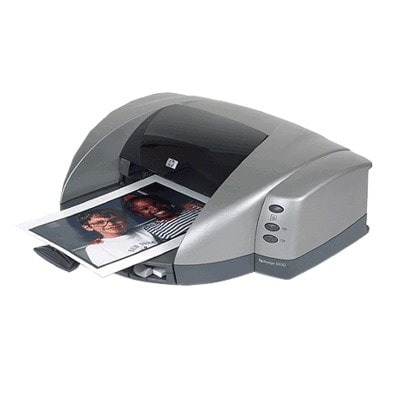
Ink cartridges for HP DeskJet 5550v - compatible and original OEM
Keep your HP DeskJet 5550v printing sharp, clean, and reliable with our range of inkjet Ink Cartridges—available as both Compatible and Original OEM options. This category is built for the HP Deskjet 5500 Series and common searches like C6487C, HP 5550v, and 5550V, so you can quickly find the right fit without guesswork.
Choose from popular black and color solutions such as HP 56 (C6656AE) Black and HP 57 (C6657AE) Color, including convenient multipacks like 56 + 57 (SA342AE), 2-packs, and high-value compatible bundles. Original OEM cartridges deliver consistent, brand-standard performance, while compatible ink cartridges offer a budget-friendly alternative designed for dependable compatibility with your printer.
Whether you need a quick black refill or a complete color-and-black refresh, you’ll find the right ink cartridges for HP DeskJet 5550v here. Pick your preferred option and get back to printing with confidence—shop now and restock in minutes, then explore the full selection to find the best match for your everyday printing.
Product Number: C6487C Other names: Printer HP DeskJet 5550v, Printer HP DeskJet 5550 v, Printer HP DeskJet 5550 V, Printer HP DeskJet 5550V
The HP DeskJet 5550v (also searched as HP 5550v, 5550V or HP Deskjet 5500 Series) is a proven inkjet printer designed for everyday home and small office use. It’s valued for straightforward operation and good print quality for documents and occasional color graphics. To keep it working at its best, choosing the right ink for HP DeskJet 5550v is essential—especially when you want consistent text sharpness, clean colors, and fewer printing interruptions.
Ink cartridges for HP 5550v: what you can expect
In this category we offer ink cartridges for HP DeskJet 5550v in two options: Original OEM and Compatible. Both are designed for the same cartridge standards—most commonly identified by the popular codes HP 56 (C6656AE) for black and HP 57 (C6657AE) for color (you may also encounter related markings such as C6487C depending on how the printer series is listed).
With the right ink for printer HP DeskJet 5550v, you can comfortably print:
clear black text for school, invoices, and everyday documents,
color charts and presentations,
simple photos and family prints,
mixed pages where black and color need to stay crisp and readable.
Compatible and Original OEM: two smart ways to print
We know different customers have different priorities, so we keep the choice simple:
Original OEM ink cartridge for HP DeskJet 5550v – manufacturer cartridges for those who prefer OEM solutions and predictable, factory-standard results.
Compatible ink cartridge for HP DeskJet 5550v – a cost-effective alternative. Our compatible cartridges from DrTusz.pl are built to deliver printing quality comparable to originals, so you can print confidently and save on everyday running costs.
Whichever route you choose, the goal stays the same: dependable printing and a cartridge that matches your real usage—whether you print occasionally or in larger batches.
Popular cartridges in our range (black, color, and multipacks)
To make shopping easier, we highlight the most frequently chosen products for HP DeskJet 5550v ink:
Compatible Ink Cartridge 56 for HP (C6656AE) (Black) – a great choice for crisp text and everyday documents.
Compatible Ink Cartridge 57 for HP (C6657AE) (Color) – for color graphics and mixed printing.
Compatible Ink Cartridges 56 + 57 for HP (SA342AE) (multi pack) – a convenient set when you print both black and color.
Compatible Ink Cartridges 2x 56 + 57 for HP (SD399AE) (multi pack) – a smart option for higher volume printing and fewer reorder moments.
Compatible Ink Cartridges 56 for HP (C9502AE) (Black) (2-pack) – extra black capacity for text-heavy users.
Original OEM Ink Cartridge HP 56 (C6656AE) (Black) – OEM black cartridge for those who prefer the manufacturer’s solution.
Original OEM Ink Cartridge HP 57 (C6657AE) (Color) – OEM color cartridge for consistent color output.
Original OEM Ink Cartridges HP 56 + 57 (SA342AE) (multi pack) – an OEM set for convenient replacement of both cartridges.
Thanks to single cartridges and multipacks, you can match the purchase to your habits—one replacement for occasional printing, or a value multipack for regular use.
How to choose the right ink for HP DeskJet 5550v (and avoid common issues)
When selecting ink for HP 5550v, we recommend focusing on a few practical points:
Choose by cartridge code: black is typically HP 56 (C6656AE), color is HP 57 (C6657AE). This is the safest way to match the cartridge to your printer.
Think about what you print: for mostly text, prioritize black (or a black 2-pack). For mixed printing, a 56 + 57 multipack is usually the most convenient.
Prevent streaks and faded prints: if prints come out pale or with missing lines, it’s often due to an empty cartridge, dried nozzles from long breaks in printing, or a cartridge nearing the end of its life. Replacing the cartridge and printing regularly helps keep ink flowing smoothly.
Minimize “cartridge not recognized” frustrations: ensure the cartridge is correctly seated and any protective elements are removed before installation. If you need help, we’re here to advise.
And the key question: original vs compatible ink cartridge for HP DeskJet 5550v? Original OEM cartridges are the classic choice. Our compatible ink for HP DeskJet 5550v is an equally strong everyday solution—offering very good print quality and reliable performance, while helping you control printing costs without compromising your results.
Order your HP DeskJet 5550v ink with confidence
We encourage you to explore our full selection of ink cartridges for HP DeskJet 5550v and pick the option that best fits your printing style—OEM reliability or our high-quality compatible alternative. If you’re unsure whether you need HP 56, HP 57, or a multipack for the HP Deskjet 5500 Series, contact us—we’ll help you choose quickly and correctly.
CTA: Add the right ink for printer HP DeskJet 5550v to your cart today, or reach out to our team for friendly, expert support. We offer convenient ordering and fast delivery options so you can get back to printing without delay.