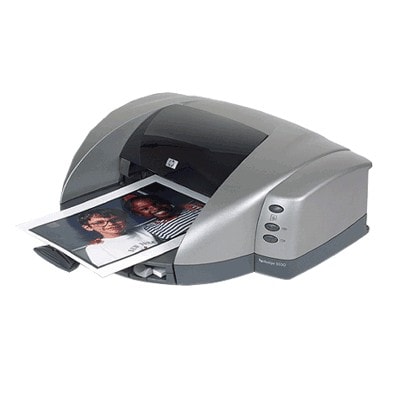
| If you use the reliable HP DeskJet 5550 (also searched as HP 5550 or HP Deskjet 5500 Series), you already know this model is built for convenient everyday printing at home and in small offices. It’s a classic inkjet printer that handles documents, schoolwork, emails, and occasional color prints with ease—provided you choose the right ink cartridge for HP DeskJet 5550. In our category you’ll find both Original OEM and carefully selected compatible ink cartridges designed for this printer, so you can match the ink to your needs and budget without compromising print quality. Ink for HP DeskJet 5550 – what you should know before you buy The HP DeskJet 5550 uses two separate cartridges: one for black and one for color. This setup is practical: you replace only what you actually run out of. The most commonly used cartridge set for this printer is the HP 56 (black) and HP 57 (color)—also recognized by codes like C6656AE (black) and C6657AE (color), as well as popular multipack markings such as SA342AE. When you choose the correct ink for HP DeskJet 5550, you can expect: - Sharp black text for documents, forms, and everyday printing
- Vivid color output for graphics, school projects, and photos on suitable paper
- Reliable page-to-page consistency and stable ink flow when the cartridge is properly stored and installed
- Convenient replacement—swap black or color independently
Whether you print occasionally or you run regular batches, choosing the right ink cartridge for HP 5550 has a direct impact on cost per page, print quality, and how often you need to replace supplies. Compatible vs Original OEM ink cartridge – how to choose wisely Many customers ask us which option is better: Original OEM or compatible ink for HP DeskJet 5550. The honest answer is: it depends on your priorities. Original OEM cartridges are produced by HP and are a great choice when you want to stick with the manufacturer’s solution. At the same time, our compatible ink cartridges for HP DeskJet 5550 from DrTusz.pl are designed to be as good as the originals in everyday use—offering excellent value and dependable results. - Original OEM ink for HP DeskJet 5550: ideal if you prefer HP-branded supplies and want a familiar, manufacturer-certified option.
- Compatible ink for HP DeskJet 5550: a smart choice if you want to reduce printing costs while still expecting strong blacks, clean colors, and stable performance.
- Multipacks (black + color): perfect if you want to restock in one purchase and avoid downtime when one cartridge runs out.
- 2-pack black options: recommended for frequent document printing, invoices, school materials, or home office work.
Popular ink cartridges for HP 5550 in our offer We keep this category focused on the cartridges people actually need for the HP DeskJet 5550 and HP Deskjet 5500 Series. You can choose from single cartridges or convenient sets: - Compatible Ink Cartridge 56 for HP (C6656AE) (Black) – a cost-effective everyday black cartridge for documents.
- Compatible Ink Cartridge 57 for HP (C6657AE) (Color) – great for graphics and color printing.
- Compatible Ink Cartridges 56 + 57 for HP (SA342AE) (multi pack) – a balanced set for users who print both text and color.
- Compatible Ink Cartridges 2x 56 + 57 for HP (SD399AE) (multi pack) – a practical choice for higher volume printing and fewer reorders.
- Compatible Ink Cartridges 56 for HP (C9502AE) (Black) (2-pack) – ideal if your HP DeskJet 5550 is mainly used for black text.
- Original OEM Ink Cartridge HP 56 (C6656AE) (Black) – HP-branded black cartridge for consistent text output.
- Original OEM Ink Cartridge HP 57 (C6657AE) (Color) – HP-branded color cartridge for everyday color needs.
- Original OEM Ink Cartridges HP 56 + 57 (SA342AE) (multi pack) – a complete OEM set for convenient replenishment.
Thanks to this range, you can easily select the right ink cartridge for HP DeskJet 5550—whether you want a single replacement, a full multipack, or a cost-optimized compatible option. Tips for smooth printing and solving common HP DeskJet 5550 issues The HP DeskJet 5550 is a proven model, but like any inkjet printer it can show typical cartridge-related problems—especially if it’s used occasionally. Here’s what we recommend to keep your ink for HP DeskJet 5550 performing at its best: - Faded prints or streaks: run the printer’s cleaning cycle and make sure the cartridge nozzles are not dried out (this can happen if the printer sits unused for weeks).
- Cartridge not recognized: remove and reinstall the cartridge firmly; check that any protective elements were removed before installation.
- Colors look dull: use proper paper for color graphics and ensure the correct print settings are selected.
- Black runs out fast: consider a 2-pack black or a multipack if you print lots of documents.
- Infrequent printing: print a small test page occasionally to keep ink flowing smoothly—this helps prevent nozzle drying.
If you’re unsure whether your printer is listed as HP DeskJet 5550, HP 5550, or HP Deskjet 5500 Series, or you’re matching codes like C6487C, we’re here to help you choose the correct cartridge quickly and confidently. Choose your ink today – we’re ready to help We encourage you to explore our selection of compatible and Original OEM ink cartridges for HP DeskJet 5550 and pick the option that best fits your printing style. Whether you need a single HP 56 black, a HP 57 color, or a convenient multipack, we make it easy to get the right supplies without guesswork. Call to action: Browse the products in this category and order your ink for HP DeskJet 5550 today. If you have any questions about compatibility, multipacks, or choosing between OEM and compatible cartridges, contact us—we’ll guide you to the best option and help you get back to printing fast. We offer efficient order processing and delivery options designed to get your cartridges to you as quickly as possible. |