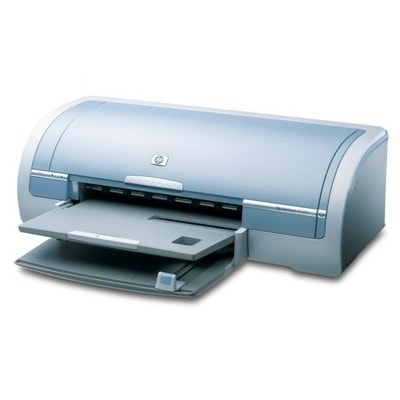
HP DeskJet 5168 – a reliable home-and-office classic The HP DeskJet 5168 (also searched as HP 5168 or HP Deskjet 5100 Series) is a proven inkjet printer designed for everyday printing: documents, school materials, forms, and occasional color graphics. It’s valued for simple operation and dependable results—provided you use the right ink for HP DeskJet 5168. In this category we offer carefully selected ink cartridges for HP DeskJet 5168 in two options: Original OEM and high-quality Compatible replacements. Ink cartridges for HP DeskJet 5168 – what you need to know This model uses the well-known HP cartridge set: HP 56 for black and HP 57 for color. You may also encounter the codes C6656AE (black) and C6657AE (color), plus multipacks such as C9006A / SA342AE. Choosing the correct ink for HP 5168 ensures sharp text, stable colors, and fewer printing interruptions. Whether you print mainly in black or you need color for charts and photos, the right cartridge helps you maintain: - Crisp black text for documents and everyday paperwork
- Consistent color for graphics, school projects, and presentations
- Reliable page flow with fewer streaks, smudges, or missing lines
- Printer safety thanks to properly matched cartridges for the HP DeskJet 5100 Series
Compatible and Original OEM – a wide choice in one place We know that different customers have different printing habits. That’s why our category combines Original OEM ink cartridges for HP DeskJet 5168 with carefully tested compatible ink cartridges for HP DeskJet 5168. If you want maximum brand consistency, choose OEM. If you print frequently and want a cost-effective option, our compatible cartridges from DrTusz.pl are made to deliver print quality that’s as good as the originals—while keeping everyday printing budgets under control. Popular products for HP DeskJet 5168 (HP 56 / HP 57) To make shopping easier, here are some of the most frequently chosen options in this category: - Compatible Ink Cartridge 56 for HP (C6656AE) (Black) – a great choice for text-heavy printing
- Compatible Ink Cartridge 57 for HP (C6657AE) (Color) – for colorful documents and graphics
- Compatible Ink Cartridges 56 + 57 for HP (SA342AE) (multi pack) – convenient set for balanced black + color use
- Compatible Ink Cartridges 2x 56 + 57 for HP (SD399AE) (multi pack) – ideal for higher volume users and families
- Compatible Ink Cartridges 56 for HP (C9502AE) (Black) (2-pack) – fewer reorders, more uninterrupted printing
- Original OEM Ink Cartridge HP 56 (C6656AE) (Black) – original black cartridge for HP DeskJet 5168
- Original OEM Ink Cartridge HP 57 (C6657AE) (Color) – original color cartridge for HP 5168
- Original OEM Ink Cartridges HP 56 + 57 (SA342AE) (multi pack) – OEM set for consistent results and convenience
How to choose the right ink for HP 5168 When selecting ink for printer HP DeskJet 5168, we recommend checking a few practical points: - Match the cartridge code: black is typically C6656AE (HP 56), color is C6657AE (HP 57).
- Consider your printing style: for frequent text printing, a black 2-pack can be the most practical choice.
- Decide between OEM vs compatible: OEM focuses on brand-original supply, while our compatible cartridges are designed to offer the same day-to-day print satisfaction at a better price.
- Choose multipacks if you want a ready-to-go black + color set and fewer “ink ran out” surprises.
Original OEM vs Compatible – what’s the real difference? Original OEM ink cartridges for HP DeskJet 5168 are made by the printer manufacturer and are often chosen by customers who prefer to stay with the original brand supply. Compatible ink cartridges for HP DeskJet 5168 are replacements designed to fit and work with the same printer model. In our store, compatible cartridges are not “random alternatives.” We focus on quality and reliability—our compatible options are engineered to deliver excellent text sharpness and stable color output. If you’re looking for a smart way to reduce printing costs without sacrificing results, compatible ink for HP DeskJet 5168 is a strong choice. Common user issues with HP Deskjet 5100 Series – and how ink choice helps Many printing problems start with an empty, dried, or incorrectly matched cartridge. With the right ink cartridge for HP DeskJet 5168, you can prevent the most common issues, such as: - Faded print or missing colors – often caused by a low cartridge or nozzles needing a cleaning cycle
- Streaks or broken lines in text – frequently linked to drying ink or long pauses between prints
- Printer not recognizing the cartridge – usually resolved by reseating the cartridge and ensuring you use the correct HP 56 / HP 57 type
If you need help choosing the correct ink for HP DeskJet 5168 (C9006A / SA342AE, C6656AE, C6657AE), we’re here to guide you—so you can get back to printing quickly and confidently. Ready to print? Choose your ink cartridge today We encourage you to explore our selection of ink cartridges for HP DeskJet 5168—both Original OEM and Compatible. Choose a single black or color cartridge, or pick a multipack to stay stocked for longer. Order conveniently online, enjoy fast delivery options, and if you have any questions, contact us—we’ll help you select the best ink for HP 5168 for your needs. CTA: Check the available cartridges above and choose the best option for your HP DeskJet 5168—if you’d like a recommendation, message us and we’ll help you match the perfect cartridge code in minutes. |