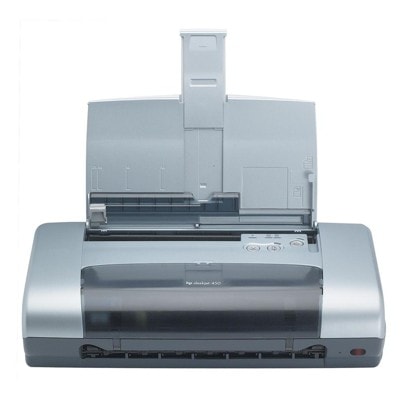
HP DeskJet 450wbt – a compact printer built for everyday work The HP DeskJet 450wbt (also searched as HP 450wbt, 450 WBT, 450WBT or HP Deskjet 400 Series) is a practical, mobile-friendly inkjet printer designed for simple, reliable printing at home and on the go. It’s valued for its compact size and straightforward operation—ideal for invoices, school materials, occasional color documents and everyday black text. To keep this model working exactly as it should, you need the right ink for HP DeskJet 450wbt—and in this category we’ve gathered both Original OEM and compatible ink cartridges matched to this printer. Ink cartridges for HP DeskJet 450wbt – what matters most This printer uses two key cartridges: a black cartridge and a color cartridge. When you choose a cartridge that matches the dedicated references (including C6656AE, C6657AE, and multipacks like SA342AE), you get consistent page output, clear text and stable color reproduction. The right ink cartridge for HP DeskJet 450wbt is especially important if you print business documents or forms—where sharp edges and readable small fonts matter. With well-matched ink, you can count on: - clean, crisp black text for contracts, emails and reports,
- smooth color fills for charts, simple graphics and school projects,
- reduced risk of streaks and fading during normal use,
- predictable results whether you print occasionally or more regularly.
Compatible and Original OEM – one category, more freedom of choice We know that different customers have different priorities. That’s why we offer both Original OEM ink cartridges for HP DeskJet 450wbt and carefully selected compatible ink cartridges. Original OEM cartridges are produced by the printer manufacturer and are a safe choice for users who prefer factory solutions. At the same time, our compatible cartridges from DrTusz.pl are designed to deliver printing quality that is as good as the originals—while helping you reduce the cost per page. Whichever option you choose, the key is compatibility with your printer model and cartridge code. If you searched using phrases like HP DeskJet 450wbt, 450 wbt or C8145A, you are in the right place to find the correct cartridge type. Popular ink cartridges in this category (OEM and compatible) To make shopping easier, we highlight several frequently chosen items—covering both single cartridges and convenient multipacks: - Compatible Ink Cartridge 56 for HP (C6656AE) (Black) – a great option for everyday text printing and office-style documents.
- Compatible Ink Cartridge 57 for HP (C6657AE) (Color) – designed for color prints such as graphics, simple photos, and learning materials.
- Compatible Ink Cartridges 56 for HP (C9502AE) (Black) (2-pack) – a practical choice if you print black often and want a spare cartridge ready.
- Compatible Ink Cartridges 56 + 57 for HP (SA342AE) (multi pack) – a balanced set for users who print both black and color.
- Compatible Ink Cartridges 2x 56 + 57 for HP (SD399AE) (multi pack) – a larger bundle that keeps you stocked for longer.
- Original OEM Ink Cartridge HP 56 (C6656AE) (Black) – the manufacturer’s cartridge for dependable, consistent black output.
- Original OEM Ink Cartridge HP 57 (C6657AE) (Color) – OEM color printing for everyday documents and graphics.
- Original OEM Ink Cartridges HP 56 + 57 (SA342AE) (multi pack) – a popular OEM set for complete replacement in one purchase.
Thanks to this selection, you can easily match your shopping style: single replacement, a cost-effective compatible option, or an OEM multipack for convenience. How to choose the right ink for HP DeskJet 450wbt If you want to buy the best ink for HP DeskJet 450wbt, start with two simple questions: what do you print most often, and how frequently do you print? - If you print mostly documents and text: choose a black ink cartridge HP 56 / C6656AE (compatible or OEM).
- If you print charts, school materials, or color graphics: add the color cartridge HP 57 / C6657AE.
- If you print regularly and don’t want to run out unexpectedly: consider a multi pack or a 2-pack of black cartridges.
Original OEM vs compatible – what’s the difference? Original OEM is the manufacturer’s solution. Compatible cartridges are an alternative designed to work with the same printer models and cartridge references. Our experience shows that a well-made compatible cartridge can provide printing quality that is as good as the original—while often offering a more attractive total cost of printing. That’s why many customers choose compatible ink when they want to print more for less, without sacrificing readable text and solid everyday color. Common user issues with HP DeskJet 450wbt – and how fresh cartridges help With printers from the HP Deskjet 400 Series, customers most often report issues that are simply related to ink condition or long breaks between prints. If you notice any of the below, a correctly selected and fresh ink cartridge for HP DeskJet 450wbt is usually the first thing to check: - Faint or streaky prints – often linked to low ink or a cartridge nearing the end of its life.
- Missing colors – common when the color cartridge is depleted or has been unused for a long time.
- Printer not detecting a cartridge – in many cases caused by improper seating; removing and reinstalling the cartridge carefully can help.
- Uneven black text – usually a sign that the black cartridge needs replacement.
If you’re unsure which product to choose (for example: C6656AE vs a multipack like SA342AE), we encourage you to contact us—our team will help you match the right cartridge to your printing needs and budget. Choose your ink today and keep your HP DeskJet 450wbt ready to print We encourage you to explore our full selection of ink cartridges for HP DeskJet 450wbt—both Original OEM and compatible ink cartridges. Whether you want a single black cartridge, a color replacement, or a convenient multipack, you’ll find proven options in this category. Add your chosen cartridges to the cart and enjoy quick, convenient delivery—or reach out to us for friendly support if you want a recommendation. Your ink for HP 450wbt is waiting—let’s get your printer printing perfectly again. |