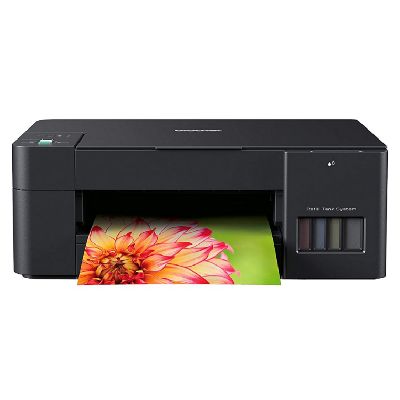
Brother DCP-T220 – a reliable all-in-one for everyday printing If you use the Brother DCP-T220 (also searched as Brother DCPT220, DCP-T220 or DCP T220), you already know why this model is so popular: it’s an affordable, compact all-in-one designed for efficient home and small-office work. Printing school materials, documents, invoices or colorful graphics is easy—provided you always have the right ink for Brother DCP-T220 ready to go. In this category we gathered everything you need: original OEM ink, compatible ink, and even cleaning fluid to keep your printer in top condition. Ink for Brother DCP-T220 – what matters most in daily use The Brother DCP-T220 uses high-yield ink bottles, so you can print a lot without frequent refills. Choosing the right ink for printer Brother DCP-T220 directly affects print quality, color accuracy, and long-term reliability of the printhead. Whether you print mainly black text or need vivid colors for charts and photos, the right set of inks ensures consistent results and reduces the risk of interruptions. In this category you will find: - Black ink for sharp text and clear lines (ideal for documents and everyday printing),
- Color ink (cyan, magenta, yellow) for vibrant graphics and consistent color fills,
- Fluids for cleaning to help maintain printhead performance and solve common print quality issues.
Compatible vs Original OEM – choose what fits your needs Many customers ask us which option is better: original OEM ink for Brother DCP-T220 or compatible ink for Brother DCP-T220. The truth is—you can choose based on your priorities. OEM ink is produced by the printer manufacturer and is a safe, classic choice. At the same time, our compatible inks from DrTusz.pl are designed to deliver the same practical results: strong blacks, clean color transitions, and reliable performance in everyday printing—while keeping your printing costs under control. What you typically gain by choosing compatible ink: - excellent value for money for frequent printing,
- stable output in both text and color prints,
- an easy way to reduce cost per page without compromising quality.
Popular products for Brother DCP-T220 – black, color and convenient multi-packs We offer a wide range of inks and supplies for the Brother DCP-T220, so you can buy exactly what you need—single colors, black for heavy text printing, or a ready-to-go color set. - Original OEM Ink Cartridge Brother BT-D60 BK (BTD60BK) (Black) – a dependable choice for crisp documents and everyday office printing.
- Compatible Ink Cartridge BT-D60 BK for Brother (BTD60BK) (Black) – our cost-effective option for frequent black printing, with quality comparable to OEM.
- Original OEM Ink Cartridges Brother BT-5000 CMY (BT5000CLVAL) (3-pack) – a practical OEM color set for consistent cyan, magenta and yellow output.
- Compatible Ink Cartridges BT-5000 CMY for Brother (BT5000CLVAL) (3-pack) – a great alternative when you want vivid color and better savings in one purchase.
- Original OEM Ink Cartridge Brother BT-5000 C (BT5000C) (Cyan) / Original OEM Ink Cartridge Brother BT-5000 M (BT5000M) (Magenta) / Original OEM Ink Cartridge Brother BT-5000 Y (BT5000Y) (Yellow) – ideal if you prefer to replace only the color that runs out.
- Compatible Ink Cartridge BT-5000 C for Brother (BT5000C) (Cyan), Compatible Ink Cartridge BT-5000 M for Brother (BT5000M) (Magenta), Compatible Ink Cartridge BT-5000 Y for Brother (BT5000Y) (Yellow) – targeted replacements for the color you need most.
- Specialistic Fluid for Cleaning Heads Brother 250 ml (Uniwersalny) – helpful when prints show gaps, faded colors, or streaks due to dried ink or clogged nozzles.
- All-In-One Printer Brother DCP-T220 – if you’re setting up a new workstation or looking for a proven all-in-one, you can also order the device itself.
How to choose the right ink for Brother DCPT220 (and avoid common issues) When buying ink for Brother DCPT220, we recommend matching the product code to what your printer uses: BT-D60BK for black and BT-5000 series for colors (C/M/Y). If you print a lot of text—stock up on black. If your work includes presentations, school projects or color charts—consider the CMY 3-pack to stay prepared. Common user issues with the Brother DCP-T220 are usually easy to fix with the right supplies and maintenance: - Faint prints or missing lines – often caused by partially clogged nozzles; a cleaning cycle and, when needed, a proper printhead cleaning fluid can help.
- Color imbalance (e.g., too much blue or missing yellow) – typically indicates one color is low or the nozzle needs cleaning.
- Infrequent printing – if the printer sits unused, ink can dry in the head; printing a small test page weekly helps prevent this.
If you’re unsure which option to choose—original OEM ink for DCP-T220 or compatible ink for DCP-T220—we’ll help you select the best solution for your printing style and budget. Order ink for Brother DCP-T220 with confidence We encourage you to explore our full selection of ink for printer Brother DCP-T220: original OEM, high-quality compatible alternatives, color packs, single bottles, and cleaning solutions. Add what you need to the cart and keep your Brother printing smoothly—without surprises. Need support before buying? Contact us—we’ll help you match the right ink for Brother DCP T220, choose between OEM and compatible options, and advise how to solve common print quality problems. We also make sure your order is packed securely and shipped quickly, so you can get back to printing as soon as possible. CTA: Choose your ink set today and keep your Brother DCP-T220 ready for every document and every color print. |