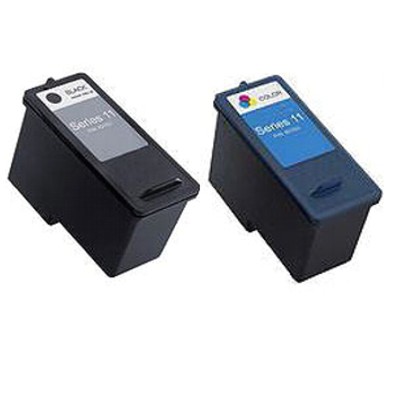
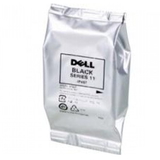
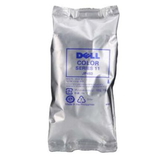
Meet Dell Series 11 ink cartridges – dependable printing that feels effortless When you want crisp text, clean lines, and colors that look natural on the page, the right cartridge matters. In this category we focus on Dell Series 11 ink cartridges designed for everyday home and small-office printing—documents, school materials, forms, and colorful projects. If your printer has started producing pale pages, streaks, or “missing” colors, replacing your cartridge with a fresh original OEM ink cartridge is often the quickest way to bring your prints back to life—no stress, no wasted paper. Original OEM: what you get with Dell Series 11 cartridges Our selection includes Original OEM Ink Cartridge Dell JP451 (592-10275) (Black) and Original OEM Ink Cartridge Dell JP453 (592-10276) (Color). These are genuine Dell cartridges created to work seamlessly with compatible printers, so installation is straightforward and print quality stays consistent from the first page to the last. If you’re looking for “it just works” reliability, an ink cartridge Dell Series 11 in OEM version is a safe, proven choice. - Sharp black text for contracts, homework, invoices, and everyday letters
- Balanced color output for graphics, charts, and family prints
- Smooth compatibility with supported devices—minimizing errors and interruptions
- Predictable results when you need the same clean look on every page
Compatible printers and everyday use cases Compatible with: Dell Series 11 cartridges are commonly used in devices such as Dell V505 and Dell V505w. These printers are often chosen for practical, family-friendly printing—where one day you need black-only pages, and the next you need color for presentations or school projects. With the right ink for Dell V505 or ink for Dell V505w, you avoid the frustration of last-minute printing problems right before a deadline. How to choose: Black (JP451) vs Color (JP453) Choosing the correct cartridge is simple when you match your printing style to the cartridge function: - Choose Dell JP451 (592-10275) Black if you mainly print text, forms, or monochrome documents and want deep, readable blacks.
- Choose Dell JP453 (592-10276) Color if you print images, charts, and mixed documents where color accuracy and smooth gradients matter.
Tip from us: if your prints look “washed out,” check which color is missing. A photo that looks oddly green or purple, or a logo that doesn’t match the screen, usually points to a depleted or clogged color cartridge—replacing the color ink cartridge Dell Series 11 can instantly restore balance. Common printing issues—and how Dell Series 11 ink solves them Many customers come to this category after noticing clear warning signs. The good news: these problems are often solved by installing a fresh Dell Series 11 ink cartridge and running a quick nozzle/printhead cleaning from the printer menu. - Streaks or lines: often caused by low ink levels or dried nozzles—new ink and a cleaning cycle typically helps.
- Faded black: replace the Dell JP451 black cartridge for stronger contrast and sharper text.
- Missing colors / odd tones: replace the Dell JP453 color cartridge to bring back accurate hues.
- Inconsistent results: OEM cartridges help maintain stable output page after page.
Original OEM vs compatible: what’s the difference? In this category you’ll find Original OEM cartridges—genuine products made for Dell devices. Many shoppers also ask us about compatible alternatives. The main differences usually come down to brand and pricing, while the goal stays the same: reliable printing at a sensible cost. - Original OEM cartridges are designed by the printer brand for maximum predictability and seamless cooperation with the device.
- Compatible cartridges are a cost-effective alternative—and in the DrTusz.pl offer, they are made to deliver print quality that is as good as the originals, while helping you reduce your printing costs.
Whichever route you choose, we encourage you to always match the cartridge number (JP451 / JP453, 592-10275 / 592-10276) to your printer model—this is the easiest way to ensure you’re buying the right ink for printer Dell V505 or ink for printer Dell V505w. In summary: choose the right Dell Series 11 cartridge and print with confidence Dell Series 11 ink cartridges are a practical answer to everyday printing—clear black text, vivid color, and the comfort of dependable results. If you need a quick refresh for your printer, choose Dell JP451 (Black) and/or Dell JP453 (Color) and get back to printing without compromises. Order your Dell Series 11 ink cartridge today and let’s bring back the crisp pages and rich colors your printer was made for. |