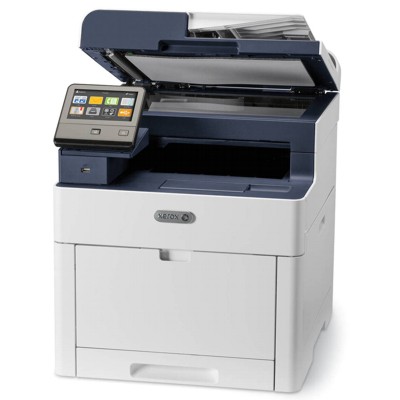
Xerox WorkCentre 6515DN – a reliable colour workhorse for office printing The Xerox WorkCentre 6515DN (also searched as Xerox 6515DN, WC6515 or 6515 dn) is a popular colour laser multifunction device designed for everyday business tasks: invoices, offers, shipping labels, and internal documents. To keep it running smoothly and to maintain consistent colour quality, it’s worth choosing the right toner for Xerox WorkCentre 6515DN and remembering that, besides toner, this model also uses drum units and a waste toner tank. Toner, drum unit and waste toner tank – what matters for print quality In the Xerox 6515DN ecosystem, performance depends on more than just the cartridge. A well-matched toner for printer Xerox WorkCentre 6515DN ensures sharp text and clean graphics, but the drum unit is responsible for transferring the image to the page, and the waste toner tank collects excess toner during printing and calibration cycles. When any of these parts is worn or full, you may see messages on the display and a drop in print quality. What you gain with the right supplies: - stable colour reproduction (C/M/Y) and deep black (K) for everyday documents,
- clean lines and readable small fonts,
- fewer interruptions and predictable running costs,
- better reliability for duplex printing and high-volume jobs.
Compatible and Original OEM supplies for Xerox WorkCentre 6515DN – choose your best fit In this category you’ll find both Original OEM and Compatible laser cartridges. If you prefer manufacturer-branded solutions, we offer a wide selection of Original OEM toner for Xerox WorkCentre 6515DN in standard, XL and XXL capacities. If you want to optimise costs without sacrificing quality, our compatible toner for Xerox 6515DN is a proven alternative—at DrTusz.pl we focus on compatibility, repeatable yield and reliable results, so you can print confidently. Popular products in this category (K, C, M, Y + maintenance components) To help you quickly find what you need, here are a few best-known items available for the Xerox 6515DN family: - Original OEM Toner Xerox 6515 K XL (106R03488) (Black) and Compatible Toner 6615 K XL for Xerox (106R03488) (Black) – dependable black for documents and crisp text.
- Original OEM Toner Xerox 6515 C XXL (106R03693) (Cyan) and Compatible Toner 6615 C XXL for Xerox (106R03693) (Cyan) – strong cyan coverage for charts and graphics.
- Original OEM Toner Xerox 6515 M XXL (106R03694) (Magenta) and Compatible Toner 6615 M XXL for Xerox (106R03694) (Magenta) – vivid magenta for branding elements.
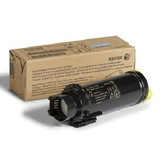
- Original OEM Toner Xerox 6515 Y XXL (106R03695) (Yellow) and Compatible Toner 6615 Y XXL for Xerox (106R03695) (Yellow) – clear yellow tones for colour highlights.
- Original OEM Drum Unit Xerox 6515 in each colour: 108R01420 (Black), 108R01417 (Cyan), 108R01418 (Magenta), 108R01419 (Yellow) – ideal when print quality drops despite fresh toner.
- Original OEM Waste Toner Tank Xerox 6515 (108R01416) and Compatible Waste Toner Tank 6615 for Xerox (108R01416) – essential when the printer reports a full waste container.
Tip: if you print a lot, consider XL/XXL versions. A higher-capacity toner for Xerox WorkCentre 6515DN usually means fewer replacements and a lower cost per page. How to choose the right toner for Xerox 6515DN (and avoid common issues) When selecting an ink for Xerox WorkCentre 6515DN (in practice: laser toner), start with your printing style and the exact code on the cartridge. The safest method is to match the product symbol (for example 106R03488 or 106R03693–106R03695). Then decide between OEM and compatible: - Original OEM – manufacturer cartridge, excellent predictability and a classic choice for strict corporate policies.
- Compatible – a cost-effective alternative; in our offer, compatible cartridges are designed to be just as good as originals in everyday office printing, giving you very good quality and stable performance.
Common Xerox WorkCentre 6515DN user problems we can help you solve with the right supplies: - “Replace Waste Toner Container” – choose the waste toner tank 108R01416 (OEM or compatible).
- Faded prints or uneven colour – check whether a colour cartridge is low and whether the relevant drum unit is worn.
- Streaks, background shading, spots – often a drum-related symptom; replacing the correct drum unit for Xerox WorkCentre 6515DN can restore clean output.
- Frequent cartridge changes – consider XL/XXL toner for Xerox 6515DN to increase yield and reduce downtime.
Order with confidence – we’ll help you match the right cartridge We encourage you to explore our full range of toner for printer Xerox WorkCentre 6515DN, including Original OEM and Compatible options, as well as the essential drum units and waste toner tanks. If you’re unsure which version (standard/XL/XXL) or which component will solve a print-quality problem, contact us—we’ll help you choose quickly and accurately. Place your order today and keep your Xerox 6515DN ready for every task with fast, convenient delivery options. CTA: Check the available toners, drum units and waste toner tanks for Xerox WorkCentre 6515DN now—or message us, and we’ll recommend the best match for your printing needs. |