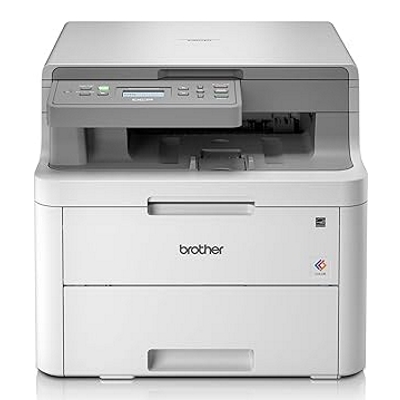
Brother DCP-L3520CDW: compact colour laser built for everyday printing If you use the Brother DCP-L3520CDW (also searched as Brother DCPL3520CDW, DCPL3520CDW, DCP-L3520 CDW or DCP L3520CDW), you already know why this model is so popular: it’s a modern colour LED/laser multifunction device designed for fast office documents, sharp graphics, and hassle-free copying and scanning. To keep it performing at its best, you simply need the right toner for printer Brother DCP-L3520CDW—and a reliable source for drum and maintenance consumables when the time comes. Toner, drum and maintenance consumables—what matters in daily use This category is dedicated to laser cartridges for Brother DCP-L3520CDW in both versions: Compatible and Original OEM. You can choose exactly what fits your printing style—whether you print occasionally at home or run steady output in a small business. A properly matched toner for Brother DCP-L3520CDW means crisp black text, consistent colour coverage and fewer interruptions. In addition to standard and high-yield toner cartridges, the printer uses service components that influence print quality and cleanliness inside the device. That’s why you’ll also find: - Drum Unit – responsible for transferring the toner image onto the page; worn drums may cause streaks or fading.
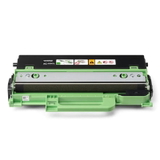
- Waste Toner Tank – collects excess toner; when full, the printer may stop until it’s replaced.
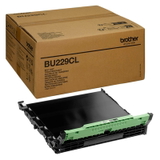
- Transfer Unit – helps move toner from the drum onto paper across colours; important for clean, accurate colour alignment.
Our range for Brother DCP-L3520CDW: Compatible and Original OEM We keep the offer wide, so you can quickly choose a single colour or a full set. Popular choices in this category include: - Compatible Toners TN-248XL CMYK for Brother (TN248XLCMYK) (multi pack) – a convenient high-yield set for heavy printing and predictable costs.
- Original OEM Toners Brother TN-248 CMYK (TN248CMYK) (multi pack) – a complete OEM set for users who prefer manufacturer cartridges.
- Compatible Toner TN-248XLBK for Brother (TN248XLBK) (Black) and Original OEM Toner Brother TN-248XLBK (TN248XLBK) (Black) – high-yield black options for frequent text printing.
- Compatible Toners TN-248 CMYK for Brother (TN248CMYK) (multi pack) – a balanced set for everyday mixed printing.
- Individual colours for flexible replacement: TN-248C / TN-248M / TN-248Y and high-yield TN-248XLC / TN-248XLM / TN-248XLY (both Compatible and Original OEM variants, depending on the colour).
- Maintenance essentials: Original OEM Drum Unit Brother DR-248CL (DR248CL), Original OEM Waste Toner Tank Brother WT-229CL (WT229CL), Original OEM Transfer Unit Brother BU-229CL (BU229CL).
Thanks to this mix, you can build a setup that matches your priorities—maximum savings, maximum OEM consistency, or a smart blend of both. How to choose the right toner for Brother DCP-L3520CDW When selecting ink for Brother DCP-L3520CDW (in a colour laser, this means toner), start with two simple questions: how much do you print, and what do you print most often? - For high volume (reports, invoices, school materials): choose TN-248XL where available—especially black—to reduce replacements.
- For balanced use (mixed colour and black): a CMYK multipack is often the most convenient and cost-efficient.
- For occasional colour: replace only the depleted colour (C/M/Y), keeping costs under control.
Also pay attention to the cartridge code. For this model, the key family is TN-248 and TN-248XL—choosing the correct designation is the fastest way to ensure perfect compatibility. Original OEM vs Compatible: what’s the difference? We offer both Original OEM and Compatible cartridges so you can decide what fits you best. OEM toners are produced by Brother and are often chosen for strict internal purchasing policies or personal preference. At the same time, our compatible toner for printer Brother DCP-L3520CDW is a strong alternative: it’s designed to match the printer’s requirements in everyday printing, delivering excellent readability, stable coverage and reliable performance. If you want to optimise cost per page without sacrificing quality, compatible options are a smart choice—especially in multipacks and XL versions. Common user issues and the right consumable fix Users typically look for toner when printouts become faint, colours look uneven, or the printer displays low-toner messages. Just as often, the issue is maintenance-related rather than cartridge-related. Here’s what usually helps: - Streaks / repeating marks: the drum may be reaching end-of-life—consider DR-248CL.
- Printer stops and shows maintenance alerts: a full WT-229CL waste toner tank can be the cause.
- Inconsistent colour transfer: the BU-229CL transfer unit is a key component for stable colour output.
- Frequent toner replacements: switch to TN-248XL (where available) or choose a CMYK multipack.
If you’re unsure whether you need a toner, drum unit, waste toner tank or transfer unit, we encourage you to contact us—together we’ll match the right consumable to your printer message and print symptoms. Choose your toner today and keep your Brother printing without breaks We encourage you to browse our selection of toner for Brother DCP-L3520CDW—Compatible and Original OEM—as well as essential maintenance components to keep print quality consistently high. Add a single cartridge or a full CMYK set to your cart, and enjoy a smooth purchase process and fast delivery options. If you have questions about the best choice for your workload, reach out to us—we’re here to help you print more, pay less, and avoid downtime. CTA: Check the available TN-248 / TN-248XL toners, multipacks, and maintenance units in this category and choose the setup that suits your Brother DCP-L3520CDW best. |