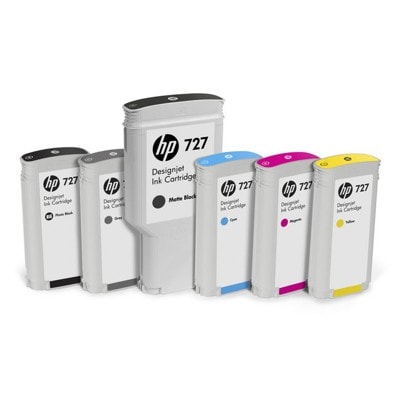
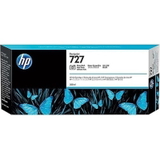
Precision printing that looks like it came from the studio Dear Customer, when every line, gradient and detail matters, the right ink becomes more than a consumable—it becomes the foundation of your work. Ink cartridges HP 727 are designed for HP DesignJet plotters used in architecture, engineering, GIS and professional graphics. In our category you’ll find both original OEM HP 727 ink and high-quality HP 727 compatible ink cartridges (including XL and XXL versions), plus the essentials that keep your device in peak condition: a dedicated HP 727 printhead and a fluid for cleaning printheads. If you want confident blacks, smooth colour transitions and reliable plotter performance—this is the right place to start. What’s included in the HP 727 series—inks, printheads and maintenance This category covers everything you typically need around the HP 727 system—whether you print occasionally or run your plotter daily. We offer: - Ink cartridges HP 727 Original OEM in key colours and capacities (XL/XXL), including Black, Matte Black, Photo Black, Cyan, Magenta, Yellow and Gray.
- Ink cartridges HP 727 Compatible—a cost-effective alternative that delivers results you can trust (our compatible inks are as good as the originals, so you don’t have to compromise).
- HP 727 printhead (B3P06A)—the heart of precise linework and consistent colour placement.
- Specialist cleaning fluid for printheads (250 ml)—ideal when you’re fighting clogs, dropouts or long printer downtime.
Thanks to this complete selection, you can not only buy ink for HP 727, but also take care of the most common issues that reduce print quality over time. Compatible printers—made for HP DesignJet performance HP 727 ink cartridges are commonly used in professional HP DesignJet plotters. They are compatible with devices such as HP DesignJet T2500 and HP DesignJet T2530 (among others in the DesignJet family). If you’re searching for “ink for printer HP DesignJet T2500” or “ink for HP DesignJet T2530”, this HP 727 cartridge series is the correct match—just be sure to confirm the exact cartridge code used by your configuration. Original OEM vs compatible HP 727—how to choose wisely Choosing between original HP 727 ink and compatible HP 727 ink cartridge depends on what you value most: brand-standard supply chain, maximum savings, or a balance of both. Here’s how we recommend deciding: - Choose Original OEM HP 727 when you want the manufacturer’s cartridge exactly as HP intended—often preferred in strictly standardised environments or when internal procedures require OEM supplies.
- Choose Compatible HP 727 when you want to lower printing costs without sacrificing quality. Our compatible cartridges are engineered to deliver excellent colour, strong blacks and reliable performance—so you can print confidently and keep budgets under control.
- Pick the right capacity: XL and XXL options help reduce replacement frequency—especially helpful in busy offices, print rooms and project deadlines.
In practical terms: if you print a lot of CAD drawings or posters, a higher-capacity HP 727 XXL cartridge (for example Matte Black) can mean fewer interruptions and a smoother workflow. Meet the colours—why HP 727 inks make technical prints look premium The HP 727 system is built for work where clarity is everything. That’s why you’ll find specialised blacks (including Matte Black and Photo Black) and a balanced colour set. Whether you need crisp text, sharp contour lines or realistic shading, the right cartridge makes your output look clean and professional. - Black / Matte Black: ideal for bold lines, readable annotations and strong contrast on technical prints.
- Photo Black: supports deeper tones and smooth dark areas for presentations and graphics.
- Cyan, Magenta, Yellow: build accurate colour layers for maps, diagrams and visualisations.
- Gray: helps produce smooth transitions and refined monochrome output.
If you’re searching for “ink for HP 727 Matte Black” or “ink for HP 727 Gray”, you’ll find both OEM and compatible options in this category. Common user problems—and how to fix them with the right products Plotters work hard, and HP 727 devices are no exception. The most common issues we see from users of this series include: - Faded lines or uneven colour—often caused by low ink levels, old cartridges, or a printhead that needs attention.
- Missing lines / banding—frequently linked to clogged nozzles or air in the system after long downtime.
- Print quality declining over time—a sign it may be time for maintenance, cleaning, or replacing the printhead.
That’s why we don’t stop at cartridges. In addition to ink cartridges HP 727, we also provide the HP 727 printhead (B3P06A) and a cleaning fluid for printheads. These products help restore clean linework and stable colour—especially when the device hasn’t been used for a while or operates in a dusty environment. How to make sure you buy the correct HP 727 cartridge We encourage you to verify the cartridge code before ordering—especially in multi-device workplaces. The safest approach is to match the symbol on your current cartridge to the product listing (for example B3P19A for Cyan or C1Q12A for Matte Black). Also consider: - Colour type (Black vs Photo Black vs Matte Black) — each serves a different purpose.
- Capacity (XL or XXL) — choose based on print volume and how often you want to replace cartridges.
- Your workflow — technical line prints vs presentation graphics may steer you toward specific blacks and gray usage.
Why buy HP 727 cartridges from us We build this category so you can complete your purchase quickly and correctly—whether you need a single HP 727 ink cartridge, a set of colours, or maintenance supplies. By offering original OEM, compatible and refill/maintenance components in one place, we help you keep your HP DesignJet running smoothly, minimise downtime, and control operating costs—without sacrificing the professional look of your prints. Ready to print with confidence? Choose your HP 727 today Pick your HP 727 Original OEM or HP 727 compatible cartridge, add the printhead or cleaning fluid if you need maintenance, and get back to producing crisp lines and vibrant visuals. We encourage you to choose the capacity and colour that fits your workflow—and place your order now to keep your DesignJet ready for the next deadline. |