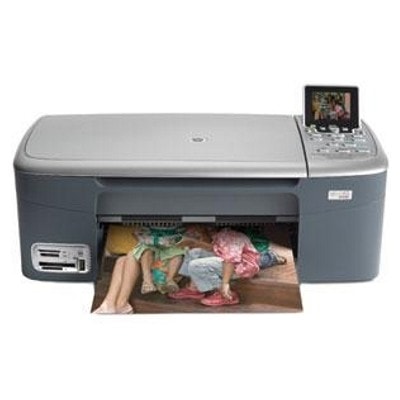
HP Photosmart 2577 ink cartridges – reliable printing for the HP Photosmart 2500 Series HP Photosmart 2577 (also searched as HP 2577, HP Photosmart 2500 Series, or by device code Q7220B) is a versatile inkjet all‑in‑one designed for everyday home documents and photo printing. To keep it working smoothly, you need the right ink for HP Photosmart 2577—matched to the printer’s cartridge system and your printing habits. In this category we offer both Original OEM and high‑quality compatible ink cartridges, so you can choose exactly what fits your needs and budget. What you get with the right ink for HP Photosmart 2577 Well-chosen ink cartridges for HP Photosmart 2577 ensure sharp text, consistent black coverage, and vivid color gradients—especially important if you print school materials, invoices, or photos. This printer family typically uses separate black and color cartridges, and in some configurations you can also add a photo cartridge for better tonal transitions. Our cartridges are intended for users who expect: - clear black text for documents and forms,
- natural colors for graphics and everyday photo prints,
- stable performance and fewer interruptions during printing,
- compatibility with the HP Photosmart 2577 inkjet platform.
Compatible or Original OEM – we help you print the way you want In our store you can choose between Original OEM ink cartridges for HP Photosmart 2577 (made by HP) and carefully selected compatible ink for HP Photosmart 2577. Original OEM is a great option if you want the manufacturer’s cartridge straight from HP. Compatible cartridges are ideal when you want to reduce printing costs without sacrificing quality—our compatible solutions from DrTusz.pl are made to deliver results that are as good as the originals in everyday use. - Original OEM: maximum brand consistency, ideal for users who prefer HP-branded supplies.
- Compatible: excellent value, very good print quality, great for frequent printing and home offices.
Popular cartridges available in this category We’ve gathered a broad selection so you can easily find the right ink cartridge for HP Photosmart 2577—whether you print mainly in black, often in color, or you want a convenient multipack. - Compatible Ink Cartridge 339 for HP (C8767EE) (Black) and Original OEM Ink Cartridge HP 339 (C8767EE) (Black) – a popular choice for crisp everyday documents.
- Compatible Ink Cartridge 344 for HP (C9363EE) (Color) and Original OEM Ink Cartridge HP 344 (C9363EE) (Color) – for color prints, charts, and graphics.
- Compatible Ink Cartridge 338 for HP (C8765EE) (Black) and Original OEM Ink Cartridge HP 338 (C8765EE) (Black) – dependable black printing for regular workloads.
- Compatible Ink Cartridge 343 for HP (C8766EE) (Color) and Original OEM Ink Cartridge HP 343 (C8766EE) (Color) – strong color performance for everyday output.
- Multipacks: Compatible Ink Cartridges 338 + 343 for HP (SD449EE) (multi pack) or Original OEM Ink Cartridges HP 338 + 343 (SD449EE) (multi pack) – convenient and often the most economical way to stock up.
- 2-packs for frequent printing: Compatible Ink Cartridges 339 for HP (C9504EE) (Black) (2-pack), Compatible Ink Cartridges 338 for HP (CB331EE) (Black) (2-pack), Compatible Ink Cartridges 343 for HP (CB332EE) (Color) (2-pack), Compatible Ink Cartridges 344 for HP (C9505EE) (Color) (2-pack).
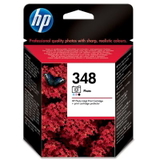
- Other supported cartridges: Original OEM Ink Cartridge HP 336 (C9362EE) (Black) / Compatible Ink Cartridge 336 for HP (C9362EE) (Black), Original OEM Ink Cartridge HP 337 (C9364EE) (Black), Original OEM Ink Cartridge HP 342 (C9361EE) (Color) / Compatible Ink Cartridge 342 for HP (C9361EE) (Color), and Original OEM Ink Cartridge HP 348 (C9369EE) (Foto) for users focused on photo output.
How to choose the correct ink for HP 2577 (and avoid common issues) When selecting ink for printer HP Photosmart 2577, start by checking the cartridge code currently installed in your device or listed in the printer menu. This model may be searched under several names (HP Photosmart 2577, HP 2577, HP Photosmart 2500 Series, Q7220B), but the cartridge symbols are what matter most. We also recommend these practical tips to reduce typical user problems: - Faded prints or streaks: replace the cartridge in time and run a standard printhead cleaning/alignment in the printer software after installation.
- “Cartridge not recognized” messages: remove and reinstall the cartridge, gently clean the contacts, and make sure you’re using the correct cartridge model (e.g., 338/339 for black, 343/344/342 for color, depending on your setup).
- Color looks off: use a fresh color cartridge and print a nozzle check; photo printing may benefit from HP 348 (Foto) if your workflow supports it.
- High printing costs: choose a compatible ink cartridge for HP Photosmart 2577 or a multipack/2-pack to lower the cost per page while keeping quality at a very high level.
If you print mostly text, prioritize a black cartridge (such as 338 or 339). If you often print school projects, charts, and images, keep a spare color cartridge (such as 343/344/342) ready. For frequent printing, multipacks and 2-packs help you avoid downtime. Order your HP Photosmart 2577 ink cartridges with confidence We make it easy to choose the right ink cartridges for HP Photosmart 2577—whether you prefer Original OEM or want a cost-effective compatible ink for HP Photosmart 2577 with excellent results. Browse the products in this category, compare variants (single, multipack, 2-pack), and pick the option that matches your printing style. CTA: We encourage you to view the full selection and order today—if you need help choosing between HP 338, 339, 343, 344, 342, 336, 337 or the photo cartridge 348, contact us and we’ll recommend the best option for your HP Photosmart 2577. We focus on fast processing, safe packaging, and helpful support—so you can get back to printing quickly and without stress. |