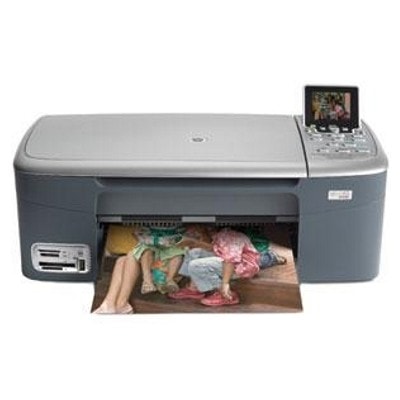
HP Photosmart 2575 – a versatile home photo printer The HP Photosmart 2575 (also searched as HP 2575 or HP Photosmart 2500 Series) is a classic all-in-one inkjet device designed for everyday printing, copying and scanning, with a strong focus on photos. It’s still valued for reliable home use: school materials, documents, colourful graphics and occasional photo prints. To keep print quality consistent, it’s essential to choose the right ink for HP Photosmart 2575 and replace cartridges before they run completely dry. Ink for HP Photosmart 2575 – what it does and why it matters In this category you’ll find ink cartridges for HP Photosmart 2575 in both Original OEM and Compatible versions. These cartridges are responsible for crisp text, smooth gradients in photos, and accurate colours in charts or images. The right cartridge choice also affects reliability—especially in older devices where a fresh, correctly matched cartridge can prevent streaking or faded prints. Depending on what you print most often, you can pick: - Black ink cartridges – best for sharp text and everyday documents.
- Color ink cartridges – for graphics, colourful pages and photo printing.
- Photo ink cartridge – dedicated support for better photo tones (ideal if you print pictures regularly).
- Multipacks and 2-packs – convenient and often more economical for frequent printing.
Customers also look for this category using codes and references such as Q7215A and cartridge symbols like HP 336/337/338/339 (black) and HP 342/343/344 (color) plus HP 348 (photo). If you’re searching by code such as C8765EE or C8766EE, you’re in the right place. Our range: compatible and Original OEM ink cartridges We’ve built this selection so you can easily match the right ink for HP Photosmart 2575 to your printing style—whether you prioritize manufacturer-original solutions or want a cost-effective alternative. Here are some popular choices available in this category: - Original OEM Ink Cartridge HP 338 (C8765EE) (Black) and Original OEM Ink Cartridge HP 343 (C8766EE) (Color) – trusted OEM choices for consistent, predictable output.
- Original OEM Ink Cartridge HP 336 (C9362EE) (Black) and Original OEM Ink Cartridge HP 342 (C9361EE) (Color) – great for everyday home printing in the HP Photosmart 2500 Series.
- Original OEM Ink Cartridge HP 339 (C8767EE) (Black) and Original OEM Ink Cartridge HP 344 (C9363EE) (Color) – ideal when you want strong blacks and vibrant colours.
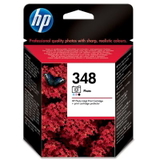
- Original OEM Ink Cartridge HP 348 (C9369EE) (Foto) – a dedicated option for better photo results.
- Original OEM Ink Cartridges HP 338 + 343 (SD449EE) (multi pack) – a convenient bundle for mixed document and colour printing.
If you’re looking for savings without compromising usability, our compatible range is a strong alternative. We offer carefully selected compatible ink cartridges for HP Photosmart 2575 that deliver print quality comparable to originals—ideal for frequent printing: - Compatible Ink Cartridge 338 for HP (C8765EE) (Black) and Compatible Ink Cartridge 343 for HP (C8766EE) (Color) – popular everyday replacements.
- Compatible Ink Cartridge 336 for HP (C9362EE) (Black) and Compatible Ink Cartridge 342 for HP (C9361EE) (Color) – a practical set for home and student printing.
- Compatible Ink Cartridge 339 for HP (C8767EE) (Black) and Compatible Ink Cartridge 344 for HP (C9363EE) (Color) – for users who print a lot of documents plus colour pages.
- Compatible Ink Cartridges 339 for HP (C9504EE) (Black) (2-pack), Compatible Ink Cartridges 343 for HP (CB332EE) (Color) (2-pack), Compatible Ink Cartridges 338 for HP (CB331EE) (Black) (2-pack), Compatible Ink Cartridges 344 for HP (C9505EE) (Color) (2-pack) – smart options when you want a запас on hand and fewer emergency purchases.
- Compatible Ink Cartridges 338 + 343 for HP (SD449EE) (multi pack) – a ready-to-go bundle for balanced black and colour printing.
- Compatible Ink Cartridge 337 for HP (C9364EE) (Black) and Compatible Ink Cartridge 339 for HP (C8767EE) (Black) – good choices when you focus primarily on crisp text output.
How to choose the right cartridge: Original OEM vs Compatible When choosing ink for HP 2575, start with your printing habits and expectations: - Choose Original OEM ink cartridges if you want manufacturer-standard performance, maximum predictability, and you print important documents or photos where consistency is crucial.
- Choose compatible ink cartridges if you print often and want to reduce costs while still maintaining strong quality. Our compatible cartridges from DrTusz.pl are designed to be just as practical and reliable in everyday use as OEM options.
Not sure what you need? If you mostly print text, choose a black cartridge first (e.g., 336/338/339 depending on what your device supports). If you print school projects, images or colourful documents, add a colour cartridge (342/343/344). For photo enthusiasts, consider the HP 348 photo cartridge to enhance photo tones and transitions. Common HP Photosmart 2575 printing issues – and simple tips With older inkjet models like the HP Photosmart 2575, users sometimes report issues that are usually easy to solve with the right approach: - Streaks or missing lines – often caused by a partially dried cartridge or infrequent printing. Replacing the cartridge and running the printer’s cleaning cycle usually helps.
- Faded black or greyish text – indicates low ink, clogged nozzles or using “draft” settings. A fresh black cartridge and normal-quality mode can restore sharpness.
- Colors not matching or looking dull – check if the colour cartridge is near empty and consider using photo paper and the correct print profile for photos.
- Cartridge not recognized – reseat the cartridge, clean contacts gently, and ensure you selected the correct model code (e.g., C8765EE, C8766EE, C9363EE).
We recommend printing a small colour page from time to time—this helps keep ink flowing and reduces the risk of drying, especially if the printer is used occasionally. Order ink for HP Photosmart 2575 with confidence We encourage you to explore our full range of ink cartridges for HP Photosmart 2575—from Original OEM options to high-quality compatible ink cartridges that help you print more for less. If you’re unsure which cartridge fits your printer or which set is best for your needs, contact us—we’ll help you match the right ink for HP Photosmart 2575 quickly and accurately. Check the available cartridges, choose your preferred version (OEM or compatible), and place your order today—we’ll take care of fast delivery and support at every step. |