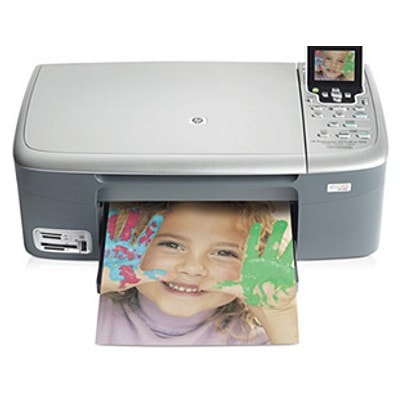
HP Photosmart 2571 – a versatile home photo all‑in‑one The HP Photosmart 2571 (also found as HP 2571, HP Photosmart 2500 Series or code Q7218C) is a classic inkjet multifunction printer designed for everyday home use: printing documents, scanning, copying and—most importantly—printing photos. To keep this model working smoothly and to maintain crisp text and vivid colors, choosing the right ink for HP Photosmart 2571 is essential. In this category we bring together both Original OEM and high-quality compatible ink cartridges so you can match performance, budget and printing habits. What ink cartridges for HP Photosmart 2571 can do for you The right ink cartridge for HP Photosmart 2571 affects more than just color intensity. It influences print sharpness, drying time, resistance to smudging, and the consistency of results from the first page to the last. This printer supports separate black and color cartridges, which is convenient when one color runs out sooner than the others. With a well-matched set of cartridges you can expect: - clear, readable black text for invoices, school prints and everyday paperwork,
- balanced color output for graphics and family photos,
- reliable operation and fewer interruptions thanks to stable ink flow,
- easy replacement—ideal for users who want quick, hassle-free printing.
If you print photos regularly, consider dedicated photo options when available—our selection includes an Original OEM photo cartridge designed to support richer photo tones. Compatible and Original OEM – choose what fits your needs We know customers often ask whether to choose Original OEM ink for HP Photosmart 2571 or a compatible alternative. Both options are available here, and we help you pick confidently. - Original OEM ink cartridges are manufactured to HP specifications and are a great choice for users who want the manufacturer’s solution and predictable results—especially for photo printing or important documents.
- Compatible ink cartridges from DrTusz.pl are a smart way to reduce printing costs without sacrificing quality. They are designed to work just as well as the originals, delivering strong blacks and vivid colors while remaining budget-friendly.
No matter which route you choose, you’ll find the correct ink for HP 2571 right here, clearly labeled by cartridge number and HP code. Popular ink cartridges in this category To make shopping easier, we stock the most commonly used cartridges for the HP Photosmart 2571—both as single pieces and convenient multipacks. Among the customer favorites you’ll find: - Original OEM Ink Cartridge HP 338 (C8765EE) (Black) and its compatible alternatives, ideal for everyday document printing,
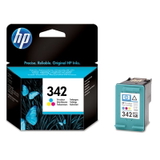
- Original OEM Ink Cartridge HP 343 (C8766EE) (Color) and compatible versions for colorful graphics and photos,
- Original OEM Ink Cartridges HP 338 + 343 (SD449EE) (multi pack) and the compatible multi pack 338 + 343 (SD449EE)—a practical set for balanced home printing,
- efficient double packs such as Compatible Ink Cartridges 339 (C9504EE) (Black) (2-pack) or Compatible Ink Cartridges 343 (CB332EE) (Color) (2-pack) for frequent printers,
- photo-focused options like Original OEM Ink Cartridge HP 348 (C9369EE) (Foto) for users who want extra depth in photo prints.
Because this model appears under multiple naming conventions (HP Photosmart 2500 Series, HP 2571), we clearly list the cartridge symbols and codes to help you avoid mismatches. How to pick the right ink for HP Photosmart 2571 When choosing an ink cartridge for HP Photosmart 2571, we recommend focusing on your real printing habits: - Print mostly text? Choose a reliable black cartridge (e.g., 336/337/338/339 depending on your current setup) or a black 2‑pack to reduce downtime.
- Print school projects and color graphics? Add a color cartridge (e.g., 342/343/344) or choose a multi pack.
- Print photos often? Consider pairing standard color with a dedicated photo cartridge option (where applicable) for more nuanced tones.
- Want fewer replacements? Multipacks are convenient and often more economical over time.
If you are unsure which cartridge number your printer uses, check the label on your current cartridge or your printer’s manual. You can also contact us—tell us “HP Photosmart 2571 / Q7218C” and we’ll guide you to the correct product. Common user issues and simple tips for smoother printing Like many home inkjet devices, the HP Photosmart 2571 can occasionally show issues that are usually easy to solve with the right approach: - Faded prints or missing lines: run a cleaning cycle and make sure the cartridge isn’t empty; replace it if needed.
- Cartridge not recognized: remove and reinsert the cartridge, clean the contacts gently, and confirm you selected the correct model code.
- Clogging after long breaks: print a small color test page every 1–2 weeks to keep ink flowing.
- Colors look “off”: align the cartridges and check paper type—photo paper can significantly improve results.
Choosing a trustworthy compatible ink for HP Photosmart 2571 also helps minimize interruptions—our compatibles are built to be stable in everyday use and provide output quality comparable to Original OEM. Order ink for HP 2571 with confidence We encourage you to explore our full range of ink cartridges for HP Photosmart 2571—compatible and Original OEM—so you can print exactly the way you want: affordably, reliably, and with excellent quality. Add a single cartridge, choose a value multipack, or stock up with a convenient 2‑pack and stay prepared for busy weeks. CTA: Browse the products in this category and select the best ink for HP Photosmart 2571 for your needs. If you’d like help matching the correct cartridge (HP Photosmart 2500 Series / Q7218C), contact us—we’ll respond quickly and make sure you order the right ink the first time. We also offer fast delivery options so you can get back to printing without delay. |