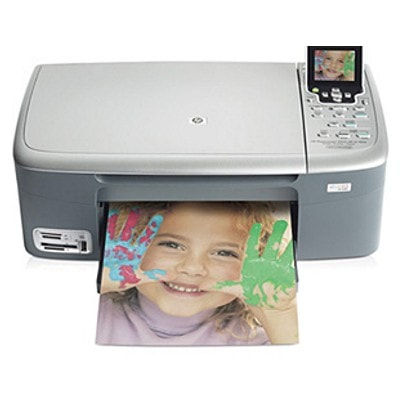
Reliable printing with the HP Photosmart 2500 Series HP Photosmart 2500 (also searched as HP 2500, HP Photosmart 2500 Series or simply 2500) is a popular all-in-one inkjet printer designed for home and family use. It’s valued for everyday document printing as well as colorful photo output—so the right ink for HP Photosmart 2500 matters not only for sharp text, but also for smooth gradients and natural-looking colors in images. What ink cartridges for HP Photosmart 2500 are made for Choosing an ink cartridge for HP Photosmart 2500 is about matching your print habits: homework and invoices, occasional photos, or frequent black-and-white pages. In this category we offer both Original OEM and Compatible ink cartridges, so you can decide whether you prefer manufacturer-branded reliability or maximum savings without sacrificing quality. With the right cartridges, you can expect: - clear, readable black text for everyday documents,
- vivid color prints for school projects and graphics,
- consistent results across multiple pages,
- easy replacement and correct recognition in the printer.
Compatible and Original OEM – one printer, two smart choices We know that many customers ask whether a compatible ink cartridge for HP Photosmart 2500 can truly match the original. Our answer is practical: yes—our compatible cartridges from DrTusz.pl are designed to deliver print quality comparable to OEM, while offering a much better cost-per-page. If you print a lot, compatible ink is often the most economical way to keep your HP Photosmart 2500 ink budget under control. At the same time, if you prefer staying with the manufacturer’s solution, we also stock Original OEM ink cartridges for HP Photosmart 2500, ideal for users who want to keep everything exactly as HP intended—especially for photo prints and color-critical work. Popular HP Photosmart 2500 ink cartridges in our selection To make shopping easier, we keep a wide range of the most commonly used cartridges for this series—single packs as well as convenient multipacks and twin packs. You’ll find, among others: - Compatible Ink Cartridge 338 for HP (C8765EE) (Black) and Original OEM Ink Cartridge HP 338 (C8765EE) (Black) – a go-to option for crisp text and everyday printing.
- Compatible Ink Cartridge 343 for HP (C8766EE) (Color) and Original OEM Ink Cartridge HP 343 (C8766EE) (Color) – great for graphics, color documents and photos.
- Compatible Ink Cartridge 339 for HP (C8767EE) (Black) and Original OEM Ink Cartridge HP 339 (C8767EE) (Black) – a popular higher-capacity black choice for more frequent printing.
- Compatible Ink Cartridge 344 for HP (C9363EE) (Color) and Original OEM Ink Cartridge HP 344 (C9363EE) (Color) – reliable color output for everyday use.
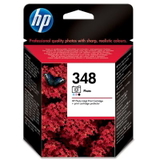
- Original OEM Ink Cartridge HP 348 (C9369EE) (Foto) – for users who want better photo tones and smoother transitions.
- Multi packs such as Compatible Ink Cartridges 338 + 343 for HP (SD449EE) (multi pack) and Original OEM Ink Cartridges HP 338 + 343 (SD449EE) (multi pack) – practical sets when you need both black and color ready to go.
- 2-packs like Compatible Ink Cartridges 339 for HP (C9504EE) (Black) (2-pack) or Compatible Ink Cartridges 343 for HP (CB332EE) (Color) (2-pack) – ideal for frequent printing and fewer reorders.
How to choose the right ink for HP 2500 If you’re not sure which ink for HP Photosmart 2500 you need, we recommend a quick checklist: - Check the cartridge code currently installed (e.g., 336/338/339 for black, 342/343/344 for color, 348 for photo).
- Match the printing style: frequent documents usually benefit from black cartridges with higher capacity (often chosen: 339), while mixed printing benefits from a black + color set.
- Consider multipacks if you print regularly—often the best value and fewer interruptions.
- Choose Original OEM for peace of mind or photo-focused work, and Compatible when you want excellent quality at a better price—our compatible cartridges are built to perform as well as originals.
Common user issues with HP Photosmart 2500 cartridges – and our tips Inkjet printers like the Photosmart 2500 Series are straightforward, but a few recurring issues can happen. Here’s what usually helps: - Printer doesn’t recognize the cartridge: remove and reseat it, then gently clean the contact points. Make sure the protective tape has been removed.
- Streaks or faded prints: run the printer’s cleaning/alignment utility and print a test page—often it’s just a nozzle refresh needed.
- Color looks off: check if one color is running low or dried; replacing the color cartridge (342/343/344) usually restores balance.
- Ink dries out from infrequent printing: printing a small test page once every 1–2 weeks helps keep nozzles in good condition.
If you’re ever unsure which ink cartridge for HP Photosmart 2500 Series is best, we’re here to help you choose quickly and correctly. Order your HP Photosmart 2500 ink today We invite you to explore our full range of ink cartridges for HP Photosmart 2500—both Compatible and Original OEM. Choose the option that fits your budget and printing needs, add it to your cart, and keep your printer ready whenever you need it. If you have questions about compatibility, cartridge codes, or which set will work best for your daily printing, contact us—we’ll guide you to the right choice. We also focus on fast, safe delivery so you can get back to printing without unnecessary downtime. CTA: Check the available HP Photosmart 2500 cartridges above and pick your preferred Original OEM or Compatible option—if you need help, message us and we’ll recommend the best ink for your HP 2500. |