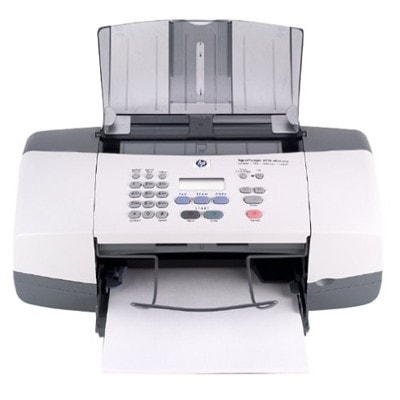
Reliable everyday printing with the HP OfficeJet 4115 HP OfficeJet 4115 (also known as HP Officejet 4100 Series or Q1614A) is a proven all-in-one designed for home and small office use. It’s valued for practical functions—printing, scanning and copying—where clear text and readable color documents matter every day. To keep your device running smoothly, the right ink for HP OfficeJet 4115 is essential: it affects print quality, page yield, and how often you need to replace the cartridge. Which ink cartridges fit HP OfficeJet 4115? In this category you’ll find ink cartridges for HP OfficeJet 4115 in two versions: Original OEM and Compatible. These are classic HP cartridge models used in this family of devices, ideal for both documents and color printing. The most common choices for ink for HP 4115 are: - HP 56 – black ink cartridge for crisp text (model code: C6656AE)
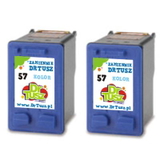
- HP 57 – tri-color ink cartridge for graphics and photos (model code: C6657AE)
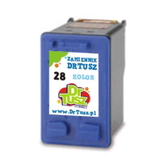
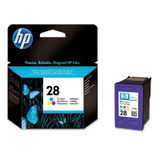
- HP 28 – tri-color option for supported print needs (model code: C8728AE)
- Multipacks such as HP 56 + 57 (SA342AE) – convenient and cost-effective for frequent printing
Choosing the correct ink for printer HP OfficeJet 4115 ensures stable operation, consistent colors, and fewer interruptions—especially important when you print invoices, school materials, forms, or occasional photos. Our selection: compatible and Original OEM ink for HP OfficeJet 4115 We offer a wide, carefully selected range so you can match your printing style and budget. Popular options include both single cartridges and multipacks: - Compatible Ink Cartridges 56 + 57 for HP (SA342AE) (multi pack) – a practical set for everyday black + color printing
- Compatible Ink Cartridge 56 for HP (C6656AE) (Black) and Compatible Ink Cartridge 57 for HP (C6657AE) (Color) – great when you want to replace only what you need
- Compatible Ink Cartridges 56 for HP (C9502AE) (Black) (2-pack) and Compatible Ink Cartridges 57 for HP (C9503AE) (Color) (2-pack) – ideal for higher-volume printing
- Original OEM Ink Cartridge HP 56 (C6656AE) (Black) and Original OEM Ink Cartridge HP 57 (C6657AE) (Color) – manufacturer cartridges for those who prefer OEM solutions
- Original OEM Ink Cartridges HP 56 + 57 (SA342AE) (multi pack) – an OEM bundle for convenient replenishment
- Compatible Ink Cartridge 28 for HP (C8728AE) (Color) and Original OEM Ink Cartridge HP 28 (C8728AE) (Color) – color cartridge options for your specific needs
No matter if you search by phrase HP OfficeJet 4115, HP 4115, or HP Officejet 4100 Series, you’re in the right place to find the right ink for HP OfficeJet 4115 quickly. How to choose: Original OEM vs compatible ink cartridges Many customers ask which ink for HP OfficeJet 4115 is the “best”. The honest answer depends on how you print: - Original OEM ink cartridge is a safe choice if you want the manufacturer’s cartridge line and a familiar, predictable experience.
- Compatible ink cartridge is the smart choice if you want excellent quality at a better price. Our compatible cartridges from the DrTusz.pl offer are designed to deliver results that are as good as the originals—clean black text, well-balanced color, and reliable everyday performance.
If you print a lot, consider multipacks (like 56 + 57) or 2-packs. They reduce cost per page and ensure you always have a replacement ready. Common user issues with HP OfficeJet 4115—and how the right ink helps The HP OfficeJet 4115 is dependable, but like any inkjet it can show typical symptoms when ink is low or a cartridge is worn. If you notice: - faded black text or missing lines,
- colors printing incorrectly or looking washed out,
- streaks on the page,
- printing interruptions after long breaks,
…it’s often time to replace the cartridge or choose a fresh set. Using the correct ink cartridges for HP OfficeJet 4115 (HP 56 / HP 57 / HP 28 where applicable) is the fastest way to restore print quality without guesswork. Order ink for HP OfficeJet 4115 with confidence We make it easy to choose the right ink for printer HP OfficeJet 4115—whether you prefer Original OEM cartridges or our high-quality compatible ink cartridges. Browse the products in this category, pick a single cartridge or a convenient multipack, and get back to smooth, sharp printing. CTA: We encourage you to explore our full selection of ink cartridges for HP OfficeJet 4115 and choose the option that best matches your printing needs. If you have any doubts about compatibility (HP 4115 / Q1614A / HP Officejet 4100 Series), contact us—we’ll help you select the right cartridge and get your order ready for fast delivery. |