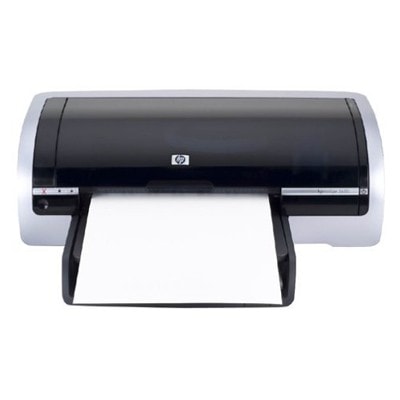
Reliable printing with the HP DeskJet 5650v (HP Deskjet 5600 Series) The HP DeskJet 5650v (also searched as HP 5650v, 5650V or 5650 v) is a well-known home and small-office inkjet printer from the HP Deskjet 5600 Series. It’s valued for straightforward operation, good everyday print quality and economical use—provided you choose the right ink for HP DeskJet 5650v. In this category we’ve gathered both Original OEM and proven compatible ink cartridges designed for this model, so you can print exactly the way you need: cost-effectively, reliably and with consistent results. Ink for printer HP DeskJet 5650v – what it does best The HP DeskJet 5650v works with two main cartridges: black and tri-color. With the right ink for HP 5650v, you’ll get crisp text for documents and balanced colors for everyday graphics, school projects or occasional photos. Whether you print once a week or every day, a properly selected cartridge helps reduce streaks, keeps blacks readable and maintains color consistency. Typical uses customers choose ink for 5650v for include: - home and office documents (letters, invoices, forms),
- school and university materials,
- basic color prints: charts, presentations and handouts,
- occasional photo printing on suitable paper.
Compatible and Original OEM cartridges – one printer, two smart options We offer two clear paths for your ink cartridge for HP DeskJet 5650v: - Original OEM – HP-manufactured cartridges designed to match the printer’s specifications.
- Compatible – carefully selected alternatives from our DrTusz.pl offer that deliver print quality and reliability comparable to originals, while often being more budget-friendly.
In practice, the choice depends on what you print, how often you print, and what you value most—maximum brand continuity or the best cost per page. If you’re looking for dependable savings, our compatible ink for printer HP DeskJet 5650v is a strong everyday choice. Popular products for HP 5650v – black, color and convenient multipacks To make shopping easier, we’ve included the most frequently chosen cartridges for the HP DeskJet 5650v, including single packs and multipacks: - Original OEM Ink Cartridge HP 56 (C6656AE) (Black) – for sharp, readable text and clean black lines.
- Original OEM Ink Cartridge HP 57 (C6657AE) (Color) – for everyday color prints, graphics and photos.
- Original OEM Ink Cartridges HP 56 + 57 (SA342AE) (multi pack) – a practical set if you want both cartridges ready at once.
- Compatible Ink Cartridge 56 for HP (C6656AE) (Black) – an economical option for frequent document printing.
- Compatible Ink Cartridge 57 for HP (C6657AE) (Color) – a smart choice for color printing with controlled costs.
- Compatible Ink Cartridges 56 + 57 for HP (SA342AE) (multi pack) – a convenient bundle for regular home use.
- Compatible Ink Cartridges 2x 56 + 57 for HP (SD399AE) (multi pack) – extra supply for higher-volume printing or shared households.
- Compatible Ink Cartridges 56 for HP (C9502AE) (Black) (2-pack) – ideal when black ink runs out the fastest.
Many customers search by cartridge codes like C6656AE, C6657AE, or bundles such as SA342AE. If you type those into our search, you’ll quickly find the right ink for HP DeskJet 5650v without guesswork. How to choose the right ink cartridge for HP DeskJet 5650v When selecting ink for printer HP DeskJet 5650v, we recommend three quick checks: - Choose the cartridge type: black HP 56 for documents or color HP 57 for graphics and photos.
- Decide between Original OEM and compatible: OEM for brand continuity; compatible for great value with quality comparable to originals (our DrTusz.pl range is selected to perform reliably).
- Consider your volume: if you print often, multipacks (like SA342AE or SD399AE) reduce downtime and are usually the most convenient.
Common user issues for the HP DeskJet 5650v are also easy to solve with the right cartridge and habits: - Faded prints or streaks: usually a low cartridge or dried nozzles—replacing the cartridge and running the printer’s cleaning cycle helps.
- Printer not recognizing a cartridge: reseat the cartridge, check protective tapes were removed, and gently clean contacts if needed.
- Infrequent printing drying out ink: print a small test page occasionally, especially if you use color rarely.
If you’re unsure which ink for HP 5650v will fit your exact version (e.g., searched as 5650 V or HP Deskjet 5600 Series), we’re here to help—just tell us what you print and how often, and we’ll recommend the best option. Order ink for HP DeskJet 5650v with confidence We encourage you to explore the full range in this category and choose the best ink cartridge for HP DeskJet 5650v—whether you prefer Original OEM or a cost-effective compatible ink cartridge that performs like the original. Add your chosen black, color or multipack set to the cart and keep your printer ready for every task. If you have any questions about compatibility, codes like C6490A, C6656AE / C6657AE, or want help picking the most economical set, contact us—we’ll guide you quickly. We also focus on fast order processing and convenient delivery options so you can get back to printing without delays. |