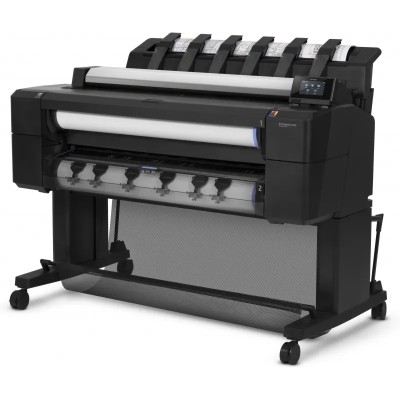
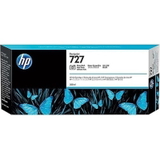
HP DesignJet T2530 (L2Y25A) – a reliable wide-format workhorse HP DesignJet T2530 from the HP DesignJet T2500 Series is a popular choice wherever speed, precision and repeatable colour are essential—design offices, architecture studios, construction companies and print rooms. This multifunction wide-format printer is built for CAD/GIS documentation, line drawings, maps and high-quality presentations. To keep your HP T2530 performing at its best, you need the right ink for HP DesignJet T2530 and well-matched maintenance supplies—exactly what we bring together in this category. What ink for HP DesignJet T2530 delivers in everyday printing Properly selected ink for printer HP DesignJet T2530 means crisp lines, smooth greys, consistent fills and predictable colour reproduction—whether you print technical plans or customer-facing posters. The T2530 uses the HP 727 system, available in standard and XL capacities. In our range you will find key colours used in the device: Cyan, Magenta, Yellow, Matte Black, Photo Black and Gray, so you can complete a full set or replace only what you need. With high-quality cartridges and correct maintenance, you can expect: - sharp text and fine line accuracy for CAD drawings and schematics,
- stable colour and neutral greys for maps and visualisations,
- reliable performance across long print runs,
- reduced risk of interruptions thanks to XL options and proven compatibility.
Original OEM and compatible cartridges – a wide choice in one place We know that different workplaces have different priorities, so we offer Original OEM, Compatible and Refill components for your HP DesignJet T2530 ink cartridge needs. If you want manufacturer-labelled supplies, choose Original OEM HP 727/727 XL. If you want to optimise operating costs without compromising print quality, our compatible solutions from DrTusz.pl are a strong alternative—designed to be as good as the originals in day-to-day work, with clear colour, proper flow and dependable performance. Popular products for HP 727 / 727 XL in this category Below are examples of items you can find here—so you can quickly match the cartridge to your colour and capacity requirements: - Original OEM Ink Cartridge HP 727 XL (C1Q12A) (Matte black) – a frequent choice for technical drawings and strong contrast.
- Original OEM Ink Cartridge HP 727 XL (F9J76A) (Cyan) and Original OEM Ink Cartridge HP 727 XL (F9J77A) (Magenta) – great for colour graphics and presentations.
- Original OEM Ink Cartridge HP 727 XL (F9J78A) (Yellow) – important for accurate colour balance in posters and visuals.
- Original OEM Ink Cartridge HP 727 XL (F9J79A) (Black Photo) – supports deep tones and photo elements.
- Original OEM Ink Cartridge HP 727 XL (F9J80A) (Gray) and Original OEM Ink Cartridge HP 727 (B3P24A) (Gray) – essential for smooth grey transitions and neutral shading.
- Compatible Ink Cartridge 727 for HP (B3P19A) (Cyan), Compatible Ink Cartridge 727 for HP (B3P20A) (Magenta), Compatible Ink Cartridge 727 for HP (B3P21A) (Yellow) – cost-effective daily printing for the HP DesignJet T2530.
- Compatible Ink Cartridge 727 XL for HP (C1Q12A) (Matte black) – higher capacity for busy environments, with excellent economy.
Whether you search by “HP DesignJet T2530”, “HP T2530”, “L2Y25A” or “HP Designjet T2500 Series”, you’ll find the right ink for HP DesignJet T2530 here. Printheads and cleaning fluids – stable quality and fewer downtime moments In wide-format printing, not only the cartridge matters. If you notice missing lines, banding, uneven fills or colour shifts, the issue may be related to the print system condition. That’s why we also include maintenance essentials for the same device family: - Original OEM Printhead HP 727 (B3P06A) – a key part when print quality drops despite replacing ink cartridges.
- Specialistic Fluid for Cleaning Heads HP 250 ml (Uniwersalny) – helpful when you need safe cleaning support and want to keep the ink path in good condition.
Using the right fluid for cleaning and a correctly selected printhead for HP DesignJet T2530 can restore sharp lines and consistent fills—especially if the printer is used irregularly or stands idle for longer periods. How to choose: OEM vs compatible ink for HP DesignJet T2530 When selecting an HP DesignJet T2530 ink cartridge, start with the cartridge code (HP 727 or HP 727 XL) and the colour you need. Then decide what matters most to you—brand preference or cost per page/plot. - Original OEM – a straightforward choice for customers who want manufacturer supplies and standardised production conditions.
- Compatible – ideal when you print a lot and want to reduce expenses. Our compatible cartridges from DrTusz.pl are as good as the originals for everyday professional use: they provide strong colour, correct density and reliable operation in the HP DesignJet T2530.
- Refill components / maintenance – recommended for users who want to proactively care for print quality (cleaning fluid) or address recurring artefacts (printhead replacement).
Common user issues with the HP T2530 that the right products can help with include: sudden banding on plots, faded sections after downtime, inconsistent greys, or repeated cleaning cycles that consume ink. In many cases, choosing an XL cartridge for heavy printing, adding proper maintenance fluid, or replacing a worn printhead helps stabilise results and reduce interruptions. Choose your HP DesignJet T2530 ink today We encourage you to browse our full selection of ink for HP DesignJet T2530—Original OEM, Compatible and practical maintenance items like printheads and cleaning fluids. If you’re unsure which HP 727 / 727 XL version you need, tell us the printer model (HP DesignJet T2530 / L2Y25A) and the colour you’re replacing—we’ll help you choose quickly and correctly. Add your cartridges to the cart and keep your wide-format workflow running smoothly with fast delivery and friendly support from our team. |