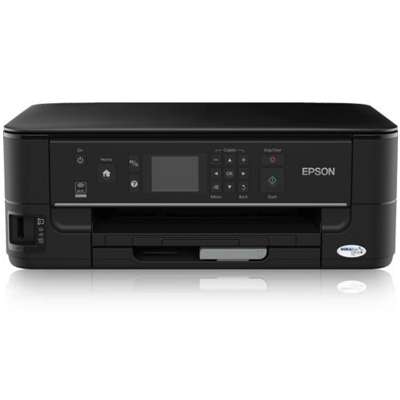
| Looking for reliable ink for Epson Stylus Office BX525 WD? This Epson all-in-one (also found as Epson BX525 WD, BX525WD, C11CA70313) was designed for busy home offices: printing, copying, scanning and faxing in one compact device. To keep it working smoothly and to maintain crisp documents and vivid colour prints, you need the right ink cartridge for Epson Stylus Office BX525 WD—and ideally a smart backup plan for cleaning and maintenance. Everyday printing quality starts with the right ink The BX525 WD uses individual colour cartridges, so you replace only the colour that runs out. In our category you will find both Original OEM and compatible ink cartridges for Epson BX525 WD, plus practical refill and service support such as cleaning fluid for Epson print heads. This is especially important when you print mixed content—text, forms, invoices, shipping labels, and occasional colour graphics. When you choose the correct ink for printer Epson Stylus Office BX525 WD, you gain: - clear black text for contracts and office documents,
- consistent colours for charts, presentations and marketing materials,
- stable performance and fewer interruptions thanks to properly matched cartridges,
- the option to optimise costs by choosing compatible cartridges without sacrificing quality.
Compatible or Original OEM: choose what fits your needs (and budget) Many customers ask whether it’s better to buy an Original OEM ink cartridge Epson BX525 WD or a compatible one. The honest answer: it depends on your priorities—but the good news is that our compatible ink for Epson Stylus Office BX525 WD is built to deliver results that are just as good as originals in everyday use. If you print a lot, compatible cartridges are a smart way to reduce running costs while keeping excellent print quality. - Original OEM ink – manufacturer cartridges for users who want a factory-branded solution and maximum peace of mind for specific workflows.
- Compatible ink cartridges – high-quality alternatives that help you cut printing expenses while maintaining sharp text and vibrant colours.
- Refill & maintenance components – including cleaning solutions that support print head performance and help prevent downtime.
Popular cartridges for Epson BX525 WD available in this category We offer a wide, practical selection—single colours when you need a quick replacement, and multipacks when you want convenience and savings. Here are some of the most frequently chosen options for ink for Epson BX525 WD: - Compatible Ink Cartridges T1295 for Epson (C13T12954010) (multi pack) – a convenient set for balanced everyday printing.
- Original OEM Ink Cartridges Epson T1295 (C13T12954010) (multi pack) – the OEM bundle for users who prefer original Epson cartridges.
- Compatible Ink Cartridges T1305 for Epson (C13T13064010) (multi pack) and 3x Compatible Ink Cartridges T1305 for Epson (C13T13064010) (multi pack) – great when you print regularly and want to stock up.
- Compatible Ink Cartridge T1301 for Epson (C13T13014010) (Black) and Original OEM Ink Cartridge Epson T1301 (C13T13014010) (Black) – ideal for heavy document printing where black runs out first.
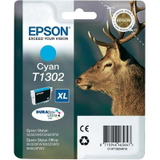
- Colour replacements such as T1292/T1302 (Cyan), T1293/T1303 (Magenta), T1294/T1304 (Yellow) in both compatible and Original OEM versions.
- Specialistic Fluid for Cleaning Heads Epson 250 ml (Uniwersalny) – helpful when prints show missing lines, faded colours or uneven output.
How to choose the correct ink cartridge for Epson Stylus Office BX525 WD To avoid mistakes, match the cartridge symbol—not just the printer name. This model commonly works with the T129 and T130 series (depending on the cartridge type you use). When selecting ink for printer Epson BX525 WD, we recommend: - Check your current cartridge code (e.g., C13T12914010 or C13T13014010) and choose the same series.
- If you print frequently, consider a multipack—it’s convenient and reduces the risk of running out mid-task.
- If black printing dominates (invoices, text, labels), add an extra black cartridge to your order.
- For irregular printing, include a cleaning fluid to help deal with occasional nozzle drying and colour dropouts.
Common BX525 WD printing issues—and how we help you solve them Even a great device like the Epson Stylus Office Series can show typical inkjet symptoms over time. Customers most often report: - Streaks or missing lines – usually caused by partially clogged nozzles; a cleaning cycle and, when needed, a print head cleaning fluid can help.
- Faded colours after a break in printing – ink can dry slightly in the head; regular printing or careful cleaning restores output.
- Printer doesn’t recognise a cartridge – reseating the cartridge typically helps; if you’re unsure, we can guide you to the correct model.
- Fast ink consumption – switching to a cost-effective compatible ink cartridge for Epson BX525 WD can significantly lower page cost.
If you’re not sure which ink for Epson Stylus Office BX525 WD to choose, tell us what you currently have installed (the cartridge code and colour) and we’ll help you pick the right option. Order ink for Epson Stylus Office BX525 WD today We make it simple to keep your printer ready for work. Choose from Original OEM cartridges, high-quality compatible ink for Epson BX525 WD, and maintenance essentials like cleaning fluid. We encourage you to browse the products in this category, select the best set for your printing habits, and place your order now. If you need support, contact us—we’ll help you match the correct cartridge quickly and confidently, and you’ll be back to clean, sharp printing in no time. |