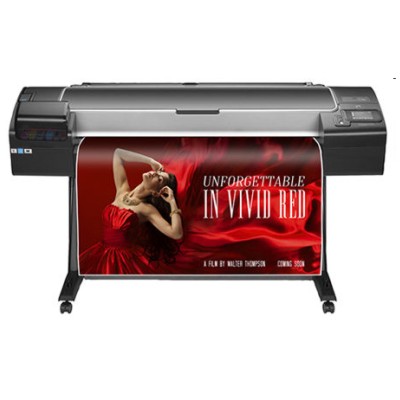
Reliable ink for HP DesignJet Z5600 PostScript (T0B51A) – made for production printing HP DesignJet Z5600 PostScript (also searched as HP Z5600 or HP DesignJet Z5600 Series) is a fast, professional large-format printer built for photo-quality posters, graphics, and demanding technical prints. To keep this device performing at its best, you need the right ink for HP DesignJet Z5600 PostScript and properly matched printheads. In this category we offer both Original OEM and compatible solutions—so you can choose exactly what fits your workflow, quality requirements, and budget. What makes HP 745 ink cartridges special? The Z5600 works with the HP 745 ink system, designed for consistent color, smooth gradients, and reliable performance in high-volume printing. Whether you print retail signage, photo posters, exhibition graphics, or precise line drawings, choosing the correct ink cartridge for HP DesignJet Z5600 PostScript helps maintain stable color reproduction and reduces downtime. In our offer you will find key colors used by this model, including Matte Black, Photo Black, Cyan, Magenta, Yellow, and Red. We also stock two popular capacities—130ml and 300ml—so you can match your purchase to your monthly print volume. - 130ml cartridges – a practical choice for mixed or lower-volume use, testing, or occasional jobs.
- 300ml cartridges – ideal for production printing, better efficiency, fewer replacements, and less downtime.
Original OEM and compatible cartridges – choose your best option Dear Customer, we know that different teams need different purchasing strategies. That’s why we provide both Original OEM ink for HP DesignJet Z5600 PostScript and carefully selected compatible ink cartridges. Original cartridges are made by the printer manufacturer and are often chosen when you want to keep everything strictly OEM across the whole fleet. At the same time, our compatible ink for HP Z5600 is a strong alternative for businesses that print a lot and want to control costs without sacrificing everyday reliability. Our compatible cartridges from the DrTusz.pl offer are designed to work just as well as the originals in regular use—clear prints, stable colors, and smooth operation—while keeping your cost per print under control. Popular products in this category (HP 745 & HP 744) We’ve built this selection around the most frequently chosen items for the Z5600. If you need a quick starting point, here are some of the top picks customers search for when they need ink for HP DesignJet Z5600 PostScript: - Original OEM Ink Cartridge HP 745 130ml (F9J98A) (Black Photo)
- Original OEM Ink Cartridge HP 745 130ml (F9J97A) (Cyan) and (F9J95A) (Magenta)
- Original OEM Ink Cartridge HP 745 130ml (F9J96A) (Yellow) and (F9K00A) (Red)
- Original OEM Ink Cartridge HP 745 130ml (F9J99A) (Matte black)
- Original OEM Ink Cartridge HP 745 300ml (F9K05A) (Matte black) and (F9K04A) (Black Photo)
- Original OEM Ink Cartridge HP 745 300ml (F9K03A) (Cyan), (F9K01A) (Magenta), (F9K02A) (Yellow), (F9K06A) (Red)
- Compatible Ink Cartridge 745 300ml for HP (F9K05A) (Matte black) and (F9K04A) (Black Photo)
- Compatible Ink Cartridge 745 300ml for HP (F9K03A) (Cyan), (F9K01A) (Magenta), (F9K02A) (Yellow), (F9K06A) (Red)
- Original OEM Printhead HP 744 (F9J86A), Original OEM Printhead HP 744 (F9J87A), Original OEM Printhead HP 744 (F9J88A)
Thanks to this mix, you can easily build a complete set for your printer, whether you prefer strictly OEM or a cost-effective compatible setup. How to pick the right ink cartridge for HP DesignJet Z5600 PostScript To avoid ordering mistakes, we recommend checking three things before adding a cartridge to cart: - Printer name: HP DesignJet Z5600 PostScript / HP DesignJet Z5600 Series / T0B51A.
- Cartridge family: HP 745 (ink cartridge) and HP 744 (printhead).
- Color and capacity: select the exact color you need and decide between 130ml or 300ml based on your usage.
If your office prints a lot of posters or runs long production batches, going with 300ml ink for HP DesignJet Z5600 PostScript typically means fewer interruptions and a smoother workflow. If your prints are occasional or highly varied, 130ml can be a flexible, lower-commitment option. Printhead and ink: the duo that keeps quality consistent Many users focus on ink and forget that print quality also depends on the printhead. If you notice banding, missing lines, inconsistent color areas, or repeated nozzle issues, it may be time to replace a printhead rather than changing cartridges. In this category you’ll find Original OEM Printhead HP 744 versions, making it easy to maintain the Z5600 at professional quality levels. Common user issues with HP Z5600 inks—and how we help - Fast ink consumption: production printing can drain cartridges quickly—switching to 300ml capacity helps reduce replacement frequency.
- Color mismatch between jobs: keeping a consistent set of cartridges (same type and series) and replacing aging printheads can improve repeatability.
- Streaks or banding: often linked to printhead condition—consider HP 744 printhead replacement when cleaning cycles don’t help.
- Ordering the wrong code: we list product names and codes clearly (e.g., F9K05A, F9J98A) so you can match what your printer expects.
If you’re unsure which ink for HP DesignJet Z5600 PostScript to choose—Original OEM or compatible—tell us what you print (photos, posters, technical drawings) and your monthly volume. We’ll help you select the best setup. Explore the offer and keep your Z5600 ready for every job We encourage you to browse our full range of ink cartridges for HP DesignJet Z5600 PostScript and HP 744 printheads—both Original OEM and high-quality compatible options. Add the colors you need to your cart, choose the capacity that fits your workflow, and let us take care of the rest. If you have any questions before ordering, contact us—our team will gladly help you pick the right cartridge or printhead, and we’ll make sure your supplies arrive quickly and safely. CTA: Choose your ink for HP Z5600 now—compare Original OEM and compatible options, complete your color set, and order today to keep your production printing running smoothly. |